
Why Architecture Matters For Salesforce Business Continuity
Salesforce business continuity planning focuses on keeping business operations running when the Salesforce platform or its data becomes unavailable. This includes situations such as data corruption, integration failures, accidental deletion, or platform outages.
Disaster recovery is one component of Salesforce business continuity, but it is not the whole strategy. Business continuity also includes maintaining access to critical Salesforce data, supporting reporting and operational workflows, and ensuring teams can continue working while systems are restored.
At a foundational level, disaster recovery comes down to evaluating two core factors: the likelihood of a disruptive event and the impact that event would have on the business. A failed Salesforce deployment, accidental data deletion, ransomware incident, or a platform outage each introduces very different recovery challenges. As a result, no single tool or recovery method can address every scenario.
Effective Salesforce business continuity planning requires a layered approach that supports preparation and recovery across a range of scenarios. When integrating GRAX into a disaster recovery strategy, it’s important to understand how its architecture and capabilities work together to support resilience, especially in situations where Salesforce itself may not be available.
Turn Insight Into Execution
Speak with a GRAX expert about implementing a practical strategy that scales.
Common Risks That Disrupt Salesforce Business Continuity
Salesforce environments rarely fail in obvious ways. More often, issues that disrupt Salesforce operational continuity build quietly, until they suddenly impact reporting, workflows, or customer-facing teams.
One of the most common risks is unintended data loss caused by integrations or automation. A misconfigured sync job, failed mapping, or downstream system update can overwrite or delete large volumes of records in seconds, often without immediate visibility. This directly threatens Salesforce data continuity, especially when changes propagate across connected systems.
Deployment and configuration changes are another frequent source of disruption. Schema updates, validation rules, or object relationship changes can break workflows and reporting, leaving teams unable to operate normally even though Salesforce itself is still online.
User-driven errors also play a major role. Bulk updates, accidental deletions, or incorrect imports can introduce widespread issues that require precise recovery to resolve—something many Salesforce continuity planning strategies underestimate.
Platform dependency is a more structural risk. When backup, access, and recovery processes rely entirely on Salesforce being available, even a temporary outage can halt operations across sales, service, and analytics teams.
Finally, security incidents, whether from compromised credentials or malicious insiders—can lead to large-scale data manipulation or deletion. Without independent access to data, maintaining business continuity for Salesforce becomes significantly more difficult.
Understanding these risks is critical because each one requires a different mitigation and recovery approach. A single tool or process is rarely sufficient to cover them all.
Architecture Considerations for Salesforce Business Continuity and Disaster Recovery
One of the most common weaknesses in Salesforce disaster recovery strategies is platform dependency. The GRAX application and data backup storage layer are designed to be hosted and run outside of the Salesforce ecosystem. This is a fundamental component of any disaster recovery plan as it ensures your data and access to your data is located in a separate redundant system.
Access to GRAX applications is not dependent on access to your Salesforce instance. In the event of a Salesforce authentication/login failure, GRAX will still be available to access your data.
GRAX stores Salesforce data within a cloud environment of the customer’s choosing, including AWS, Microsoft Azure, or Google Cloud Platform. This bring-your-own cloud model gives organizations full control over where Salesforce data resides, how it is secured, and how redundancy is implemented. It also allows Salesforce backup and recovery strategies to align with existing enterprise cloud standards, security controls, and compliance requirements.
Each support cloud provider offers built-in redundancy mechanisms for replication and object storage. These additional layers of protection further strengthen Salesforce disaster recovery and business continuity planning.
Validate Your Salesforce Disaster Recovery Architecture
Talk to GRAX about designing a disaster recovery strategy that removes platform dependency and aligns with your business needs.
Salesforce DR & Business Continuity Metrics
An effective Salesforce business continuity plan needs to have clearly defined recovery metrics.
Recovery Point Objective (RPO) – Determines the period of time in the past where, if a system fails, the level of data loss is considered acceptable by the business.
With GRAX your RPO is outlined below based on the type of data being backed up. All business critical data is captured at a frequency of less than 1 hour which will cover any RPO of 1 hour or more.
| Data Type | RPO |
| Record Data (Standard, Custom, joining, system object data) | Less than 1 hour |
| Files (Content Documents, Attachments, Event Logs) | Less than 1 hour |
| Delete Tracking | Frequency determined by option selected in Settings (Quarter Hourly, Half Hourly, Hourly) |
| Metadata (SF Codebase, configuration) | Frequency determined by option selected in Settings (Hourly, Twice per Day, Daily, Twice per Week, Weekly) |
Recovery Time Objective (RTO) – Determines the acceptable amount of downtime a business application or process can be offline before any significant risk of revenue loss, reputation tarnishing or some other major business impact. The amount of downtime is determined by the business.
Each Salesforce business continuity and disaster recovery plan outlines the mitigation steps necessary in order to bring some level of business continuity back to a business and then the recovery steps in order to bring a business application or process back to a healthy state.
And when incorporating GRAX into your Salesforce business continuity and Disaster Recovery plan it’s important to consider the full suite of features and functionality that GRAX has to offer as each feature can be incorporated to solve for different scenarios and their mitigation and recovery steps.
The next section outlines how you can utilize GRAX within various Disaster Recovery and Business Continuity scenarios and how you can utilize the different features to build these mitigation and recovery plans.

Salesforce Business Continuity During Platform Outages
Salesforce outages are rare, but when they happen, the impact is immediate. Teams lose access to customer data, pipelines stall, support slows down, and reporting visibility disappears. Maintaining Salesforce operational continuity during these events depends on one key factor: whether your data remains accessible outside of Salesforce.
When access to data is tied directly to the platform, an outage effectively becomes a full operational shutdown. Even if backups exist, they cannot be used in real time, which limits true Salesforce data continuity.
A more resilient approach ensures that Salesforce data is continuously replicated into an independent environment. This allows teams to continue working with critical data, even if Salesforce is temporarily unavailable.
During an outage, this can mean:
- Sales teams continuing outreach using replicated pipeline data
- Support teams accessing case history to assist customers
- Leadership maintaining visibility into performance metrics
- Technical teams assessing impact and preparing recovery actions
This is where business continuity for Salesforce becomes more than just recovery, it becomes operational resilience. Business continuity is not just about restoring Salesforce after the fact. It is about maintaining momentum while the disruption is still happening.
Keep Your Teams Moving, Even When Salesforce Isn’t
See how GRAX enables true Salesforce data continuity with independent access, so your business doesn’t stop when the platform does.
Planning Salesforce Business Continuity Risks Mitigation and Recovery
Your Salesforce Data Recovery Scenarios/Risk Assessment should define which scenarios to plan for first based on their likelihood to occur and impact on the business.
To best prepare for Salesforce disaster recovery scenarios or Issues that may impact business continuity, it’s first recommended to define the likelihood of the event compared to its potential impact (or severity) on the business. Then prioritize your planning and efforts to ensure events that have the higher priority are covered in more detail than the lower priority items. Below is an example of a risk matrix to help determine High to Low priority Disaster Recovery and Business Continuity scenarios.
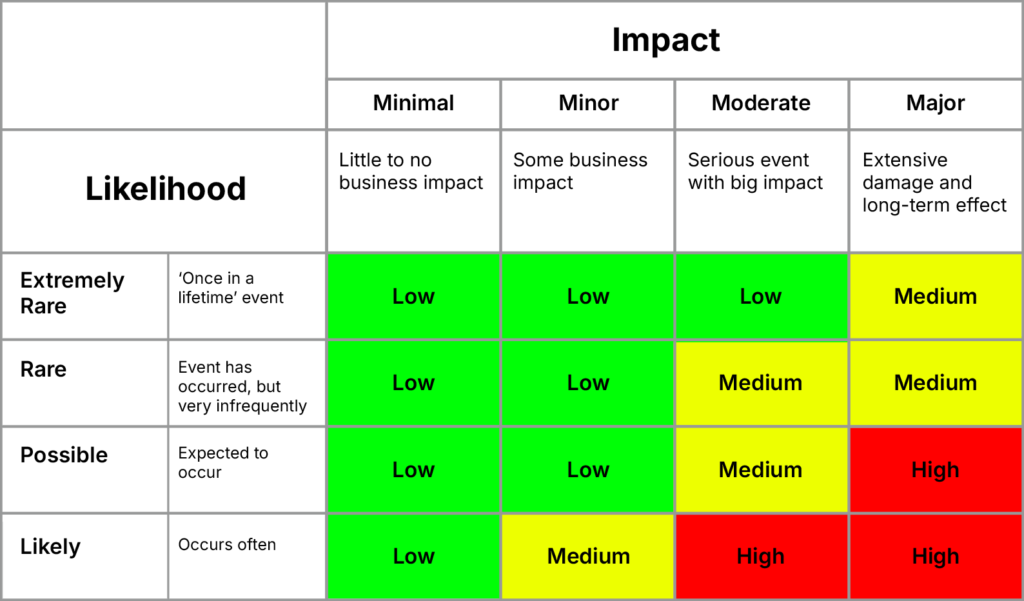
Potential Scenarios listed below as an example.
| Scenario/s | Recovery Planning Priority | Mitigation / Recovery Plan |
| Integration process deletes large set of a records for 1 object with no child relationships | Medium/High | Mitigation 1. Admin log into GRAX. 2. Utilize GRAX Global Search to determine the extent of data that was deleted. 3. Publish the data to business leaders to review and disseminate to teams as necessary. Recovery 1. Utilize GRAX Global Search to determine the extent of data that was deleted. 2. Segment data based on relevancy to users. Ie By most recently created or last modified first. 3. Utilize GRAX Restore to restore the records, restoring most relevant records first. |
| Integration process deletes large set of a records with hierarchy | Medium/High | Mitigation 1. Admin log into GRAX. 2. Utilize GRAX Global Search to determine the extent of data that was deleted. 3. Publish the data to business leaders to review and disseminate to teams as necessary. 4. Users can login to GRAX to view records and full hierarchy of data. Recovery 1. Utilize GRAX Global Search to determine the extent of data that was deleted. 2. Segment data based on relevancy to users. Ie By most recently created or last modified first. 3. Utilize GRAX Restore to restore the records, restoring most relevant records first. |
| Deployment / Configuration update causes data loss | Medium | Mitigation 1. Admin log into GRAX. 2. Utilize GRAX Global Search to determine the extent of data that was deleted. 3. Publish the data to business leaders to review and disseminate to teams as necessary. 4. Users can login to GRAX to view records and see the previous versions of the records. Recovery 1. Utilize GRAX Global Search to determine the extent of data that was deleted. 2. Segment data based on relevancy to users. Ie By most recently created or last modified first. 3. Utilize GRAX Restore to restore records if they were deleted. 4. Utilize GRAX Point-in-Time Restore to restore record values to a previous point in time |
| Salesforce is not accessible | Medium | Mitigation 1. Provide Users with local access to GRAX. 2. Utilize GRAX Global Search to find data. 3. Users can view all record data, history and hierarchy of data. Recovery 1. Coordinate with Salesforce to recover accessibility to Salesforce. |
| Salesforce Database Corrupted | Low | Mitigation 1. Admin log into GRAX. 2. Utilize GRAX Global Search to determine the extent of data that was deleted. 3. Publish the data to business leaders to review and disseminate to teams as necessary. 4. Users can login to GRAX to view records and see the previous versions of the records. Recovery 1. Utilize GRAX Global Search to determine the extent of data that was deleted. 2. Segment data based on relevancy to users. Ie By most recently created or last modified first. 3. Utilize GRAX Restore to restore records if they were deleted. 4. Utilize GRAX Point-in-Time Restore to restore record values to a previous point in time |
| User deletes a record unknowingly | Low | Mitigation 1. No mitigation steps necessary. Recovery 1. Utilize GRAX Restore to restore the records |
| User updates records with the wrong value | Low | Mitigation 1. No mitigation steps necessary. Recovery 1. Utilize GRAX Point-in-Time Restore to restore record values to a previous point in time |
| Malicious employee deletes many records | Low | Mitigation 1. No mitigation steps necessary. Recovery 2. Utilize GRAX Restore to restore the records |
| Malicious employee updates many records with bad values | Low | Mitigation 1. No mitigation steps necessary. Recovery 1. Utilize GRAX Restore to restore the records 2. Utilize GRAX Point-in-Time Restore to restore record values to a previous point in time |
Turn Risk Assessment Into a Recovery Plan
Work with GRAX to prioritize Salesforce recovery scenarios based on real business impact and recovery requirements.
Testing Your Salesforce Business Continuity Strategy
A Salesforce business continuity plan is only as strong as its last test.
Many organizations define recovery objectives like RPO and RTO, but never fully validate whether those targets can actually be met. Without testing, gaps in Salesforce continuity planning often remain hidden until a real incident occurs.
Effective testing goes beyond verifying backups. It should simulate real-world disruptions that impact Salesforce operational continuity, such as data corruption, failed integrations, or temporary platform outages.
This includes:
- Validating that data can be accessed independently of Salesforce
- Testing recovery across objects, relationships, and metadata
- Measuring actual recovery times against RTO targets
- Verifying that restored data maintains full integrity
- Ensuring teams understand their role in recovery processes
Testing also plays a key role in maintaining Salesforce data continuity, ensuring that data is not only recoverable, but usable and accurate after restoration. Involving both technical and business teams is critical. Recovery is not just a system process; it directly impacts how teams operate during disruption.
Regular testing turns a theoretical plan into a proven capability and strengthens overall business continuity for Salesforce.
Building a Salesforce Business Continuity Strategy
Building an effective approach to Salesforce continuity planning starts with understanding what the business cannot afford to lose, both in terms of data and operational capability.
The first step is identifying critical processes that depend on Salesforce, such as revenue operations, customer support, and compliance reporting. These define acceptable downtime and data loss thresholds, shaping your approach to Salesforce operational continuity.
Next, organizations should evaluate risk scenarios based on likelihood and impact. Integration failures, deployment risks, user errors, and outages should all be considered as part of a broader business continuity for Salesforce framework.
A strong strategy layers multiple capabilities together to ensure Salesforce data continuity, including:
- Continuous data replication to minimize data loss
- Independent data storage to remove platform dependency
- Granular recovery options for different incident types
- Defined mitigation steps to maintain operations during disruption
It’s also important to align this strategy with existing infrastructure, security policies, and compliance requirements. Business continuity should extend beyond Salesforce and integrate with enterprise-wide standards.
Finally, continuity planning is not a one-time effort. As environments evolve, risks change. Regular testing and iteration ensure that your Salesforce continuity planning remains effective over time.
The goal is not just to recover from disruption, but to ensure the business can continue operating with confidence, no matter what happens to the platform.
Turn Insight Into Execution
Speak with a GRAX expert about implementing a practical strategy that scales.
FAQs
What is Salesforce business continuity planning and why is it important?
Salesforce business continuity planning ensures that critical operations can continue even if Salesforce becomes unavailable due to data loss, integration issues, or platform outages. It goes beyond disaster recovery by focusing on maintaining Salesforce operational continuity and access to data during the disruption itself. This is important because without strong Salesforce data continuity, even short outages can impact revenue, customer support, and overall business performance.
What is Salesforce disaster recovery?
Salesforce disaster recovery refers to the processes and systems used to restore Salesforce data and operations after an unexpected disruption, such as data loss, corruption, cyberattacks, or platform outages.
How does Salesforce business continuity differ from disaster recovery?
Disaster recovery focuses on restoring systems and data after an incident occurs, while Salesforce business continuity ensures that essential business operations can continue during the disruption itself. Business continuity planning also accounts for data access, reporting, and operations while Salesforce services may be unavailable.
Why is it risky to rely only on Salesforce-native tools?
Salesforce-native tools often depend on Salesforce availability or platform services. During outages or other disruptions, this can delay access to data and slow recovery efforts. Independent solutions reduce this risk by ensuring data remains accessible outside of the Salesforce ecosystem.
How does GRAX support Salesforce disaster recovery?
GRAX supports Salesforce disaster recovery by storing Salesforce data outside of the platform in a customer-controlled cloud environment. This allows organizations to access, analyze, and restore Salesforce data even when the platform is unavailable, which supports both disaster recovery and business continuity planning.
Can Salesforce data be accessed during a Salesforce outage?
Yes, if Salesforce data is stored independently of the Salesforce platform. With solutions like GRAX, Salesforce data remains accessible during outages because authentication, storage and access are handled outside of the platform.