When teams talk about backup and disaster recovery in Salesforce, RPO and RTO come up constantly. But in practice, they’re often misunderstood, or worse, assumed.
You’ll see vendors claim “point-in-time recovery,” but only run backups once per day. That leaves you exposed to nearly a full day of potential data loss. And when something actually goes wrong, those gaps become very real, very fast.
This isn’t about semantics. It’s about understanding what your business is actually prepared to handle, and whether your current backup approach reflects that reality.
What are Salesforce RTO and RPO and why do they matter?
RTO and RPO are often framed as technical metrics, but they’re really business decisions.
They define how much disruption your organization can absorb before things start to break, whether that’s revenue, customer trust, or compliance exposure. Setting these targets without grounding them in actual business impact is one of the most common mistakes teams make.
What is Salesforce Recovery Time Objective (RTO)?
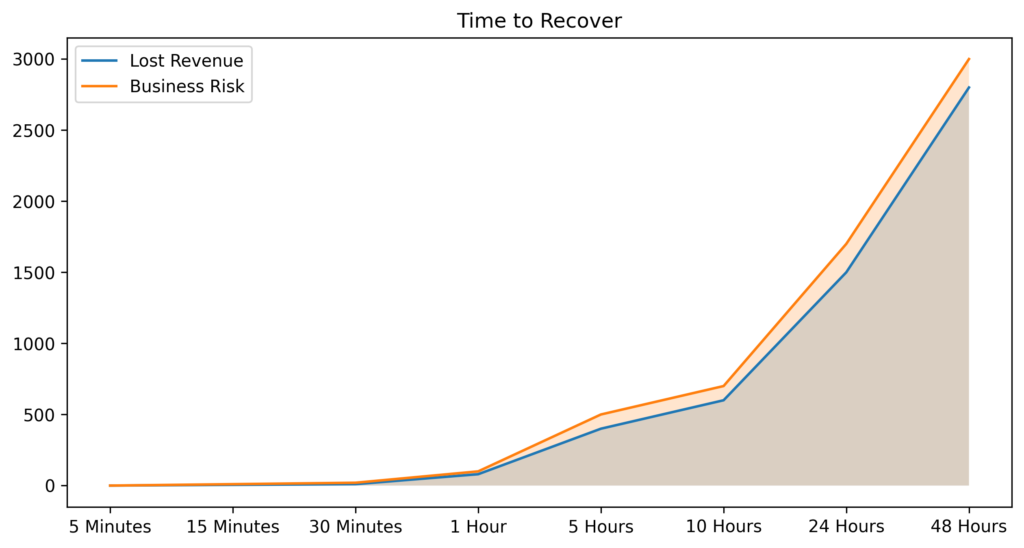
Recovery Time Objective (RTO) is the maximum amount of time your organization can tolerate being without access to Salesforce after a disruption.
That disruption might be a failed deployment, a corrupted dataset, or a broken integration that overwrote records across the org. Regardless of cause, the question RTO answers is straightforward: how long can we afford to be down before the business starts to feel it?
For sales-driven organizations, even an hour of downtime can stall pipeline movement and cut off customer-facing teams from the data they need. For others, longer windows may be tolerable, but only if that tolerance is explicitly planned for, not assumed. RTO isn’t just a technical target. It’s a commitment your IT and operations teams make to the rest of the business.
What is Salesforce Recovery Point Objective (RPO)?
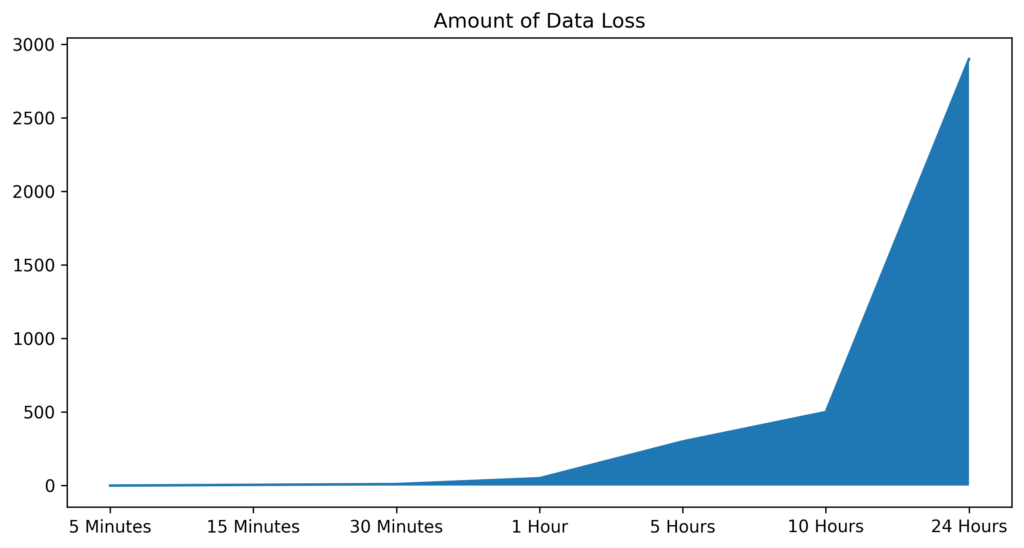
Recovery Point Objective (RPO) measures how much data you can afford to lose, expressed as a period of time.
If your backups run once per day, your RPO is effectively 24 hours. That means any changes made after the last backup, including updated records, new deals, and closed support cases, could be permanently lost in a recovery scenario.
That loss isn’t abstract. It shows up as missing pipeline updates, incomplete transactions, reporting gaps, and broken audit trails. In regulated industries, it can also mean a compliance exposure that’s difficult to explain after the fact. Tightening your RPO limits how far back recovery requires you to go and significantly reduces the manual cleanup your team has to do afterward.
How do RTO and RPO affect business continuity and SLAs?
RTO and RPO are directly tied to business continuity, whether they’re formally documented or not.
If your organization promises real-time insights to leadership or customers, but recovery takes several hours, there’s a structural disconnect. If you operate in a regulated environment, such as financial services, healthcare, or life sciences, the inability to meet defined recovery expectations doesn’t just create operational pain. It creates compliance risk.
For enterprise organizations, these aren’t IT-only concerns. They’re operational commitments that leadership, legal, and compliance teams all have a stake in. When a disruption happens, everyone wants to know how long recovery will take and how much data is gone. Having clear, tested answers to both questions is what separates organizations that recover cleanly from those that scramble.
How should RTO and RPO be defined for different Salesforce workloads?
Not all Salesforce data carries the same level of criticality, and recovery targets should reflect that.
Active sales pipeline, open support cases, and customer account data often require tight recovery targets. Downtime or data loss in these areas has immediate, visible impact. Historical records, archived cases, or legacy data may allow more flexibility. The key is to map recovery targets to business impact, not apply a blanket standard across the entire org.
A practical approach: work with business stakeholders to identify which Salesforce objects and workflows are most critical to daily operations, then set RTO and RPO targets accordingly. This also helps prioritize where to invest in backup frequency and recovery tooling.
Know Your Real RPO
Most teams think they have minutes until they realize it’s hours.
Why does Salesforce need a dedicated backup and disaster recovery strategy?
There’s a persistent assumption that because Salesforce is cloud-based, it inherently protects your data. It doesn’t, at least not in the way most organizations expect.
Salesforce is an exceptionally reliable platform, but reliability and data protection are two different things. Understanding where Salesforce’s responsibility ends and yours begins is the first step to building a recovery strategy that actually works.
Does Salesforce’s shared responsibility model cover backups?
Like most cloud platforms, Salesforce operates on a shared responsibility model.
Salesforce is responsible for platform uptime, infrastructure security, and availability. You are responsible for your data, including how it’s changed, deleted, or corrupted by users, automations, and integrations. If something goes wrong at the data level, Salesforce won’t restore it for you. That responsibility sits with your team.
Many organizations don’t discover this gap until after a data loss event. By then, the question isn’t theoretical.
What Salesforce risks are not addressed by native protections?
The majority of data issues in Salesforce environments don’t come from platform outages. They come from everyday activity.
An admin runs a bulk update with incorrect logic. A developer pushes a change that affects thousands of records unintentionally. An integration, whether MuleSoft, a third-party tool, or a custom API, overwrites data across systems in ways that are difficult to trace and even harder to undo. These issues spread quickly through a connected org, and native Salesforce tools weren’t built to address them at scale.
How common are data loss incidents in Salesforce environments?
More common than most teams expect, and the frequency tends to increase as Salesforce environments grow in complexity.
Every new field, workflow, automation, and integration introduces additional surface area for something to go wrong. Teams that have been on Salesforce for years often have configurations that no single person fully understands. In that environment, data issues are rarely a matter of if. They’re a matter of when, and whether you’re prepared when they happen.
What are the business impacts of lost or corrupted Salesforce data?
The impact of a Salesforce data loss event rarely stays contained to the team that discovers it.
Sales teams lose pipeline visibility. Support teams lose case history and customer context. Reporting becomes unreliable, which means leadership decisions get made on incomplete data. Downstream systems that depend on Salesforce, including BI tools, data warehouses, and AI models, pull in bad data and compound the problem.
Because Salesforce sits at the center of so many revenue and customer-facing operations, data issues ripple outward quickly. The cost isn’t just remediation time. It’s the decisions made on faulty data while recovery is in progress.
See Where Salesforce Stops
Understand what native protections cover, and where your responsibility actually begins.
Salesforce RPO and RTO Tradeoffs
There’s no perfect RTO or RPO, only tradeoffs your organization is willing to make with clear understanding of the consequences.
Lower RPO requires more frequent backups, which increases storage consumption and operational overhead. Lower RTO requires faster, more reliable recovery processes, which take investment in the right tooling and regular testing. Organizations that chase the lowest possible targets without accounting for these costs often end up with an approach that’s expensive to maintain and inconsistently applied.
The goal isn’t to minimize both metrics at all costs. It’s to make deliberate, informed decisions based on business risk, and then validate that your tools and processes can actually deliver on those decisions when it matters.
What are the limitations of Salesforce native recovery options?
Salesforce provides native tools, but they were designed for routine administrative tasks, not full-scale disaster recovery. Understanding their limitations is essential before assuming they’ll be sufficient in a real recovery scenario.
Can you fully recover deleted records with the Recycle Bin?
The Recycle Bin is useful for small, recent, individual deletions. It was not designed for scale.
Retention windows are short: 15 days for end users and 30 days for administrators. Storage is capped and counts against your org’s overall limit. Restoring large datasets or complex records with multiple relationships is slow and often incomplete. Dependent records may not restore cleanly, leaving your data in a partially recovered state that requires additional manual intervention.
Go Beyond Native Recovery Limits
Close the gaps left by native tools with full-fidelity backup and restore.
What are the constraints of native point-in-time recovery and sandbox refresh?
Sandbox refreshes are a development and testing tool, not a recovery mechanism.
Using a sandbox refresh to recover production data is slow, imprecise, and disruptive. It requires significant preparation, can’t target specific records or objects, and typically involves more time and coordination than the recovery problem itself warrants. For teams that have tried to use it as a recovery option under real pressure, the experience is usually a lesson learned once.
How reliable and granular is Salesforce’s native export (Data Export) for DR?
Data Export provides periodic backups of your Salesforce data, but it was built for compliance and data portability, not operational recovery.
Exports run on a weekly or monthly schedule depending on your edition, require manual handling to download and store, and don’t capture metadata in a way that supports full org restoration. The files are delivered in CSV format, which makes restoration a significant manual effort. By the time you need them in a real recovery scenario, they’re often already outdated relative to the data you’ve lost.
What compliance or retention gaps exist with native tools?
Native Salesforce tools don’t support long-term data retention, immutable storage, or the level of auditability that many compliance frameworks require.
For organizations in regulated industries, including financial services under FINRA, healthcare under HIPAA, or any organization subject to GDPR or CCPA, these gaps are more than operational inconveniences. They represent real exposure. Demonstrating data recoverability, maintaining complete audit trails, and enforcing retention policies all require capabilities that sit outside what Salesforce natively provides.
How often should Salesforce backups run to meet RTO/RPO targets?
Backup frequency directly determines your RPO. It’s one of the most concrete levers you have.
If backups run daily, your maximum data exposure is 24 hours. If they run hourly, that exposure drops to 60 minutes. For organizations with active sales and service operations, the difference between those two windows is significant. Moving to high-frequency or near-continuous backup is often the single most impactful change a team can make to reduce recovery risk and shrink the gap between what they assume their RPO is and what it actually is.
How do RTO/RPO targets affect the selection of Salesforce backup and DR solution?
Choosing a solution isn’t just about features. It’s about whether the solution can actually meet your recovery targets under real-world conditions.
That means evaluating how frequently data is captured, how granular recovery is (can you restore a single record, or only an entire object?), whether the solution captures metadata and relationships, and whether it’s been tested against recovery scenarios that resemble what your org actually looks like. Vendor claims about recovery capabilities are easy to make. The question to ask is: has this been tested, and can you show me what recovery actually looks like for an org of our scale and complexity?
Balance Risk, Cost, and Recovery Speed
Find the right tradeoff between storage, effort, and business impact.
Designing practical disaster recovery plans for Salesforce
A disaster recovery plan is only useful if it reflects how your business actually operates, not how you wish it operated when you wrote the document.
How do you map business processes to RTO and RPO requirements?
Start with your most critical workflows, not your data.
If your sales team can’t access Salesforce for two hours, what breaks? If support cases are unavailable for four hours, what’s the downstream impact on customer SLAs? Answer those questions first, and you’ll have a clear picture of where your tightest recovery targets need to be. From there, define acceptable downtime and data loss thresholds, and build your backup and recovery approach around them, not the other way around.
How do you update RTO/RPO and DR plans as the org evolves?
Salesforce environments are rarely static. New integrations, automations, custom objects, and third-party tools are added continuously, and each one changes the risk profile of your org.
A recovery plan written 18 months ago may not reflect what your current org looks like at all. Recovery plans should be reviewed whenever a significant change is made to the org, whether that’s a new integration, a major workflow update, or a staffing change in the team responsible for recovery. At a minimum, plans should be reviewed on a regular scheduled cadence. If your plan hasn’t been revisited since your last major release, it’s already out of date.
Are there insurance or contractual implications tied to RTO/RPO commitments?
In many cases, yes, and this is a consideration that often gets overlooked until after a policy is already in place.
Cyber insurance carriers increasingly ask about data protection practices, backup frequency, and recovery capabilities as part of the underwriting process. Organizations that can demonstrate defined, tested recovery targets and the tooling to back them up are better positioned on both coverage and premiums. Customer contracts in regulated industries may also carry explicit data recovery expectations. Being able to demonstrate those capabilities when audited or challenged is no longer optional for many enterprise organizations.
What mistakes do teams make when defining RTO and RPO and how to avoid them?
The most common mistake is treating RTO and RPO as planning exercises rather than operational commitments.
Teams define targets once, document them, and never test whether their tools and processes can actually meet them. Then when a real disruption happens, they discover that their assumed RTO of two hours is actually closer to eight, or that the data they needed for recovery was already overwritten.
A second common mistake is equating having backups with having a recovery strategy. These are different things. Backups are the raw material. Recovery is the process of using them effectively under time pressure, often with incomplete information. That process needs to be documented, practiced, and owned by someone specific, not treated as something to figure out when the need arises.
How do you perform a simple RTO/RPO assessment for your Salesforce org?
Start with three questions and answer them honestly.
How much data can we afford to lose? How long can we afford to be down? And, critically, can we actually prove we could meet those expectations today if something went wrong right now?
Most teams find meaningful gaps between what they’ve assumed and what they’ve actually validated. That gap is exactly what a practical DR assessment is designed to surface, before a disruption forces it into the open.
Test Your Recovery Before You Need It
Validate your RTO and RPO with real-world recovery drills, not assumptions.
How to Decide On Proper Salesforce RTO and RPO Times
Start with risk, not technology.
Define what’s acceptable in terms of both data loss and downtime before you evaluate any tools or solutions. Those definitions, grounded in real business impact, become the requirements your backup and recovery strategy has to meet. From there, backup frequency, recovery process design, and solution selection all follow logically.
Organizations that start with technology first often end up with a solution that’s technically capable but misaligned with what the business actually needs. Getting clear on your risk tolerance first is what makes the difference between a DR strategy that checks a box and one that actually works.
Take Control of Your Salesforce Recovery Strategy
See how GRAX helps you reduce RPO, accelerate RTO, and prove your recovery readiness before an incident happens.
FAQ
What is a realistic RPO and RTO for Salesforce in a production environment?
A realistic RPO for Salesforce can range from several hours with basic backups to just a few minutes with near real-time replication, depending on how critical your data is. RTO varies similarly, with native or manual recovery often taking hours or days, while modern solutions can restore data in minutes. For most production environments, especially in enterprise or regulated settings, organizations aim for minute-level RPO and sub-30-minute RTO to minimize data loss and operational disruption.
How do you calculate and validate RTO and RPO for your Salesforce environment?
RPO is calculated by measuring how much data you can afford to lose, which typically aligns with your backup or replication frequency, while RTO is the time it takes to fully restore data and resume operations after an incident. To validate both, organizations need to regularly run recovery tests, simulating real-world data loss scenarios to measure actual restore times and data gaps. Without consistent testing and documented results, RTO and RPO are just assumptions, not reliable benchmarks for business continuity.
How do you use Salesforce for RPO services?
Salesforce can support recruitment process outsourcing workflows by centralizing candidate data, automating hiring stages, and providing a single platform for managing client and candidate relationships simultaneously. As data volumes grow and integrations multiply, recovery objectives become increasingly important. A platform supporting active recruiting workflows needs clearly defined RPO and RTO targets, because data loss in a recruitment context isn’t just an IT problem. It affects candidate relationships, client deliverables, and the reporting that drives business decisions. Backup and recovery strategies ensure that both operational data and candidate history remain protected and recoverable, regardless of what causes a disruption.