

As of 2026, Salesforce Knowledge is still the backbone of how many organizations deliver self-service support through Service Cloud. It’s where documentation lives, where support teams pull answers from, and where customers go when they don’t want to open a ticket.
But when it’s time to move that content, whether during a merger, org consolidation, or platform change, things get complicated fast.
Migrating Salesforce Knowledge Articles between orgs isn’t just a data transfer. You’re rebuilding a system that carries version history, embedded media, and object relationships that Salesforce doesn’t treat anything like standard records. Teams that don’t account for that upfront usually find out the hard way, mid-migration, when something breaks and the rollback plan wasn’t ready.
What Is Salesforce Knowledge?
Salesforce Knowledge is a structured knowledge base used to store support articles, internal documentation, and customer-facing help content. You can find the full overview in Salesforce’s Knowledge documentation.
At a surface level, it looks simple. You create articles, publish them, and update them over time.
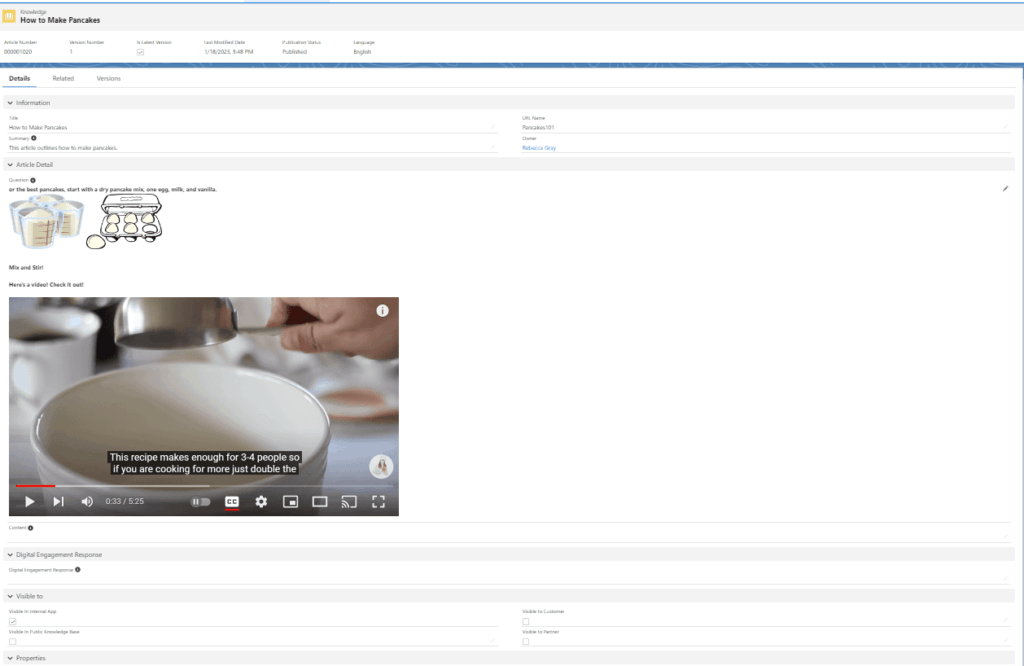
But under the hood, Knowledge behaves very differently than other Salesforce objects. Articles can include rich text formatting and structured layouts, embedded images and videos, linked data and categorization, and multiple versions of the same article maintained in parallel over time.
That versioning model is what makes Knowledge powerful. It’s also what makes migration more involved than most teams expect.
Why Do Companies Use Salesforce Knowledge?
Organizations invest heavily in Salesforce Knowledge because it becomes a central source of truth. Over time, it reduces friction across the business in ways that aren’t always obvious until the system isn’t there.
Customers can resolve issues without contacting support. Support teams respond faster because the answer is already written, reviewed, and ready. Internal teams stop relying on tribal knowledge and start pulling from shared documentation that’s actually maintained.
A Knowledge base that’s been in use for several years isn’t just a help center. It’s a curated operational library. That’s why migrations matter. Losing article history, formatting, or structural relationships isn’t just inconvenient. It directly degrades support quality and creates internal confusion that’s hard to unwind after the fact.
Why Is Salesforce Knowledge Migration So Complex?
Most teams assume this is just another Salesforce data migration. It isn’t.
The complexity comes from how Salesforce structures Knowledge behind the scenes. You’re not moving records from one org to another. You’re reconstructing a system with strict internal rules about how content is stored, versioned, and updated. Two areas drive most of the difficulty: article versioning and API constraints.
Knowledge Article Versioning and Import Rules
Salesforce Knowledge uses a version-controlled model, not standard record updates.
Every time an article is edited, a new version is created, the previous version is preserved, and the system tracks draft versus published states. This is valuable for auditing and rollback. During migration, it introduces a layer of sequencing you can’t skip or shortcut.
You’re not loading “the current version” of an article. You’re rebuilding its entire history in the correct order. That means you need access to all historical versions, you have to recreate them sequentially, and you have to manage publish and archive states throughout the process. If you skip steps, Salesforce rejects the load. There’s no partial credit.
What Is the Salesforce Knowledge API?
Salesforce Knowledge doesn’t use the same APIs as standard objects. It relies on a dedicated Salesforce Knowledge API designed specifically to enforce how articles are created, versioned, and published. As of API version 59, that separation is still required.
The constraints are specific: only one draft version can exist at a time, only one version can be published at a time, and you can’t insert multiple versions in parallel. Tools that work cleanly for Accounts or Opportunities won’t translate to Knowledge. This is where a lot of migration approaches quietly break down before anyone realizes what’s happening.
Don’t let Knowledge migration complexity slow you down
GRAX handles version sequencing, API constraints, and media handling automatically, so you don’t have to.
How Do Knowledge Article Versions Affect Migration?
Versioning isn’t a technical footnote. It dictates the entire migration process.
To move Knowledge Articles successfully, you start with the oldest version, load it into the target org, then layer each subsequent version on top in chronological order. Salesforce assigns version numbers as you go, so you can’t predefine them or adjust them after the fact. This forces a strict sequential rebuild of every article, no matter how many versions it has.
In practice, that means migration jobs need careful sequencing, failures mid-process can leave articles in incomplete states, and validation after each stage isn’t optional. It’s how you catch problems before they compound.
Why Do Images Complicate Salesforce Knowledge Migration?
Images are one of the most common sources of migration failure, and they’re almost always underestimated during planning.
How Salesforce Stores Knowledge Images
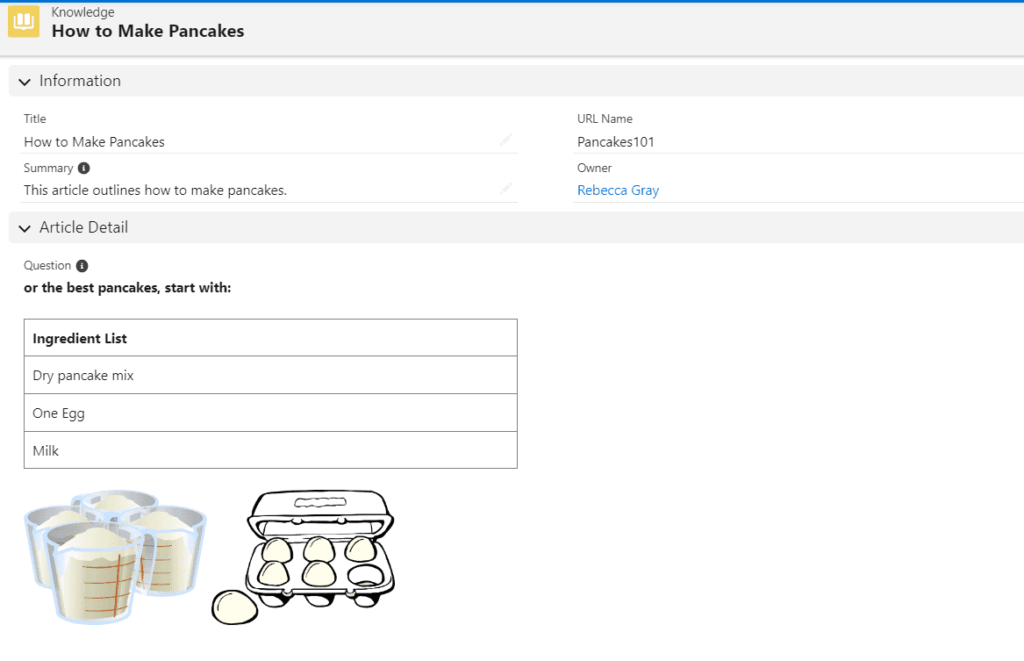
Salesforce doesn’t store images inside Knowledge Articles. The article contains a reference, essentially a link, while the actual file lives in a separate storage system. When you extract article data, you’re not automatically extracting the image itself.
Why That Becomes a Problem
A complete Knowledge migration requires extracting raw image files separately, preserving their association with the article content, and restoring them during the load process. When data is loaded into the target org, Salesforce rebuilds the image references automatically, but only if the raw files are present. If they’re missing, the article loads with broken or empty content. It won’t throw an obvious error. It just looks wrong in the UI, and someone has to track down what happened.
Migration issues often hide in the details
See how GRAX extracts, preserves, and restores Knowledge Articles with full fidelity, images included.
How Do You Migrate a Salesforce Knowledge Base?
Most Salesforce migrations follow an Extract, Transform, Load (ETL) approach, and Knowledge is no exception. ETL remains the standard because it gives you control at each stage rather than treating migration as a single bulk operation. With Knowledge, each phase carries additional considerations that aren’t present in standard object migrations. If you’re evaluating Salesforce ETL tools for this work, the Knowledge-specific constraints covered below should factor heavily into that decision.
How Do You Extract Salesforce Knowledge Data?
Extraction is where migrations either succeed or quietly fail without immediate consequence.
You’re not pulling records. You’re pulling a complete representation of each article, including article content, full version history, images and embedded media, and all metadata and relational context.
GRAX handles this by replicating Salesforce data into a relational database that preserves structure and relationships rather than flattening everything into an export file. One of the practical advantages here is incremental extraction. Instead of taking a single point-in-time snapshot and hoping nothing changes before cutover, you can continuously sync updates, keep data current through the final migration window, and reduce downtime during migration.
When Is Data Transformation Required?
Transformation depends entirely on how similar your source and target environments are.
If both orgs share the same schema, you may not need to transform anything. But most real migrations aren’t that clean. Transformation becomes necessary when fields don’t match, object structures differ between orgs, or business logic has changed since the source org was originally configured. This work typically happens in a staging database, where data can be reshaped and validated before it ever touches the target org.
GRAX mirrors Salesforce schema in the staging database, which means the data you’re working with looks familiar rather than requiring translation at every step. Mapping is more predictable and data integrity is easier to maintain throughout the process.
How Do You Load Knowledge Articles Into a New Salesforce Org?
Loading is where everything comes together, and where most of the complexity that wasn’t addressed earlier will surface.
This phase has to account for record relationships, version sequencing, and Knowledge API constraints simultaneously. If extraction and transformation were done correctly, loading should be predictable. It won’t be simple, but it should be controlled.
GRAX manages this by enforcing version order automatically, handling Knowledge API interactions behind the scenes, and restoring images and related content in the correct sequence. That reduces the need for custom scripts or manual intervention during the most fragile part of the migration, the part where a mid-process failure has the most downstream impact.
Example: Migrating a Salesforce Knowledge Base Using GRAX
Understanding the theory matters. Seeing how it plays out in practice matters more.
Preparation
Start by setting up both environments: the source Salesforce org with Knowledge enabled, and the target org prepared to receive data. This stage is where teams frequently underinvest. Validate permissions thoroughly, confirm Knowledge is configured correctly in the target org, and identify schema differences before the extraction begins, not after. Surprises at this stage are manageable. Surprises during load are not.
Extract
Replicate the Knowledge base into a staging database. This includes all article versions, associated images, and supporting metadata. The goal is a working copy of your Knowledge base that exists entirely outside of Salesforce, giving you full control over the process without putting production data at risk.
Transform
If needed, adjust the data to match the target org. This might involve mapping fields, aligning record types, or adjusting data structures that differ between environments. In simpler migrations with identical schemas, this step may be minimal. It should never be assumed unnecessary without explicitly validating that the source and target environments match.
Load
Move the prepared data into the target org. This step rebuilds article version history in sequence, restores images and relational content, and validates that articles appear exactly as expected in the destination environment. When the process completes successfully, the Knowledge base functions the same as it did in the source org. Same content, same structure, nothing missing.
Pros and Challenges of Salesforce Knowledge Migration
| Pros | Challenges |
| Preserves historical article data | Versioning rules are strict and unforgiving |
| Maintains support continuity | Images require separate extraction and handling |
| Supports org consolidation | Knowledge API limitations constrain load options |
| Enables long-term data reuse | Load sequencing must be precise throughout |
Ready to migrate your Salesforce Knowledge base?
GRAX manages every stage of the process, from extraction to load, without custom scripts or manual intervention.
Salesforce Knowledge Migration Checklist
Before starting a migration, validate that all key steps are in place:
- Enable Knowledge in the target org and confirm configuration matches the source
- Extract all article versions, not just the most recent published state
- Capture images and embedded media as separate raw files
- Plan load order based on version history, oldest first
- Archive previously published versions where required before loading new ones
- Validate article formatting, links, and media after migration is complete
Skipping any of these steps usually doesn’t fail immediately. It creates problems that surface later and take longer to diagnose than the step would have taken to complete.
Key Takeaways
Salesforce Knowledge migration is difficult because of structure, not volume.
Versioning rules, Knowledge API constraints, and media handling all introduce dependencies that have to be respected in sequence. There’s no workaround for them. Only teams that account for them upfront versus teams that discover them mid-migration. Once those constraints are understood and planned for, the process becomes significantly more predictable. The difference between a smooth migration and a painful one almost always traces back to how well those constraints were addressed before the first job ran.
Can Salesforce Knowledge Be Integrated With Other Systems?
Yes, and this is where Knowledge starts delivering value beyond support operations.
When replicated outside of Salesforce, Knowledge content becomes reusable data that can feed reporting and analytics, internal systems and workflows, and AI and automation use cases that depend on structured documentation. As of 2026, more teams are treating Knowledge as a governed dataset rather than a static help center. That shift changes how migrations get scoped. You’re not just moving a support library. You’re preserving a dataset that has business value across the organization, and the migration approach needs to reflect that.
Your Knowledge base is more than a help center
With GRAX, replicated Knowledge data is ready for analytics, AI, and enterprise integration the moment migration is complete.
Getting Knowledge Migration Right
Salesforce Knowledge migration is one of those projects that looks manageable on the surface and earns its complexity the deeper you go.
The three areas that account for most of the difficulty, version history, API constraints, and media storage, aren’t obscure edge cases. They’re structural features of how Knowledge works. Once you account for them, the process becomes controllable. And when the migration is done right, you don’t just move your Knowledge base. You keep everything that makes it worth having.
FAQ
What is Salesforce Knowledge?
Salesforce Knowledge is a built-in knowledge base system within Salesforce Service Cloud that allows organizations to create, manage, and share help articles. These articles serve both customer self-service and internal support teams, helping standardize answers and reduce repetitive work. Because articles support rich text, embedded media, and version history, they often become a central operational resource that teams depend on well beyond the original support use case.
Why is Salesforce Knowledge migration difficult?
Salesforce Knowledge migration is challenging because it involves more than moving records. Articles are versioned, meaning every update creates a new version that must be migrated in sequence. On top of that, Salesforce requires the use of a dedicated Knowledge API with strict rules around drafts, publishing states, and load order, making the process more structured and less forgiving than standard data migrations.
Can Knowledge Articles be exported directly from Salesforce?
Yes, but not always in a complete or migration-ready format. Standard export methods may capture article text and metadata but often omit full version history and associated media. A proper migration requires a solution that extracts articles, version history, and supporting files together while preserving the relationships between them. Exporting article text alone will leave you with incomplete content in the target org.
How are images stored in Salesforce Knowledge?
Images in Salesforce Knowledge are not stored inside the article record. The article holds a reference to an image stored separately in Salesforce’s file system. During migration, images must be extracted as raw files and reloaded into the target org so Salesforce can rebuild the references correctly. If the raw files aren’t present at load time, the articles will appear to have migrated successfully, but the embedded visuals will be missing or broken.
What tools support Knowledge migration?
Specialized tools are typically required to handle Salesforce Knowledge migration correctly. Platforms like GRAX (formerly CapStorm) are built to work with Salesforce’s data model, including Knowledge Articles, version history, and media handling. GRAX manages Knowledge API complexity, enforces correct load sequencing, and restores articles with full fidelity in the target org without requiring custom scripts or manual intervention at the steps most likely to introduce errors.