
Picking a Salesforce edition feels like a licensing decision. In practice, it’s closer to an architectural one, and most organizations don’t realize that until they’re already locked in.
For the first year or two, the gaps between editions are mostly invisible. Deals get tracked, reports get pulled, the team moves on. Then someone tries to build a real integration. Or automate a cross-team process. Or pipe Salesforce data into an analytics platform. Suddenly the edition chosen based on headcount and budget starts dictating what the business can actually build, and the ceiling shows up fast.
Edition re-selection is one of the most common, and disruptive, projects in the Salesforce ecosystem. Companies outgrow Professional and move into Enterprise. Some push further into Unlimited. Others try to simplify after years of accumulated complexity and end up in a painful downgrade project they weren’t fully prepared for. The goal of this guide isn’t to tell you which edition is “best.” It’s to help you understand what each one actually enables before you’re making that decision under pressure.
What Salesforce Editions Are Available and Who Are They For?
Salesforce Professional Edition Overview
Professional is typically where organizations land after outgrowing basic CRM tools. Core objects are all there: Accounts, Contacts, Opportunities, Cases, along with reasonable customization through page layouts and profiles. For a team with straightforward sales or service processes and no immediate integration requirements, it does the job.
The ceiling becomes visible the moment complexity enters the picture. Automation is limited in both scope and volume. Reporting is functional but not particularly flexible. API access isn’t included by default, which is the part that catches teams off guard most often. If Salesforce is meant to connect with anything outside itself, an ERP, an analytics tool, a data warehouse, Professional either requires an add-on purchase or forces an edition change sooner than expected.
For small teams with stable, well-defined processes, Professional is a reasonable starting point. For teams that expect to grow, or that have integration work already on the roadmap, it’s worth stress-testing whether Professional will actually hold up 18 months from now.
Salesforce Unlimited Edition Benefits & Advanced Features
Unlimited is built for organizations that have already spent too much time engineering around limits. The numbers are substantially higher across custom objects, fields, automation capacity, and storage, but that’s almost beside the point. The real value is operational: teams can build what they need without constantly checking whether the edition supports it.
Developer sandbox access is significantly more robust in Unlimited, which matters for any organization trying to maintain proper testing discipline before deploying changes to production. Support is elevated by default. And in environments where multiple divisions, regions, or product lines are operating within the same org, Unlimited removes the architectural compromises that lower editions quietly force over time.
The cost is real, and the justification has to be too. Unlimited carries a substantial premium over Enterprise, and for many organizations the gap is hard to defend until they’ve already felt the pain of not having it. The clearest case comes from reduced administrative overhead, faster development cycles, and fewer conversations that end with “we can’t do that in this edition.”
Different Salesforce Versions and Their Target Audiences
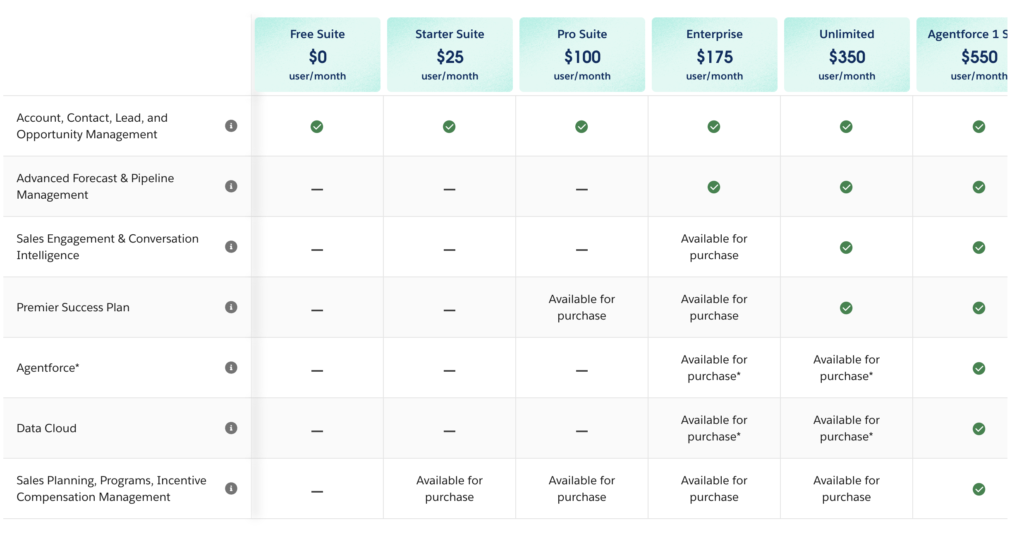
The progression from Starter through Unlimited tracks fairly closely to business maturity, though not perfectly:
- Starter / Essentials: Basic CRM for small teams with limited customization needs
- Professional: Structured sales and service processes, with limited integration support
- Enterprise: A customizable platform with API access and real integration capability
- Unlimited: Large-scale, multi-team environments where hitting limits has operational consequences
What matters more than the tier labels is understanding that moving between editions isn’t simply unlocking new features. It changes how the org operates. Teams that plan for that shift rather than stumbling into it mid-project have a meaningfully better time.
Industry-Specific or Add-On Editions: Nonprofit, Education, Pardot
Salesforce has built vertical solutions for several sectors: Nonprofit Cloud, Education Cloud, and Pardot (now Marketing Cloud Account Engagement) being the most common. Each comes with a prebuilt data model and workflow logic designed for that context, which can dramatically compress implementation timelines.
The tradeoff is worth understanding before you commit. Nonprofit and Education Cloud introduce entity structures that don’t always map cleanly to standard Salesforce objects. Reporting gets more complex. Integrations require more planning. Long-term data management, particularly around how data is retained, governed, and accessed outside of Salesforce, gets harder as the environment matures. These aren’t reasons to avoid those solutions, but they are reasons to think about the data architecture early rather than inheriting a mess later.
Choosing the Right Edition by Company Size (Small, Mid-Market, Enterprise)
Company size correlates with edition selection, but it’s not the most reliable variable to optimize on. Operational complexity is a better frame.
Smaller organizations prioritize cost and simplicity. Professional usually satisfies both. Mid-market teams tend to hit the automation and integration ceiling first, and that’s typically the inflection point where Enterprise starts making sense. Larger enterprise organizations focus on control, governance, and scale without constant re-architecting.
The trap most teams fall into is selecting an edition based on current state. The majority of emergency upgrade situations trace back to a selection made for current needs, with insufficient attention paid to where the business would be 12 to 18 months later. It’s a fixable problem, but it’s a lot easier to fix before signing.
Salesforce Sales Cloud vs Service Cloud Editions Comparison
These two get conflated regularly. Sales Cloud and Service Cloud define the functional purpose: sales pipeline management versus customer support. Editions define the capability depth within whichever cloud you’re running.
You can run either cloud on Professional, Enterprise, or Unlimited. Your edition determines how much automation you can build, how flexible your integrations are, and how granularly you can configure access and workflows. Choosing between the clouds is a functional decision. Choosing the edition is an infrastructure decision, and the two shouldn’t be confused during planning.
What Are the Key Salesforce Edition Differences?
Feature Comparison: Basic CRM, Automation, AI, and Analytics
Every edition provides core CRM functionality. The differences show up in depth, not presence, and they compound quickly once business processes start depending on Salesforce to actually run things rather than just track them.
Professional gives you standard reporting and a limited automation footprint. Enterprise unlocks advanced workflow automation, more flexible reporting, and Einstein AI features including lead scoring, opportunity insights, and prediction builder. Unlimited extends all of that with higher thresholds. One thing worth noting on the AI features specifically: they require clean, complete, well-structured data to produce meaningful results. Turning on Einstein at Enterprise doesn’t automatically generate useful insights. The data foundation has to be there first.
Licensing, User Roles, and Customization Capabilities
User management is one of the first places edition limits create real operational friction as organizations grow.
Professional caps the number of roles, profiles, and record types. That’s manageable for a single team running a single process. It breaks down quickly when different teams need different data visibility, different approval workflows, or segmented access by region or department. Enterprise removes most of those restrictions. Permission sets, profiles, and record type configurations can be built to reflect how the organization actually works rather than how it needs to work to stay within the edition’s limits. For organizations with any meaningful internal complexity, that flexibility is worth a lot.
Data Storage, API Call Limits, and Sandbox Access
These three tend to get glossed over during edition selection conversations and become significant pain points later.
Storage allocations start at a baseline and scale with user count, but teams with high attachment volumes, long history tracking requirements, or large integrated datasets frequently outpace those allocations. Additional storage is purchasable, and it’s not cheap relative to storing equivalent data outside of Salesforce in your own cloud environment.
API limits run on a rolling 24-hour window and are tied to edition and license count. Enterprise includes API access by default; Professional requires add-ons. For any organization with live integrations, analytics pipelines, or frequent syncing between Salesforce and external systems, hitting API limits doesn’t just cause slowdowns. It breaks things. Planning around those limits proactively is significantly easier than responding to a broken integration in production.
Sandbox access rounds out the picture. Enterprise includes partial sandboxes. Unlimited expands sandbox types and capacity. Organizations that skip proper sandbox environments and deploy directly to production are taking on risk that tends to materialize at the worst possible moment.
Stop Managing Around Salesforce Limits
Your data, in your cloud, without the caps.
How Does Salesforce Pricing Work Across Editions?
Base Subscription Costs and Per-User Pricing
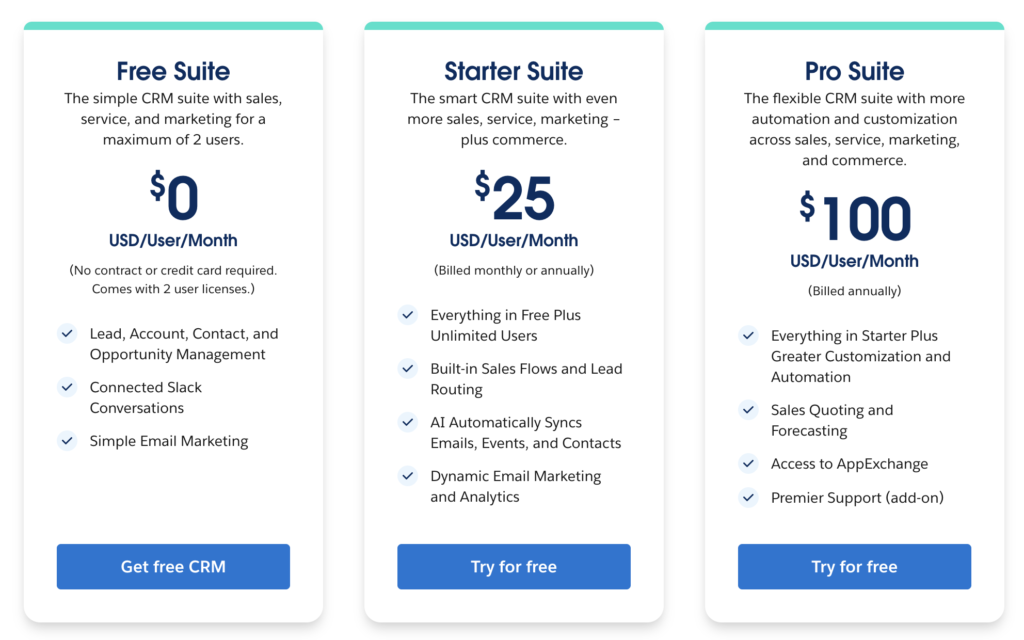
Salesforce pricing is built around per-user licensing, and the costs step up considerably across editions. Professional is the lowest entry point. Enterprise adds a real premium for expanded automation and API access. Unlimited sits at the top of the standard tier, priced for organizations where the operational value of removing limits outweighs the cost of the tier itself.
Published list prices are a starting point, not a final number. Contract terms, negotiated discounts, and the specific cloud products included all affect the actual figure.
Additional Costs: API Access, Support, Storage, and Add-Ons
The base license is the most visible line item. It’s rarely the only significant one.
Additional storage costs accumulate as data volumes grow. Premium support tiers are priced separately at lower editions, where the included support level often doesn’t match what a production Salesforce environment actually requires. API access at Professional requires add-ons. And Salesforce Shield, which provides platform encryption, event monitoring, and extended field audit trails, is a separate purchase at every edition.
For regulated industries, Shield isn’t really optional. Treating it as an optional line item during budgeting creates compliance gaps that surface at the worst possible time.
Total Cost of Ownership (TCO) Considerations for Each Edition
Licensing is one input into the real cost. Implementation effort, ongoing administration, integration maintenance, the cost of engineering around edition limits, and the cost of the upgrade projects that eventually result from under-purchasing all belong in the same calculation.
Organizations that choose a lower edition to reduce initial spend and then spend the following two years working around its constraints frequently end up spending more in aggregate than if they’d started one tier higher. That’s not a universal argument for buying up. It’s an argument for doing the full-cost math before signing rather than treating the per-seat number as the whole story.
Reduce the Real Cost of Salesforce
Cut storage costs without losing access to your data.
Automation and Customization Across Editions
Availability of Flow, Process Builder, Apex, and Custom Objects
Automation capability increases meaningfully at each tier, and it’s often the primary driver behind upgrade decisions, though rarely the stated one until a project hits the wall.
Professional limits the number of active flows and automation processes. At low volume and low complexity, that’s manageable. When a team starts building automation to run actual business operations across multiple objects and teams, those limits become a hard architectural constraint. Enterprise removes most of them, enabling multi-step flows, complex approval chains, and automation scenarios that span multiple objects. Unlimited extends the ceiling further.
For organizations where Salesforce is genuinely running processes rather than just logging them, automation limits aren’t a minor consideration. They’re a core infrastructure decision.
Development Tools: Sandboxes, Change Sets, and Deployment Options
Testing before deploying to production shouldn’t be optional, but without the right sandbox environment, it often effectively is.
Enterprise includes partial sandboxes, giving teams an isolated environment to test configuration changes, automation updates, and integration behavior before pushing anything live. Unlimited adds full sandbox types and increased sandbox capacity, which supports more rigorous and realistic pre-production testing.
The risk of skipping this is well-documented in the Salesforce ecosystem: configuration changes that look fine in isolation interact badly with existing data or processes, and those errors reach end users. From there it’s a recovery problem, and recovery problems have a way of becoming much bigger conversations about backup, data integrity, and accountability.
Integrations and API Access
AppExchange Availability and Integration Restrictions
The AppExchange offers thousands of pre-built integrations and apps. Most function at a basic level across editions, but the ability to fully configure, extend, or automate them depends on what your edition supports underneath.
At Professional, some AppExchange products require workarounds because the automation or API access they rely on isn’t included by default. At Enterprise and Unlimited, integrations generally behave as intended. This matters most for data integration tools, analytics connectors, and anything that runs background API calls to keep data synchronized across systems.
API Call Limits, Concurrency, and Best Practices Per Edition
API usage is central to any Salesforce environment that connects with the outside world, which is most of them. Enterprise editions include API access with defined limits based on license count. Those limits reset on a rolling 24-hour basis. When organizations hit them, integrations stall, data syncs fall behind, and downstream systems start surfacing errors that can be difficult to trace back to the actual cause.
Data-intensive environments, frequent cross-platform syncing, live analytics pipelines, real-time integrations, need to plan API consumption as part of the architecture conversation, not after the fact. Additional capacity is purchasable, but it’s far easier to plan for than to purchase reactively during an outage.
Support, Training, and Resources
Support Levels (Standard, Premier, Premier+, Unlimited) and Costs
Support tiers vary by edition and can be purchased separately. Higher tiers mean faster response times, access to dedicated technical resources, and Salesforce experts available for architectural guidance, not just break-fix support.
Unlimited includes elevated support by default. For organizations where Salesforce downtime or a data issue has direct business impact, that’s not a minor benefit. Lower editions include standard support, which carries slower response SLAs and limited specialist access. For production environments with compliance obligations or significant user populations, standard support often isn’t sufficient. That gap belongs in the budget.
Onboarding, Success Resources, and Partner Ecosystems
More complex Salesforce environments require more experienced implementation partners, and the quality of that relationship matters more than most organizations expect going in. The partner ecosystem is broad, but it’s uneven, and the cost of poor architecture is significantly higher at Enterprise and Unlimited where the configuration surface area is larger.
Selecting a partner with genuine depth in the edition you’re running, not just general Salesforce familiarity, is worth prioritizing early rather than discovering the difference when a project goes sideways.
Security, Compliance, and Governance Across Editions
Advanced Security Options: Salesforce Shield, Encryption, Event Monitoring
Salesforce Shield is the most significant security add-on available across editions. Platform encryption protects field-level data at rest. Event monitoring logs user activity in detail: logins, report exports, API calls, record views. Field audit trails extend history tracking beyond the 18-month native window that Salesforce enforces by default.
For organizations in regulated industries, these aren’t nice-to-haves. Financial services, healthcare, legal, and public sector environments consistently have compliance requirements that Salesforce’s native toolset can’t satisfy without Shield. That’s reflected in the add-on pricing.
One thing Shield doesn’t address: data governance outside the platform. Event monitoring tells you what happened inside Salesforce. It doesn’t govern data once it’s been exported, replicated, or moved to an external system. That gap requires a separate strategy, and organizations that assume Salesforce handles it end up with a compliance problem they didn’t see coming.
Compliance Controls, Audit Trails, and Data Residency Differences
Higher editions offer more flexibility around access controls, audit trail configuration, and data residency options. The 18-month ceiling on Salesforce’s native history object data is a concrete example of where edition-level controls run out. Finance, healthcare, and legal organizations routinely face retention requirements of five, seven, or ten years. No Salesforce edition meets those requirements natively. Meeting them requires an external solution that retains full data history outside the platform, under the customer’s own governance policies.
Data residency adds another layer of complexity for multinational organizations operating under regional regulations. Enterprise and Unlimited provide more configuration options, but the question of where backup and archived data actually lives, and who controls access to it, isn’t something any edition fully resolves on its own.
Governance Best Practices When Choosing an Edition
Governance is most useful when it’s part of the edition selection conversation, not a project that gets kicked off after something goes wrong.
The questions worth answering before you commit: What are the data retention requirements for this org? Who is authorized to access which records, and how is that enforced and audited? What happens to data when an employee leaves, a record is deleted, or the org structure changes? And perhaps most practically: who owns the data if something goes wrong with the Salesforce platform itself?
Organizations that work through those questions upfront consistently make better architectural decisions and spend far less time later cleaning up gaps they could have avoided.
It’s Your Salesforce Data, Actually Own It.
Retention policies you control, audit trails that don’t expire.
Migration, Upgrade, and Downgrade Considerations
Why Upgrade Your Salesforce Edition?
Most edition upgrades are reactive. An integration project surfaces an API limit. A process automation effort runs into a flow cap. A new compliance requirement demands audit trail capabilities the current edition doesn’t support. The decision rarely comes from proactive planning. It comes from hitting something that doesn’t work, usually mid-project.
That pattern has consequences. Upgrades that happen under pressure come with compressed timelines, insufficient testing, and higher risk of data issues during the transition. Organizations that track their edition usage and monitor where they’re approaching limits can initiate upgrades on their own terms, with proper preparation. That’s the better version of the same event.
How to Upgrade From Starter to Professional Salesforce Edition
The Starter-to-Professional transition introduces structured CRM functionality that supports real sales and service operations: case management, quoting, more granular customization through profiles and page layouts. For teams that have been running at a basic level, this upgrade tends to unlock meaningful headroom quickly.
The data migration consideration is relatively limited compared to higher-tier transitions. The more substantive work is usually process redesign, taking advantage of Professional’s capabilities rather than simply porting existing workflows into a more capable environment and calling it done.
How to Upgrade From Professional to Enterprise Salesforce Edition
This is the most operationally significant upgrade for most organizations. It’s where data and architecture considerations start to dominate the project scope, sometimes unexpectedly.
Enterprise introduces API access, significantly expanded automation, and the ability to build configurations that match actual business complexity. For organizations that have been working around Professional’s integration limits, this upgrade opens up a lot. It also tends to unlock a backlog of integration projects that were deferred because Professional couldn’t support them, which means the upgrade rarely ends the scope conversation.
This transition is also a natural checkpoint for data governance. Before the environment gets more complex, it’s worth auditing what’s accumulated in the org, establishing retention and access policies, and making sure backup and recovery processes are in place and tested.
How to Upgrade From Enterprise to Unlimited Salesforce Edition
Unlimited upgrades are driven by scale: more teams, more automation complexity, higher data volumes, or multi-region deployments where hitting limits has real operational consequences.
The expanded sandbox environments are often what tips the decision for technical teams. Robust pre-production testing reduces deployment risk and enables more disciplined release management. Combined with elevated default support, Unlimited is designed for environments where Salesforce is mission-critical infrastructure rather than a tool one team uses.
Why Downgrade Your Salesforce Edition?
Downgrades happen, and they’re usually a business decision: cost reduction after a restructuring, simplification following an org consolidation, or splitting a large org into smaller environments. The business rationale is often clear. The technical execution is almost always more complex than anticipated.
Downgrade Paths and Potential Limitations
Going from Enterprise to Professional, or Unlimited to Enterprise, means operating within tighter limits across objects, automation, and API access. Configurations that exceed those limits need to be reworked or removed before the downgrade completes. That’s frequently not visible until the project is already underway.
The data dimension is where downgrades get genuinely difficult. Moving to a lower edition often requires migrating data to a new environment, restructuring metadata to fit within reduced constraints, and reworking integrations that depended on capabilities the lower edition doesn’t support. These projects pull in administrators, architects, developers, and compliance stakeholders at the same time, and they carry real risk of data loss or corruption when not managed carefully.
Any organization planning a downgrade should treat it as a data migration project from day one. Not a configuration project with data implications. A data project.
Decision Framework: Selecting the Right Salesforce Edition
Questions to Ask Stakeholders and Performing a Trial or Proof of Concept
The most useful pre-selection exercise is a structured conversation about where the business is going, not where it is today. What integrations are planned or under consideration over the next 18 months? How complex are the processes Salesforce will need to support? What are the data retention and compliance requirements? What does the analytics and AI roadmap look like?
A proof of concept, particularly for organizations evaluating Enterprise or Unlimited, can validate whether the edition’s capabilities actually address the use cases driving the decision. It also surfaces surprises before they land in production.
When to Consult Salesforce Partners or Consultants
Multi-team implementations, significant integrations, compliance constraints, migration projects, downgrade projects: any of these warrant involving experienced Salesforce partners before committing to an edition or starting execution. The value of that engagement is highest at the architecture stage, when identifying problems is cheap. After something has been built into production, it’s significantly less so.
How GRAX Supports Salesforce Edition Changes
Edition changes almost always surface data problems. The more complex the change, the bigger the risk.
Upgrades create an opportunity to clean up data that’s accumulated without proper structure or governance. Downgrades require reducing the data and metadata footprint to fit within tighter constraints. Multi-org restructures involve moving data between environments while preserving relationships, hierarchies, and historical context. Any of these projects introduces real risk if the underlying data isn’t properly protected and inventoried before the work begins.
GRAX addresses this directly. Before an edition change, GRAX provides a complete, schema-intact replica of your Salesforce data in your own cloud environment, whether that’s AWS, Azure, GCP, Snowflake, or on-prem. That replica preserves the full data structure, including object relationships, field history, and metadata, in a format your team controls completely. If something breaks during the migration, you’re not relying on Salesforce’s native recovery tools to reconstruct what you had.
During the migration, GRAX enables record-level validation by comparing source data against destination data to identify discrepancies before the old environment is closed out. That’s a meaningfully different position than discovering data issues weeks after the fact.
After the migration, GRAX continues replicating data from the new environment in near real-time. The result is an ongoing backup, an always-current dataset for analytics and compliance reporting, and a foundation for AI readiness that doesn’t depend on Salesforce’s native storage constraints or API limits for downstream access.
For organizations in regulated industries, GRAX also fills a gap that no Salesforce edition resolves natively: data retention beyond 18 months, maintained in a customer-owned environment, under the customer’s own governance policies. That’s not a workaround. It’s a structural requirement for regulated data, and GRAX is built to meet it.
Planning an Edition Change? Protect Your Data First.
GRAX ensures nothing gets lost in the transition.
FAQ
How Do I Choose the Right Salesforce Edition for My Organization?
Start with operational requirements, not current headcount. Evaluate the integrations you need to support, the complexity of the processes Salesforce will run, your data volume trajectory, and your compliance obligations. Then add 18 months of growth to each of those inputs. The edition that looks sufficient at signing may create real constraints before the next renewal cycle. If you’re deciding between two editions and the gap feels close, the cost of starting at the higher tier is almost always lower than the cost of an emergency upgrade mid-project.
Which Editions Include Salesforce Shield and Advanced Security?
Shield is an add-on at every edition. It’s not included by default in any standard tier. It covers platform encryption for data at rest, event monitoring for detailed user activity logging, and field audit trail capabilities that extend history tracking beyond Salesforce’s 18-month native limit. For organizations in financial services, healthcare, legal, or other regulated sectors, Shield is typically a compliance requirement, not an optional enhancement. Pricing depends on your overall Salesforce investment and edition tier.
Are There Special Editions for Nonprofits and Educational Institutions?
Yes. Nonprofit Cloud and Education Cloud provide prebuilt data models and workflows designed for those sectors, available through Salesforce’s philanthropic pricing programs for eligible organizations. The implementation acceleration is genuine: purpose-built objects and processes reduce time to value significantly. The tradeoff is data model complexity that compounds over time, particularly around reporting, integrations, and long-term data governance. How data will be protected, retained, and accessed outside of Salesforce is worth addressing before the environment matures to the point where revisiting it becomes expensive.