This post was co-authored by Kimmo Salmela, Communications Manager, Documill
Agentic CRM (customer relationship management) depends on two things: workflows that run the same way every time, and a complete history of every change behind them. Ortoo and Documill run the system of work inside Salesforce. GRAX keeps the system of record in storage you own. Together, these Ascendx companies give AI agents something they can be trusted to act on.
Why do AI agents need more than a good model?
AI agents need trustworthy data and governed processes, because access to capable models is becoming widespread. What separates a useful agent from a risky one is the data it can reach, and whether you can prove where that data came from.
The number of agents is about to grow quickly. Gartner predicts that by 2028 an average global Fortune 500 enterprise will have more than 150,000 agents in use, up from fewer than 15 in 2025. Gartner calls the resulting uncontrolled growth in the number of AI agents across an organization “agent sprawl”.
Governance is not keeping pace. In the same release, Gartner reported that only 13% of organizations think they have the right AI agent governance in place. Deloitte’s 2026 State of AI in the Enterprise survey found a similar gap: only about one in five companies has a mature governance model for autonomous AI agents.
Most Salesforce teams have seen an early version of this. A team turns on an AI feature and the first results look promising. A few weeks later, someone notices the agent assigned an account to the wrong owner, quoted a discount that was never approved, or summarized a customer’s history without the case that mattered most. Trust drops, the pilot gets parked, and the work goes back to being done by hand.
The model is only one part of the problem. Data quality, permissions and workflow design also determine the result. IBM’s State of Salesforce 2025–2026 survey of 1,222 Salesforce customers found that only 33% of AI initiatives were meeting their return on investment (ROI) targets, and it named data availability and quality among the biggest barriers to agentic AI adoption. The usual blockers sit underneath the model:
- Inconsistent records. Ownership, timestamps and handoffs are set by a tangle of flows and rules, so the same field means different things on different records.
- Work that happens outside the platform. Quotes are edited in Word, contracts are signed in another tool, and the final terms never make it back to the record.
- History no one can trace. Salesforce shows the current state of a record. What it looked like last quarter, who changed it and why, often lives in an inbox or nowhere at all.
An agent acts on whatever it is given. Inconsistent, incomplete or snapshot-only data produces confident answers that are wrong in ways that are hard to spot. Before you add the next agent, the more useful question is what it will read and act on.
Why do Salesforce admins feel this first?
Salesforce admins and platform owners feel it first because they own every layer an agent touches. Routing, document generation and data protection may each have a different operational owner, but the platform owner usually coordinates the technical evaluation. They decide whether a new tool gets evaluated, and they get the ticket when an agent gives a strange answer.
Most admins live with three kinds of sprawl:
- Flow and routing sprawl. Leads and cases are assigned by a mix of flows, assignment rules, queues and one-off overrides. Each made sense when it was built. Together they produce logic that only one person can explain.
- Template sprawl. Quotes, contracts and customer letters exist in dozens of versions across regions, languages and business units. Updates happen in Word, outside Salesforce, and nobody is sure which version is current.
- Storage and history risk. Data volumes grow toward the org’s storage limit. Backups exist, but turning them into a usable, queryable history is a project of its own.
Each of these is usually treated as an admin productivity problem. Each is also a data problem. A routing override means the owner field no longer reflects the rule. A contract edited in Word means the signed terms differ from the opportunity. A purge to free up storage means last year’s context is gone. Every workaround leaves records a little less consistent, and agents then learn from and act on that inconsistency. Cleaning it up is the first step of an AI strategy.
“We had the data in the CRM sufficiently clean already. Then, it’s now easy to replicate in documents without errors. There hasn’t been a need to track any errors, quite frankly.”
– Thumas Miilumäki, Head of Sales Service & CRM at Lapland Hotels & Safaris, Finland
What is a system of work and a system of record?
A system of work is where workflows, documents and approvals happen. A system of record is the complete history of every change those workflows make, kept somewhere you control. Agentic CRM needs both, connected so that work is captured as history and history feeds the next action. In this article, the system of record means that customer-owned history, not the live Salesforce org. Operational history, the term used throughout, means the past versions of each record and the changes between them.
Ortoo, Documill, and GRAX are Ascendx companies. Ascendx runs them as one operating company with a shared go-to-market and continuing investment in AI features, such as agent-driven routing in Ortoo and governed AI access to history in GRAX, while each company keeps its own brand, product leadership and customer relationships. Each covers a different part of this model:
| Tier | Company | What it fixes | What it gives AI agents |
| System of work: how work runs | Ortoo | Routing sprawl, manual triage, reassignments | Consistent, traceable records of who did what, and when |
| System of work: what work produces | Documill | Template sprawl, quotes built in Word, off-platform signing | Terms, pricing and responses kept structured in Salesforce |
| System of record: what is kept | GRAX | Storage limits, vendor lock-in, history lost to inboxes | A complete, queryable history in storage you own |
The two tiers depend on each other. Workflows without history leave agents with only today’s snapshot. History without governed workflows faithfully records inconsistent data. The next three sections take each part in turn.
How does orchestration make Salesforce records consistent?
Orchestration gives every lead, case and request one governed path from intake to resolution, so the fields that describe ownership and handoffs mean what they say. Ortoo does this natively in Salesforce, using the objects and flows you already have.
Instead of adding another rule to the pile, Ortoo coordinates leads, cases, agents and approvals as one workflow. It routes on territory, account ownership, skills, product area or any other field, then assigns based on real capacity and availability. A rep on vacation stops receiving leads automatically. A case goes to someone who can resolve it, instead of to whoever is next in a queue. Operations teams change routing logic through configuration, without waiting for a development cycle.
The data benefit is easy to miss. When routing follows a known rule, the owner, timestamp and handoff fields on each record reflect that rule. Every step is logged and traceable, so you can see why a record went where it did. An agent reading those records can reason about them because they were produced the same way every time.
In one documented example, a global support operation handling more than 14,000 cases a month used Ortoo Orchestrator to classify and route cases on arrival. Manual triage was eliminated, reassignments dropped, and first-touch routing now reaches nearly 100%, with response times improving within weeks.
Ortoo also lets you decide where AI applies: AI where it is needed, rules where they are required. Deterministic logic (predefined rules that produce the same outcome every time) and AI-driven steps run side by side, and you choose which steps use which. That matters for governance, and it matters for budgeting, because Ortoo ties cost to work completed rather than token usage. An agentic rollout becomes something you can forecast.
How does document generation keep terms inside Salesforce?
Document generation builds quotes, contracts and customer responses directly from Salesforce data, so the numbers and terms on the page match the record. Documill does this inside Salesforce, from the first draft through approval and signature.
“After evaluating alternatives, we chose Documill Generate, largely because of its ability to handle the more intricate demands that come with Salesforce CPQ integrations. These were demands that simpler document tools typically just can’t meet.”
– Caroline Calegari, Team Lead CRM Applications, Komax, Switzerland
Dynamic templates pull live opportunity, product and pricing into the document. The same applies to case data in case resolution. Conditional logic and nested product tables handle the bundles, tiered pricing and regional terms that usually push people back into spreadsheets. Clause libraries keep approved language consistent, so an outdated term cannot slip in from an old file.
One template can produce the same document in several languages through built-in translation management.
Collaboration and signing happen in the same workflow. Documill includes built-in e-signatures that comply with eIDAS (the EU regulation on electronic identification and trust services), GDPR (the EU General Data Protection Regulation) and FDA 21 CFR Part 11 (US FDA rules for electronic records and electronic signatures), and external signers can review and sign without a Salesforce license. Every action is recorded in an audit trail. Which of these features are included depends on which of the three Documill editions you license.
The data benefit is that the final version of a quote or contract lives on the record it belongs to, as structured data, instead of as a PDF on someone’s drive. When an agent later asks what was agreed with a customer, the answer is in Salesforce.
“Each Documill document template (and workflow) serves five different brands at once. The templates faithfully adhere to each brand’s styling and branding guidelines, which naturally is a key requirement for a leading, renowned manufacturer.”
Why does AI need operational history, not just today’s records?
AI needs to know what changed, when and why, and a record’s current state cannot show that. A snapshot cannot explain a trend, a churn signal or a negotiation. GRAX keeps the full operational history of your data in your own cloud, so agents and analysts can see how things got to where they are.
GRAX continuously captures every version of the records you choose to back up as they change, in Salesforce, Veeva, ServiceNow, Dynamics 365 and more coming soon. Backup and archive protect that history and keep your org within its storage limits without losing context, and you can roll back a change or restore to any point in time.
GRAX then writes the full version history to your own storage on Amazon Web Services (AWS), Microsoft Azure or Google Cloud in Parquet, an open format. Data Lake writes only the objects and fields you enable, and its first run backfills every stored version of those objects.
Your team can then query that history in place with tools it already runs, such as the Snowflake and Databricks data platforms, Amazon Athena or the open-source DuckDB.
GRAX does not connect that history to an AI model automatically. Your team points a query engine at the files, issues credentials scoped to that engine, and connects AI tools through a connector it controls, such as a Model Context Protocol (MCP) server with read-only access and result limits. GRAX supports the data lake itself; the query, connector and view layers on top are yours to build and run.
For an agent, this is the layer that turns a snapshot into a sequence of events. An assistant can see how a deal’s discount moved across three renewals, or how a customer’s case history changed in the quarters before they churned. Because the data stays in your cloud, you decide who and what can query it, and every answer stays traceable back to the source record.
Ownership comes with it. Your history sits in your own cloud account in Parquet, an open format, which reduces dependence on any one vendor’s proprietary format. Access follows the permissions you set in your own cloud. Your data, your rules.
How do the system of work and the system of record work together?
Work happens on top, and every change is captured underneath. Ortoo starts the work, Documill produces the output, and GRAX keeps the history that analytics and agents read from. That history then informs the next routing decision, the next document and the next agent action.
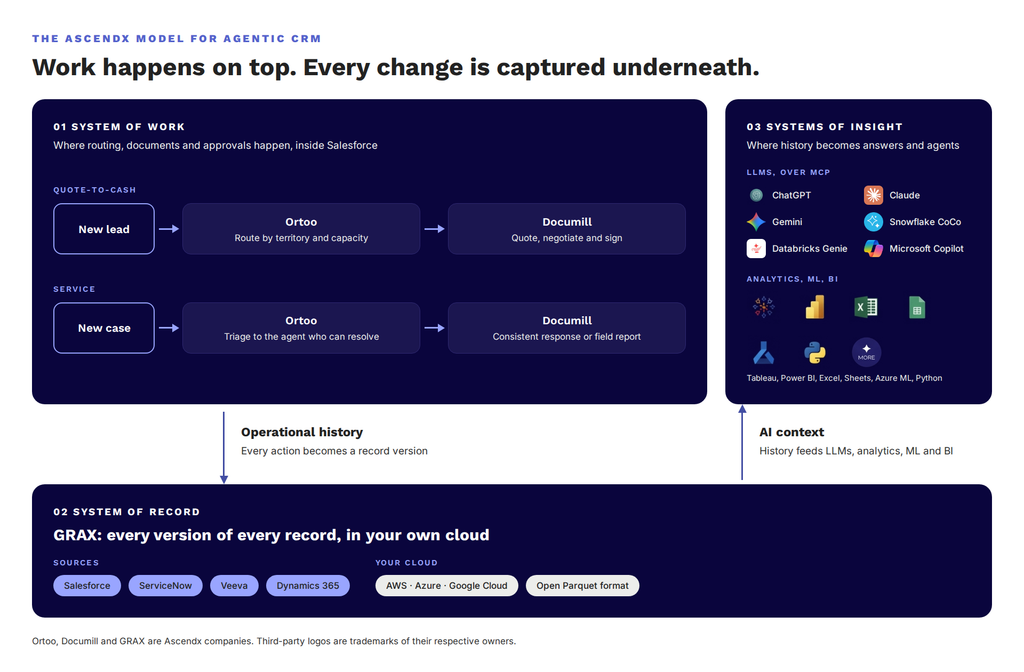
Figure 1. The system of work runs on top. GRAX captures every change underneath and feeds that history back to workflows, analytics and agents.
Figure 1 also shows a third layer, the system of insight. That is where the history is consumed: the AI models, analytics and business intelligence (BI) tools your team already runs. It is not another Ascendx product.
The two workflows below are illustrative examples:
In quote-to-cash, Ortoo routes a new lead to the right rep based on territory and capacity. Documill generates the quote and contract from Salesforce data and can handle negotiation, approval and signing. GRAX keeps every version of the opportunity, quote and approval, so the negotiated terms are still there when the renewal comes up, and an agent preparing that renewal can see what changed since the last one.
In service, Ortoo triages a case to the agent who can resolve it and tracks it against its service level agreement (SLA). Documill produces a consistent response or field service report from live case data. GRAX keeps the full service history, so you can connect how customers were served to whether they renewed.
The arrows matter as much as the boxes. Captured means GRAX backs up the Salesforce records that Ortoo and Documill create and update, so each change becomes a record version in your storage without a manual export. Only the objects you configure for backup are captured. Operational history means that each record version becomes context for the next workflow: a routing rule informed by past resolution times, a renewal quote informed by the last negotiation, or an agent grounded in what happened over time as well as what is true today. Insight is not automatic: your team queries the history with its own tools, or through an AI connector it controls, and uses the result to change a rule, prepare a document, or ground an agent.
What changes when an agent can read the full history?
An agent with full history can answer why something happened and what to do next, in addition to what is true now. Most questions that matter to revenue and service leaders depend on change over time, and those are the questions a snapshot answers badly.
| Question an agent is asked | With today’s records only | With full operational history |
| Is slow case resolution hurting renewals? | Shows open cases and current renewal dates | Matches every case to its account’s renewal across several quarters and compares renewal rates by resolution time |
| What did we agree at the last renewal? | Shows the current opportunity and contract | Shows each quote version, discount and approval leading up to the signature |
| Why did this account’s owner change? | Shows the current owner | Shows each reassignment, when it happened and which routing rule made it |
| Which records did an agent change last week? | Shows current values only | Shows the before and after of every field the agent touched, ready to review or roll back |
Take the first question. A service leader asks an agent whether slow case resolution is hurting renewals. Today’s open cases cannot answer it. With full history, the agent can pick the last six completed quarters, match every case to its account’s renewal, and split accounts by how quickly their cases were resolved. If accounts with slow resolution renew at a falling rate while fast-resolution accounts hold steady, the gap shows up quarter by quarter, and the leader has a reason to change how cases are routed. This is an illustrative workflow.
Each part of the model contributes to that answer. Consistent routing makes resolution times comparable from one case to the next. Responses generated on the record make the service history complete. Full version history in your own cloud lets the agent look back six quarters instead of six days.
The last row of the table matters more as agent counts grow. When hundreds or thousands of agents write to your CRM, a version history of every change gives you the evidence to review what they did and roll back what they got wrong. That evidence supports governance but does not replace it. Gartner’s six steps for managing agent sprawl also include governance policies, a central agent inventory, agent identity and permissions, AI information governance, and monitoring and remediating agent behavior. Those controls decide what an agent may do; the history shows what it did.
What does this mean for the architect and the CFO?
For the enterprise architect, it means one integration pattern to review instead of several. For the economic buyer, it means AI and data costs that can be forecast.
The enterprise architect rarely starts these conversations but can stop any of them. Each new tool usually brings a new integration to review and a new trust boundary (a point where data or permissions pass from one system to another) to approve. Ortoo and Documill run natively inside Salesforce, with no separate platform to integrate. GRAX keeps history in cloud storage you already govern, and agents and analytics reach it through access you define. The review criteria are the same across all three, which shortens the review.
The chief information officer (CIO), chief data officer (CDO) or chief financial officer (CFO) cares about whether spend is predictable and whether it compounds. Ortoo prices orchestration on work completed rather than token usage. Documill brings generation, document workflow and signing under one license. GRAX turns backup and archive from a fixed cost into a history that analytics, compliance and AI teams reuse.
Fewer disconnected tools and one reusable data asset make an open-ended AI budget easier to forecast, and help the business adapt faster when priorities change.
Where should a Salesforce team start?
Start with the question that is hardest to answer honestly. Each one points to the part of the model with the biggest gap.
- How many flows and rules decide where a lead or case goes? If only one admin can explain them, start with how work runs.
- How many versions of your quote and contract templates are in use? If the honest answer is “we would have to count,” start with what work produces.
- Where would you find the terms negotiated at the last renewal, or the value a field held last quarter? If the answer is an inbox or nowhere, start with the history underneath.
Whichever question made you pause is where your agents will stumble first. Most teams begin with one part of the model and add the others as agent use grows.
If you are deciding where to start, the table below maps common problems to a first product and to what the others add. It describes the architecture and the potential benefits. Each product is licensed, configured and connected separately, and the links between them are not automatic.
| Customer problem | Who usually owns it | Where to start | What the combination adds |
| Leads and cases are assigned inconsistently or reassigned often | Sales Ops, Service Ops or the Salesforce admin | Ortoo | GRAX keeps the history of each assignment and reassignment for analysis. Documill keeps the documents that follow on the same records. |
| Quotes, contracts and service documents are built by hand or outside Salesforce | Sales or Commercial Ops, Legal or the Salesforce admin | Documill | GRAX keeps the history of the opportunity, quote and approval records behind each document, for renewal context and audit. Ortoo routes the work that triggers them. |
| Historical CRM data is hard to keep, find or analyze | Salesforce admin, data team or compliance | GRAX | Ortoo and Documill make the operational data that GRAX captures more consistent and more complete. |
Frequently asked questions
What is agentic CRM? Agentic CRM is a CRM where AI agents take actions, such as routing work, drafting documents or updating records, alongside people. It depends on governed workflows for those actions and on trustworthy data for the agents to read.
Do I need all three products to get value? No. Ortoo, Documill and GRAX are licensed separately, and each part stands on its own. Most teams start with the part behind their hardest question and add the others as AI use grows.
Does GRAX copy my Salesforce data into a vendor’s cloud? No. GRAX writes your history to storage you own, in an open format your own tools can query.
Does GRAX automatically make history available to any AI agent? No. GRAX writes your history to storage you own. Your team connects a query engine and a connector it controls, such as an MCP server, and decides which views an agent can see.
Are Ortoo and Documill Salesforce-native? Yes. Both run inside Salesforce using your existing objects and data, so there is no separate platform to integrate.
Why do AI agents need historical data rather than current records? Current records show what is true today. Trends, churn signals, negotiation context and a reviewable record of what agents changed only appear when you can compare versions over time.
Start with the history underneath
Every agent you add will read from and write to your CRM. Make sure a complete history you own sits underneath it from the first day. Start a free GRAX trial and capture the history your agents will depend on.
Explore each part on its own: