

To protect Electronic Health Record (EHR) data integrated with Salesforce Health Cloud, you have to identify patient records stored in Salesforce, back them up to storage from which the data can be recovered, protect the backup copies with appropriate security controls, and regularly test recovery procedures to ensure that you can restore the information when needed.
Is Salesforce Health Cloud an EHR?
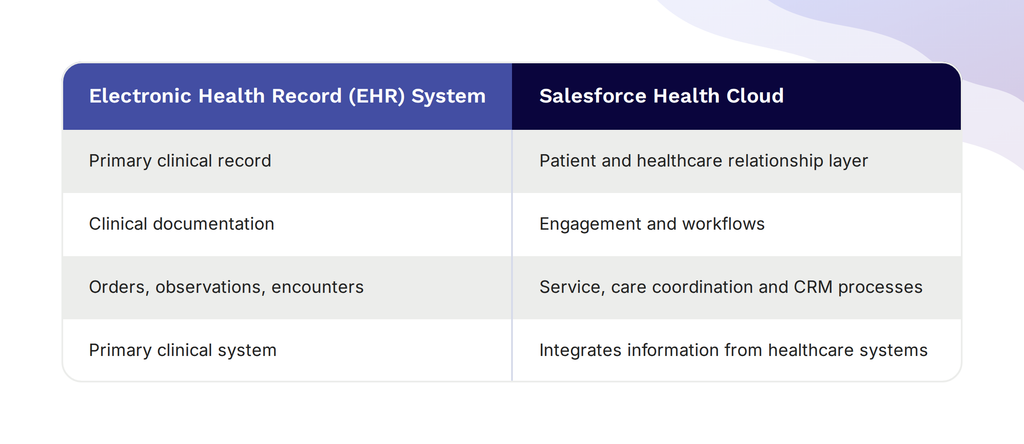
Salesforce Health Cloud is not a replacement for an organization’s EHR system. It instead works alongside EHRs like Epic to connect clinical information with patient engagement, care coordination, and healthcare workflows.
An EHR system is primarily designed to manage clinical records, including documentation, encounters, and other information used in patient care. Salesforce Health Cloud, on the other hand, is an engagement, data aggregation, and collaboration layer that extends the value of an existing EHR. It helps healthcare organizations bring clinical and non-clinical information together to support patient relationships, coordinated services, and operational processes.
Integrating Salesforce Health Cloud with an EHR does not necessarily mean that all clinical data is stored in Salesforce. The way the 2 systems are connected and configured for each implementation determines whether Salesforce retrieves information from the external EHR when needed, stores selected records locally, or combines the imported data with the information created within Health Cloud.
How Does Salesforce Health Cloud Integrate With Epic and Other EHR Systems?
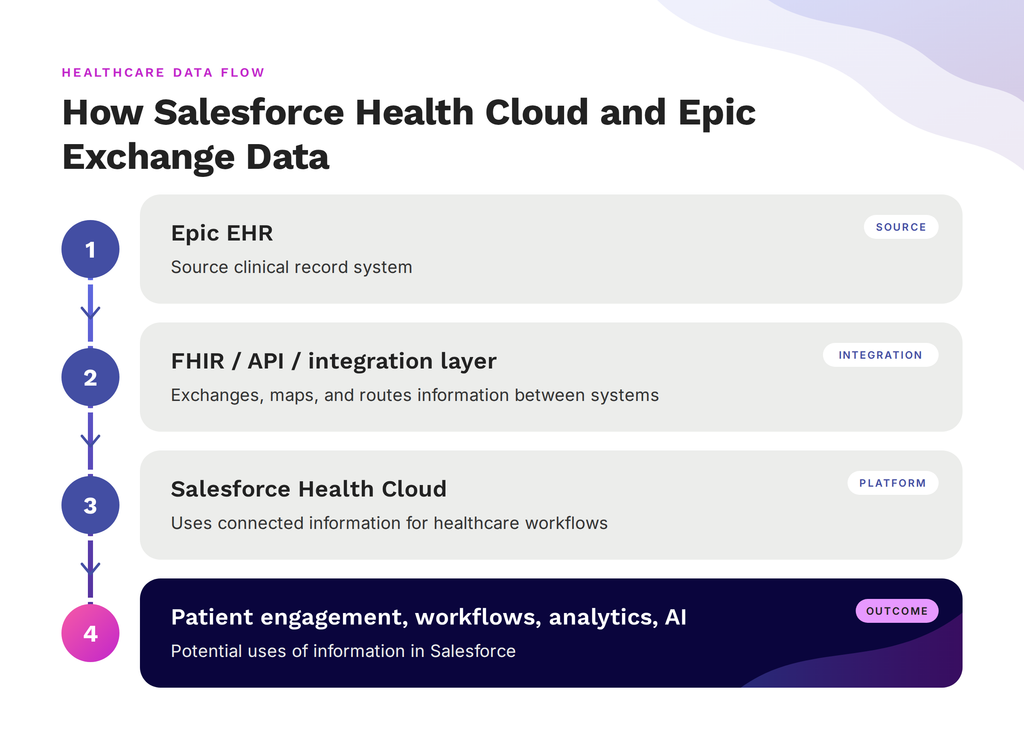
Salesforce Health Cloud integrates with Epic and other electronic health record systems through different approaches involving APIs (Application Programming Interfaces), healthcare data standards like FHIR (Fast Healthcare Interoperability Resources), and integration platforms that exchange patient data between systems. The specific architecture and configuration of the integration setup determines how patient data moves between the systems and what information Salesforce accesses or stores locally.
How the integration works
Salesforce Health Cloud and Epic exchange information through an integration layer that connects the 2 systems. This framework helps to manage how data is requested, transferred, and mapped so that Salesforce can use relevant healthcare information in its workflow.
APIs (Application Programming Interfaces) allow the software systems to request and exchange data, while integration middleware may coordinate communication between them. Interfaces, on the other hand, determine how information is made available for exchange, while data mapping aligns information from Epic with the corresponding fields or structures in Salesforce.
What is FHIR?
FHIR (Fast Healthcare Interoperability Resources) is an API-focused standard that is designed to support the efficient exchange of clinical and administrative healthcare data. It provides a common framework for information such as patient details, encounters, medications, and clinical observations, which helps different systems interpret exchanged information consistently. However, using FHIR does not automatically connect Epic to Salesforce. The integration also needs the right interfaces, appropriate configuration, and data mapping between the 2 systems.
Although Epic is our main example, the same integration principles can apply to other EHR systems. Note that the available interfaces, supported standards, and implementation requirements may vary across different platforms.
What Happens to EHR Data After It Enters Salesforce?
After EHR data enters Salesforce Health Cloud, it may be stored as Salesforce records, transformed, enriched with additional information, or used in healthcare workflows. How the data is accessed and stored depends on the integration setup.
Different EHR data scenarios and their protection needs
An integration between Epic and Salesforce Health Cloud does not necessarily mean that every patient record is copied into Salesforce. Some information remains in Epic and is retrieved when needed, while other information is stored in Salesforce for use in patient engagement, care coordination, and related workflows.
When Salesforce retrieves data from Epic in real time without storing a copy, that data is not necessarily part of the Salesforce backup scope. The organization still needs to protect the source records in Epic. However, if the integration stores a separate copy in Salesforce, that copy and any changes made to it need to be considered in the Salesforce recovery strategy.
These scenarios have different implications for data protection.
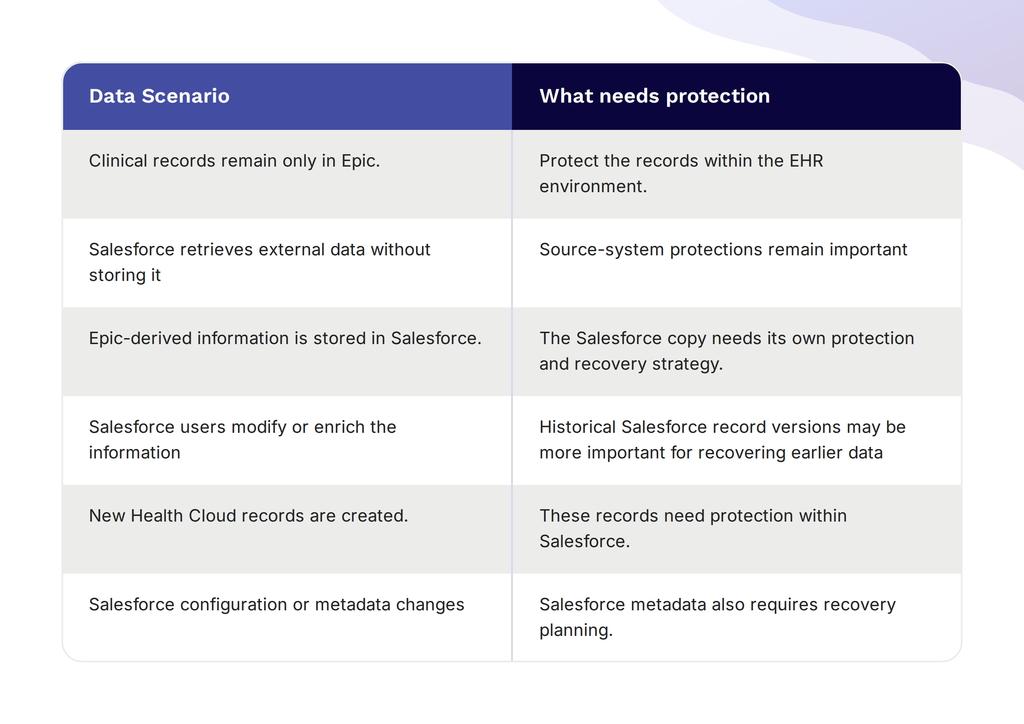
When patient information is copied from Epic into Salesforce, the organization now has data in 2 environments. Protecting the original copy in Epic does not automatically protect the separate Salesforce copy.
This distinction becomes especially important when Salesforce users or automated workflows update that information. For example, an EHR-derived patient record in Salesforce Health Cloud might be supplemented with engagement details or other information used by care coordination teams. In the event of that Salesforce record being accidentally deleted or altered, recovering the original record from Epic might not restore the additional information added in Salesforce.
The same thing applies to records created directly in Health Cloud. These may contain healthcare-related information that does not exist in the source EHR, so restoring the EHR alone would not necessarily recover them.
Healthcare organizations therefore need to identify which EHR-derived records are persisted in Salesforce, what changes occur there, and what information must be recoverable. The goal is to always ensure that the data stored in Salesforce and its subsequent changes can be protected and recovered when needed.
Your Salesforce Copy Needs Its Own Backup
See how GRAX protects Health Cloud records Epic can’t restore.
Why Does EHR Data in Salesforce Create a HIPAA Consideration?
EHR data stored in Salesforce Health Cloud may be subject to HIPAA (Health Insurance Portability and Accountability Act) when it qualifies as electronic protected health information (ePHI) held by a HIPAA-regulated organization. Healthcare organizations must therefore consider how this information is accessed, protected, retained, and recovered within their Salesforce environment.
When does EHR Data in Salesforce qualify as ePHI?
EHR data stored in Salesforce may qualify as ePHI when it contains individually identifiable information, relates to a person’s health condition, healthcare services, or payment for healthcare, and is maintained or transmitted electronically by a HIPAA-regulated covered entity or business associate.
For example, patient information imported from Epic into Salesforce Health Cloud may include identifying details linked to diagnoses, treatment, encounters, or care coordination. When that information qualifies as ePHI, the HIPAA Security Rule applies to its electronic protection, and storing it in Salesforce does not remove the organization’s responsibility to safeguard it.
Why is the Salesforce environment important?
When ePHI is stored in Salesforce, healthcare organizations must account for the security of that information within the Salesforce environment and not only in the original EHR. This includes considering who can access the records, how unauthorized changes or deletions are addressed, and whether the organization can restore information in the event of data loss or disruption.
The specific safeguards needed depend on the type of data stored in Salesforce, how the organization uses it, and its responsibilities under HIPAA. For example, an organization that stores patient diagnoses and treatment details in Health Cloud needs to account for those records in its security and recovery procedures. Organizations must therefore assess what information their Salesforce environment contains and how it is handled instead of assuming that every EHR integration creates the same risks or requirements.
What Does HIPAA Require for Backup and Recovery of ePHI?
HIPAA requires covered entities and business associates to implement contingency plans for responding to emergencies that affect access to electronic protected health information (ePHI). These plans include procedures for backing up data, restoring lost information, and maintaining critical operations during disruptions.
HIPAA’s data backup and recovery requirements
Under the HIPAA Security Rule, the contingency plan standard requires that organizations establish procedures to create and maintain retrievable exact copies of electronic protected health information.
For healthcare organizations using Salesforce Health Cloud, this means accounting for the ePHI stored in Salesforce when developing backup and recovery procedures.
The HHS HIPAA Audit Protocol provides assessment criteria for evaluating whether organizations have implemented the required contingency planning measures, including data backup and disaster recovery procedures.
Organizations should take these into consideration when developing their backup and recovery procedures:
- Identify ePHI stored in Salesforce: Determine which Health Cloud records contain ePHI and how the information moves between Salesforce and the source EHR
- Establish appropriate backup procedures: Know how frequently data should be backed up based on the organization’s risk assessment, operational needs, and recovery objectives
- Ensure backed-up data can be restored: Maintain retrievable copies that can support the recovery of lost ePHI.
- Protect backup copies: Apply appropriate security controls to prevent unauthorized access, alteration, or loss of backup data
- Test recovery procedures: Confirm that the organization can restore the required information and resume critical operations. Also document the results to support ongoing assessment of recovery procedures.
HIPAA does not require every healthcare organization to use a particular backup product. Instead, organizations must determine the appropriate safeguards and procedures based on their circumstances and applicable requirements. Regular recovery testing helps to establish whether those procedures work as intended.
For healthcare organizations, the main goal is to ensure that ePHI stored in Salesforce can be recovered when needed, even when the original EHR remains available.
Does Salesforce Being HIPAA Eligible Remove the Need for a Backup Strategy?
Salesforce being HIPAA-eligible does not automatically establish whether a healthcare organization can recover the Salesforce records and changes that it needs after data loss. While Salesforce may provide platform-level safeguards and support for HIPAA use cases, healthcare organizations still need to determine whether their Salesforce data can be restored in line with their recovery objectives.
Salesforce’s safeguards and the organization’s responsibilities
Salesforce provides security capabilities and supports healthcare organizations in meeting applicable compliance requirements. However, using a platform with HIPAA-related safeguards does not automatically mean that every record, change, or configuration can be recovered to meet an organization’s operational needs.
If a record is accidentally deleted or altered, the organization needs to determine whether its existing structures can restore the information it needs, including the changes made within Salesforce.
Relevant questions to determine whether additional Salesforce backup and recovery are needed include:
- Can the organization recover deleted or altered Salesforce records?
- Can it restore information to an appropriate point in time?
- Are historical record changes and relevant metadata covered by its recovery approach?
- Are backup copies protected against unauthorized access, alteration, or loss?
- Are recovery procedures tested and documented?
- Can the organization meet its recovery objectives during an incident or disruption?
The answers to these questions help to determine whether the current approach is sufficient or whether additional capabilities are needed.
Ultimately, HIPAA compliance cannot be established simply by purchasing a backup product or using a platform with HIPAA-related safeguards. Healthcare organizations need an appropriate, documented, tested approach to protecting and recovering the ePHI they maintain in Salesforce.
How Should Healthcare Organizations Protect Salesforce Health Cloud Data?
Healthcare organizations should protect Salesforce Health Cloud data by identifying the information stored in the platform, maintaining recoverable copies, controlling access to backups, and regularly testing recovery procedures. The protection strategy must cover the EHR-derived data, records created directly in Salesforce, and changes made within the platform.
Major considerations for protecting Salesforce Health Cloud
- Maintain recoverable copies of Salesforce data: Organizations should determine how Salesforce records containing ePHI are backed up and whether those copies can be retrieved when needed. The appropriate data coverage should include EHR-derived information stored in Salesforce, records created directly in Health Cloud, and relevant data added or modified through users and automated workflows.
- Account for changes to records over time: Patient information stored in Salesforce may be updated or enriched through user activity and automated workflows. Organizations should assess whether their recovery approach can restore records or selected information without overwriting unaffected records and whether historical versions are available when needed.
- Protect backup copies: Backup data can contain sensitive patient information, so organizations should apply appropriate access controls and security measures to reduce the risk of unauthorized access, alteration, or loss. They should also assess where backup copies are stored, who controls that storage, and how long the copies are retained.
- Test recovery procedures regularly: Having backup copies does not guarantee recovery success. Organizations should test whether they can restore records and information they need, document the results, and address any gaps identified during testing. They should also set backup frequency to ensure that it aligns with their recovery objectives and the amount of data loss they can tolerate.
- Define recovery objectives and responsibilities: Healthcare IT teams should establish how much data loss is acceptable and how quickly critical Salesforce information needs to be restored. They should also document who is responsible for managing backup operations, recovery decisions, testing, and incident response.
These considerations help organizations evaluate whether their existing Salesforce data protection arrangements meet their operational and compliance needs.
How Does GRAX Protect EHR-Derived Data in Salesforce?
GRAX protects EHR-derived patient information stored in Salesforce Health Cloud by backing up Salesforce data and metadata, preserving historical record versions, and supporting granular and point-in-time recovery. It also replicates Salesforce data to customer-owned cloud storage, providing healthcare organizations with more control over how their Salesforce data is retained and accessed.
Protecting Salesforce records and their history
GRAX provides backup and recovery capabilities for EHR-derived information stored in Salesforce Health Cloud, helping organizations access the needed information if the records in Salesforce are deleted, altered, or lost.
Its capabilities address several of the protection needs discussed earlier:
- Salesforce data and metadata backup: GRAX backs up supported Salesforce records, metadata, files, and attachments.
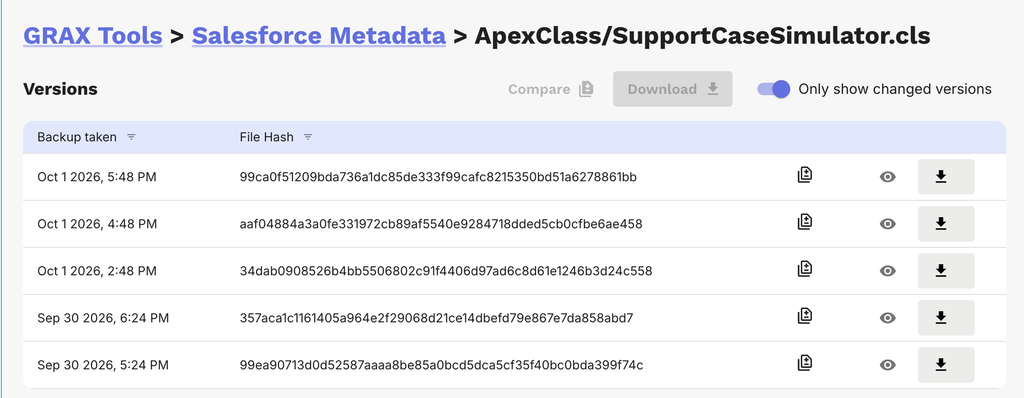
- Historical record versions: GRAX captures changes to Salesforce records, allowing organizations to access previous versions of supported data.
- Granular and point-in-time recovery: Administrators can restore selected records or fields to an earlier state, helping address accidental deletions and unwanted changes without necessarily reverting an entire Salesforce environment.
- Customer-owned cloud storage: GRAX can store replicated Salesforce data in a customer’s cloud environment, such as AWS, Azure, or Google Cloud. This gives the organization greater control over storage location and access arrangements.
These capabilities can help healthcare IT teams address recovery requirements for EHR-derived records that have been persisted in Salesforce, along with other information created or updated within Health Cloud.
How GRAX fits into a healthcare data protection strategy
Take, for instance, a hospital that imports patient information from Epic into Salesforce Health Cloud and supplements those records with patient engagement details. Epic retains the original clinical record, while Salesforce holds a separate copy that may include additional engagement or care coordination information that is not recorded in Epic. If a Salesforce user accidentally deletes a record or an automated workflow changes its fields incorrectly, the hospital may need to recover the Salesforce record and preserve information added after the original import.
GRAX’s historical record and recovery capabilities can help administrators retrieve an earlier version of supported Salesforce data. The organization can assess which records and fields need restoration and select an appropriate recovery point based on the incident.
This protection complements the organization’s arrangements for safeguarding its source EHR. GRAX’s role in this scenario is to protect the EHR-derived information and other healthcare data stored in Salesforce, including the changes that may exist only in that environment.
While GRAX provides capabilities for protecting and recovering Salesforce data, the healthcare organization remains responsible for ensuring that its data protection approach meets its operational and compliance requirements. Organizations should assess these capabilities against their data protection requirements and recovery objectives, then test recovery procedures regularly to confirm that the approach can restore the information they need.
Put Health Cloud History to Work
Replicate every record version to AWS, Azure, or GCP.
What Should Healthcare IT Teams Ask Before Choosing a Salesforce Backup and Recovery Approach?
Healthcare IT teams should ask questions that evaluate whether their Salesforce backup and recovery approach can protect EHR-derived data, preserve important record changes, and restore information when needed. The assessment has to reflect the organization’s data protection requirements, recovery objectives, and compliance responsibilities.
The important questions to consider include:
- Which Epic-derived records are actually persisted in Salesforce?
- Are Salesforce records and metadata both covered?
- Which Salesforce records contain ePHI?
- How much history must we retain?
- Can we restore individual records or selected fields without overwriting unaffected data?
- How frequently is Salesforce data protected?
- Can we test restores without affecting production?
- Where are backups stored and who controls access?
- Can we recover historical versions of records and track changes?
These questions help healthcare IT teams to assess whether their current approach meets their needs or whether additional capabilities are worth considering.
Frequently Asked Questions
Is Salesforce Health Cloud an EHR?
No. Salesforce Health Cloud is a healthcare CRM platform that works alongside an electronic health record (EHR) system to support patient engagement, care coordination, and healthcare workflows.
Can Salesforce Health Cloud integrate with Epic?
Yes. Salesforce Health Cloud can integrate with Epic through APIs, healthcare data standards such as FHIR, and integration platforms. The specific integration setup determines which data Salesforce accesses and which records it stores.
Does HIPAA require backup of Salesforce healthcare data?
The HIPAA Security Rule requires covered entities and business associates to implement data backup procedures for electronic protected health information (ePHI). If Salesforce Health Cloud stores ePHI, organizations must account for that data in their backup and recovery planning. However, HIPAA does not mandate a specific backup product or third-party provider. Organizations must assess their risks and implement appropriate safeguards to ensure the data can be recovered when needed.
Does Salesforce back up data imported from an EHR?
Importing EHR data into Salesforce does not establish that the data is covered by a separate backup and recovery arrangement. Healthcare organizations have to verify what Salesforce data protection capabilities are available and whether they meet their recovery needs. Protecting the original EHR does not necessarily protect the separate copy stored in Salesforce.
How can healthcare organizations recover EHR-derived data stored in Salesforce?
Healthcare organizations can recover EHR-derived data by using backup and recovery arrangements that cover records stored in Salesforce. Depending on the solution, this may involve restoring deleted records, recovering altered information from historical versions, or restoring data to an appropriate point in time. Organizations should test their recovery procedures to verify that the required information can be restored.