

Salesforce Field Audit Trail extends Field History Tracking by archiving changes to selected fields for long-term retention. It primarily serves as an audit mechanism that records details such as who changed a field and when the change occurred. However, despite its long-term retention capabilities, Salesforce Field Audit Trail is not a complete backup, recovery, or historical-data solution. Organizations that need those capabilities may need tools that are built for Salesforce data preservation and recovery.
What Is Salesforce Field Audit Trail?
Salesforce Field Audit Trail is a built-in data auditing feature that allows organizations to retain field-change history for longer periods, thereby extending Field History Tracking. It records changes to selected fields, including the old and new values, who made the change, and when the change happened.
Salesforce Field Audit Trail can be considered a build on Salesforce’s native Field History Tracking capability. While Field History Tracking stores changes in standard history objects, Field Audit Trail uses a retention policy to archive historical records in the Field History Archives for long-term access.
How Does Salesforce Field Audit Trail Work?
Salesforce Field Audit Trail works by allowing administrators to select which fields to track, recording changes to those fields, and archiving the history for long-term retention.
Salesforce Field Audit Trail operating process typically involves 4 main steps:
- Select Fields to track: Administrators enable Field History Tracking for the relevant objects and choose the fields whose changes they want to monitor
- Capture changes: When a tracked field changes, Salesforce records details such as who made the change and when it occurred. Old and new values are recorded where supported, but some field types have limitations on the values captured.
- Archive Field History: Field Audit Trail uses a retention policy to move historical records into the Field History Archive for long-term retention
- Access historical records: Administrators and authorized users can access the archived Field History record when they need to investigate past changes.
What Is the Difference Between Field History Tracking and Field Audit Trail?
Both Field History Tracking and Field Audit Trail track the changes made to selected fields, but they differ in storage, retention, and intended use.
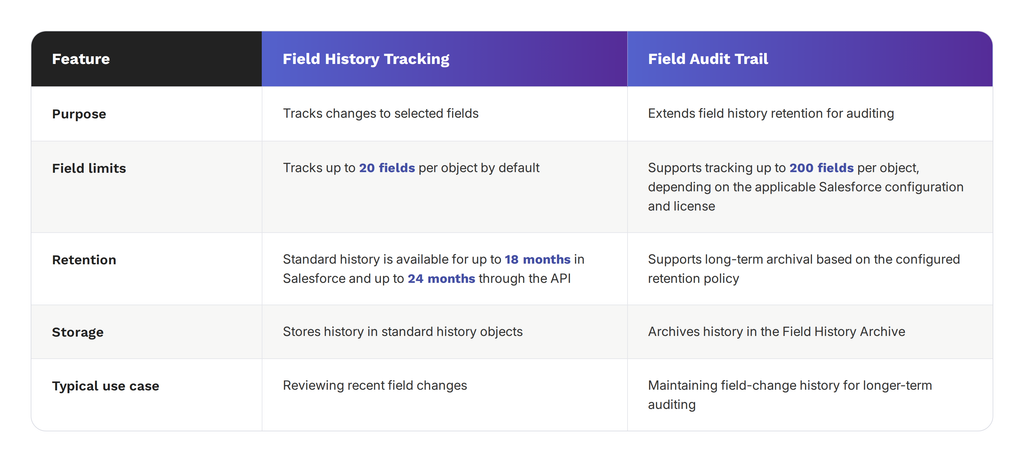
Salesforce also provides Setup Audit Trail, which serves a different purpose. While Field History Tracking and Field Audit Trail both record changes to Salesforce records, Setup Audit Trail helps to keep track of the configuration changes made to the Salesforce environment, such as changes to user permissions and security settings.
Setup Audit Trail helps administrators identify who made a setup change in Salesforce, when the change occurred, and what was changed.
How Do You Set Up Salesforce Field Audit Trail?
Setting up Salesforce Field Audit Trail requires you to:
- Procure the appropriate Salesforce license: Field Audit Trail is a paid feature that is only available either through Salesforce Shield or a standalone Field Audit Trail license, depending on your Salesforce edition.
Salesforce Shield not only includes Field Audit Trail but also Event Monitoring, Platform Encryption, and Data Detect. Organizations that only need Field Audit trail should consider getting the standalone license. Contact your Salesforce account representative to confirm your license availability and activate the feature.
- Enable Field History Tracking: From the Shield Home page, click Field Audit Trail, then Field History Tracking. Search for the Salesforce object that you want to monitor, select it, and enable Field History Tracking. Choose the individual fields whose changes you want captured and then save your settings.
For example, an organization tracking Account changes might select Account Name, Phone, and Billing Address. Repeat this exact process for each object that requires auditing.
- Configure your retention policies: In the Field History Tracking settings, configure the retention policy using 3 settings:
- Archive After (Months): This determines how long field history remains in the standard History related list before Salesforce archives it.
- Archive Retention Years: Specifies the intended retention period for archived records. This value serves as a reminder for manual deletion; Salesforce does not automatically delete archived field history when the period expires.
- Grace Period (Days): Adds extra time after the configured Archive After period before the initial archive operation.
A company might, for instance, use an Archive After period of 12 months and a Grace period of 7 days. When configuring these settings, you should consider your organization’s audit, compliance and data-retention requirements.
For Metadata API deployments, the retention policy is defined using History Retention Policy and deployed to organizations.
- Verify that the field tracking works: Create a test Account or update an existing test record to confirm that Salesforce captures the change. To do this, change one of the fields you selected, save the record, and open Field History Explorer from the Shield Home page. Search for the test record and confirm that the change appears in the history.
The history should show the user who made the change, the date & time the change occurred, and the old and new values (where supported).
- Access archived history: Once the retention policy takes effect, the recent field history can be viewed through the standard Salesforce history views and Field History Explorer. After Salesforce archives the records, retrieve them from the Field History Archive using the supported API and query methods. Ensure that the relevant users have the permissions needed to access the history and test archived-record retrieval before relying on it for an audit.
How To View Archived Field History with Field History Explorer
Salesforce provides Field History Explorer in the Shield app to allow administrators to review tracked field changes without writing SOQL queries.
To access Field History Explorer in the app, you have to:
- Open the App Launcher
- Select Shield
- Click the Field Audit Trail tab
- Select Field History Explorer from the left-hand navigation bar
Search for each record either by its name or ID to view its field-change history. You can then filter the results you get by field, user, or date to identify specific changes and establish who made them and when.
There has also been an update to the Field History Explorer, which allows it to directly download field history changes, making it easier to retain results for compliance reviews and external audits
Note that users need the View Shield App Pages permission to access Field History Explorer. They also need the View All Data permission to view archived data. Additionally, the results they can see remain limited by their object-level Read access.
How Long Does Salesforce Field Audit Trail Retain Data?
Without Field Audit Trail, Salesforce retains standard field history for up to 18 months in the UI and up to 24 months through the API. With Field Audit Trail enabled, Salesforce archives field history after 18 months in production by default, or after one month in sandboxes. Organizations can configure their own archival policies, and archived records are retained until manually deleted. This data retention policy provides administrators with long-term access to field-level changes for auditing and historical reference.
What Are the Limits of Salesforce Field Audit Trail?
Although Salesforce Field Audit Trail provides long-term access to selected field-change records, its capabilities have specific limits. These limits become very important when organizations need to do more than investigate field-level changes, such as recovering lost data, reconstructing historical Salesforce states, or analyzing how customer relationships evolve over time.
Field Audit Trail Is Not Retroactive
Salesforce Field Audit Trail does not reconstruct the changes made before field history tracking was enabled for relevant fields. As a result, historical records may be incomplete if field tracking was activated after the audit began.
Some Field Types Cannot Be Tracked
Salesforce Field Audit Trail does not support every field type such as formula, roll-up summary, auto-number, long-text, and multi-select fields. Organizations should verify field-level tracking support before relying on Field Audit Trail to meet audit or compliance requirements.
Field Audit Trail is not a Backup
Salesforce Field Audit Trail archives audit records, which, unlike a backup, are not designed to restore an entire Salesforce dataset in the event of accidental deletion, data corruption, or other causes of data loss. Field-change records help administrators to investigate changes, but they do not preserve a complete, restorable copy of Salesforce data. Organizations that need to recover lost or corrupted records require a dedicated Salesforce backup and recovery solution that preserves recoverable data and its relationships.
An Audit Trail Is Not the Same as a Historical Salesforce State
Salesforce Field Audit Trail records changes to individual fields, but these records do not provide a complete picture of what Salesforce data looks like at a specific point in time.
For example, an administrator can use Field Audit Trail to investigate an opportunity’s stage that changed from Negotiation to Closed Lost and when the change occurred. If tracking was enabled for the Stage Field, the audit history can show:
- Field changed: Stage
- Previous value: Negotiation
- New Value: Closed Lost
- Changed by: The user who made the change
- Date and time: When the change occurred
However, determining information such as what the associated account, opportunities, contact, and activities looked like on that particular day would require a dataset that preserves the important records and their relationships at that point in time.
To reconstruct that state, the auditor would need the relevant records and versions as they existed on the day being investigated, including:
- The account’s status, ownership, risk indicators and other relevant field values on that day
- The opportunity’s stage, amount, close date, probability, owner and other material fields on that date.
- Related activity such as the relevant tasks, completed calls, meetings and other activity records including their dates to explain what had happened before the opportunity was lost.
Field Audit Trail may provide evidence of changes to tracked fields, but it does not automatically preserve every field, activity, or related record in a complete point-in-time snapshot.
Audit History Is Not Automatically an Analytics Dataset
Salesforce Field Audit Trail preserves field-level changes, but having access to these records does not automatically provide a structured dataset for historical analysis. The archived records are individual field-level changes which may need to be combined with other Salesforce records to identify wider business trends.
For example, analyzing the changes that usually come before customer churn requires details such as historical account data, customer activity, and relevant changes over time. To uncover these patterns, organizations need historical data that can be organized and analyzed.
Salesforce Audit History Is Not an Independent Data Copy
Salesforce Field Audit Trail stores archived field-change records within Salesforce. While this supports auditing and historical reference, it does not automatically provide an independent copy of an organization’s Salesforce data outside its production environment.
Organizations that need independently preserved Salesforce data may have to consider solutions that store Salesforce data in a separate location they can control. This provides them with another source of data for recovery and historical analysis if the records in the production environment are lost or altered.
Audit Logs Can’t Restore Your Data
Recover deleted records and their relationships with GRAX.
Is Salesforce Field Audit Trail Enough for Compliance?
Salesforce Field Audit Trail can suffice for compliance requirements that are focused on identifying who changed a field, when the change occurred, and maintaining defined audit history. Its compliance suitability depends on the specific regulatory requirements and records that an organization needs to retain.
Some requirements may, however, extend beyond field-level auditing to include capabilities such as independent data retention, broader data preservation, recovery, and historical state reconstruction. Organizations have to assess these needs against their applicable regulatory obligations and internal policies to determine whether Field Audit Trail is enough for them.
Can You Use Salesforce Audit History for Analytics and AI?
While Salesforce audit history can provide useful information about how CRM data changes over time, field-change records alone may not provide the complete historical dataset that is required for analytics and AI (Artificial Intelligence).
The data required for analysis must preserve important historical records, field values and relationships over time to provide adequate context for understanding past business activity.
Historical Salesforce data can help organizations answer questions such as:
- Why did an opportunity eventually become Closed Lost?
- What changes commonly occur before customer churn?
- How has account risk evolved over time?
- What patterns preceded successful renewals?
- How did a customer relationship develop over several years?
Access to historical context like this can help organizations identify patterns in customer behavior, evaluate past business decisions, and improve data-driven forecasting. For a deeper explanation of how historical Salesforce records can support trend analysis, see our guide to historical trend reporting in Salesforce.
When Is Salesforce Field Audit Trail Enough?
Salesforce Field Audit Trail can be considered enough for organizations whose main objective is to track changes to selected fields and retain that history for auditing purposes. Examples of use cases that Salesforce Field Audit Trail supports include:
- Investigating individual field changes
- Identifying who made changes
- Maintaining selected audit records
- Maintaining straightforward auditing requirements
When an organization’s needs center on these use cases, Salesforce Field Audit Trail may provide the necessary audit history to investigate field changes, confirm who made them, and maintain records for long-term reference.
When Do You Need More Than Salesforce Field Audit Trail?
Salesforce Field Audit Trail can preserve selected field changes for long-term reference. However, organizations that need to preserve Salesforce data independently, recover lost or corrupted records, reconstruct historical Salesforce states, or analyze how customer relationships evolve over time may require capabilities that extend beyond field-level auditing.
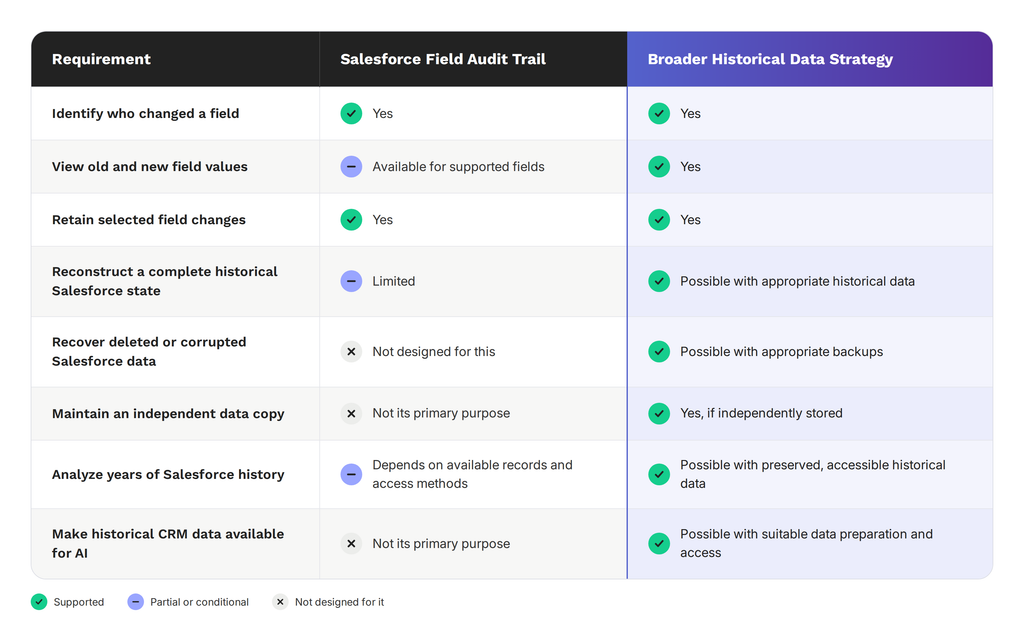
A broader historical-data strategy combines the preservation, recovery, and accessibility of Salesforce data to support requirements beyond auditing individual field changes. The capabilities depend on how the data is stored, retained and made accessible.
See What the Audit Trail Misses
Book a demo and see point-in-time Salesforce history.
How Does GRAX Complement Salesforce Field Audit Trail?
GRAX complements the Salesforce Field Audit Trail by preserving Salesforce data independently and making historical records available for recovery, analysis, and reuse.
While Field Audit Trail archives selected field changes, GRAX can provide a broader copy of Salesforce data for recovery and analysis. Its Backup & Restore functionality captures Salesforce data, metadata, relationships, files and attachments depending on the backup settings and supported data types. This capability is why admins can use GRAX to restore selected records or recover data to an earlier backed up state.
Using the Opportunity stage example shared earlier in this article, Field Audit Trail can record the Stage change, showing the previous value, the new value, who made the change, and when it occurred. GRAX, on the other hand, can preserve successive versions of Salesforce records through its Backup and Restore functionality. This allows an administrator to compare an Opportunity’s earlier and later values or restore supported fields to an earlier backed-up state. Related Account and Contact records can also provide additional context when they are included in the backup.
GRAX also supports the storing of Salesforce backups in customer-controlled cloud environments, including AWS, Azure and Google Cloud. Its Data Lake capabilities write backed-up Salesforce data to Parquet files, including historical record versions. For example, an organization could preserve versions of Account and Opportunity records and use them to investigate how customer details or deal values changed over time.
The preserved data can then support both recovery and analysis. Administrators use GRAX’s recovery tools to restore supported records from available backups, while teams can query historical Parquet files using platforms such as Snowflake, BigQuery, Databricks and Amazon Athena. For example, an organization could analyze changes in Opportunity values over time or use historical records to investigate an unwanted change.
Salesforce Field Audit Trail and GRAX address different requirements. Field Audit Trail supports field-level auditing within Salesforce, while GRAX extends the use of preserved Salesforce data to backup, recovery, historical analysis, and other data-driven applications.
Frequently Asked Questions About Salesforce Field Audit Trail
What Is Salesforce Field Audit Trail?
Salesforce Field Audit Trail is a built-in Salesforce feature that extends Field History Tracking by archiving selected field changes for long-term retention. It records details such as who made a change, when the change occurred, and the old and new values (where applicable).
What Is the Difference Between Field History Tracking and Field Audit Trail?
Salesforce Field History Tracking records changes to selected fields. Salesforce specifies 18 months in the UI and up to 24 months through the API for standard Field History Tracking without Field Audit Trail. Salesforce Field Audit Trail, on the other hand, extends this capability by archiving field history for long-term retention and supporting tracking of up to 200 fields per object.
Is Salesforce Field Audit Trail a Backup?
No. Salesforce Field Audit Trail records changes to selected fields, but it does not provide a complete, restorable copy of Salesforce data. Organizations need a separate backup solution to recover lost or corrupted records.
Can Salesforce Field Audit Trail Be Used for AI and Historical Analytics?
Salesforce Field Audit Trail can be used to explain how fields change over time. However, analyzing business trends or training AI models may require additional historical records, relationships, and context beyond field-change history alone.