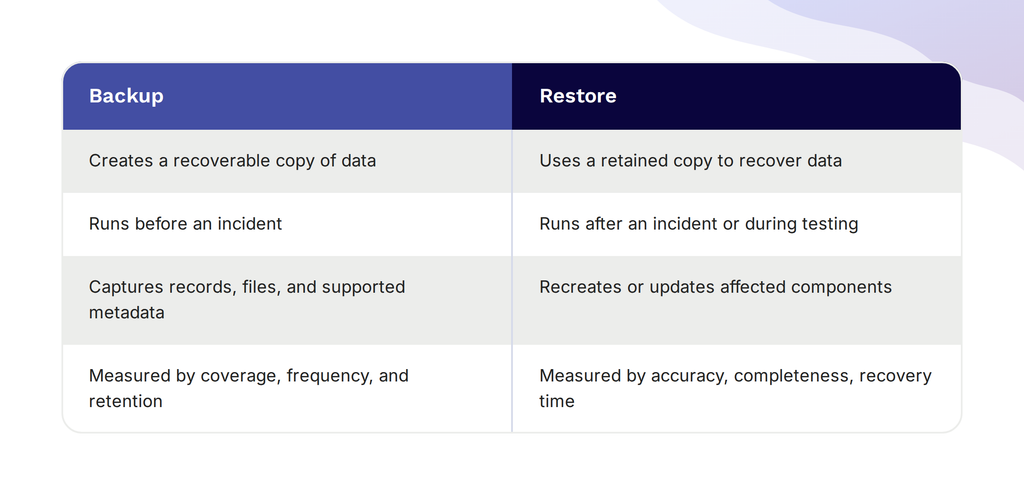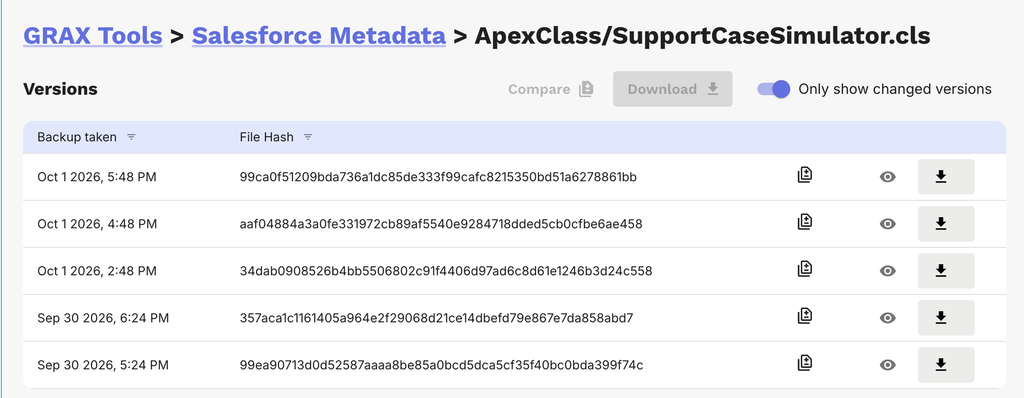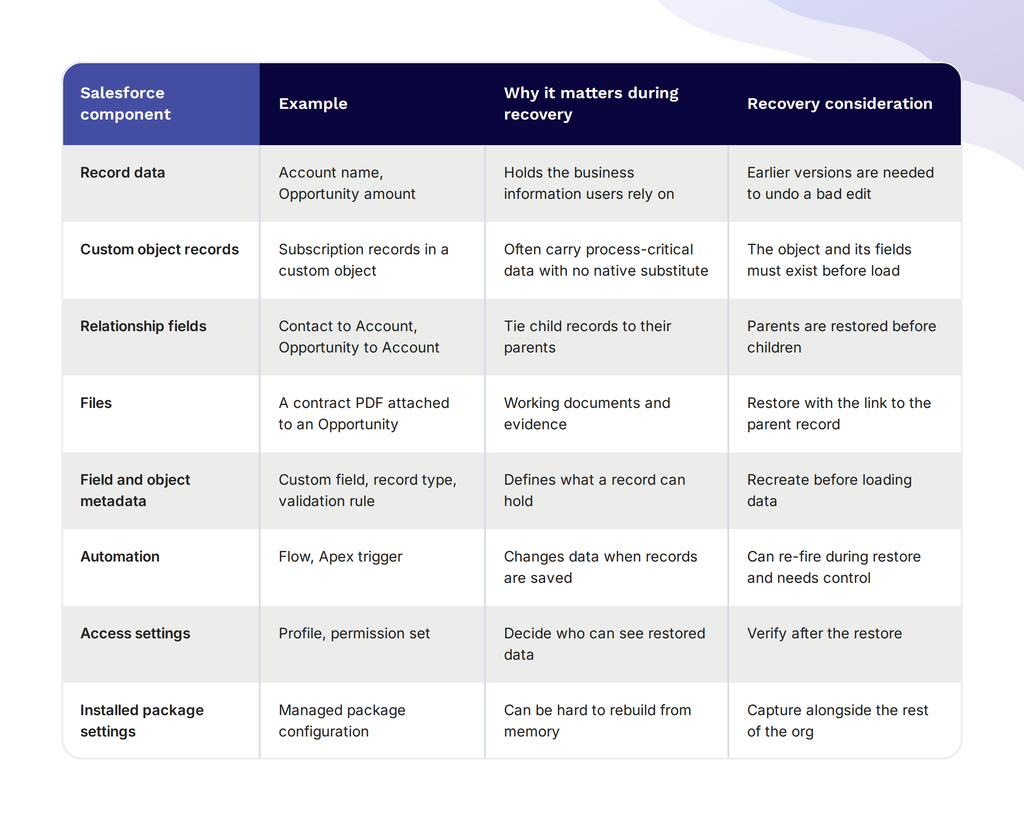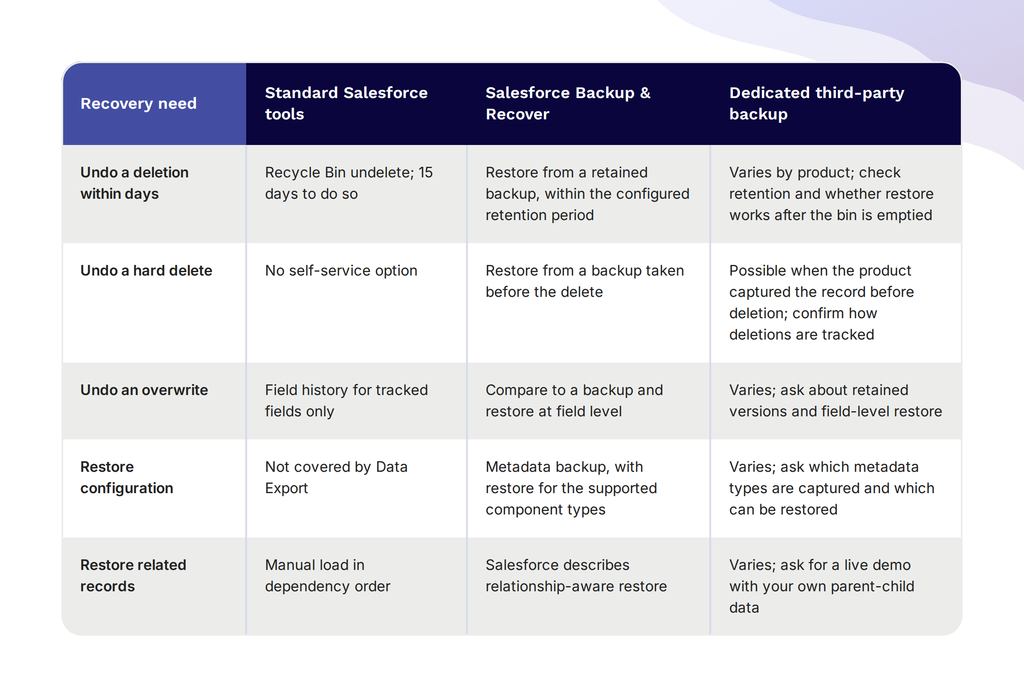
What Is Salesforce Backup and Why Does It Matter?
Salesforce backup refers to the creation and archiving of organizational records, configuration settings, and metadata so that it can be recovered after being lost or corrupted. Salesforce backups can span across objects, relationships, and system settings that define how exactly a Salesforce environment (org) functions.
What data and metadata should be included in a Salesforce backup?
A complete Salesforce backup includes not only standard records, but also much more. The distinction between metadata and data is often critical ā data is the actual record stored in an object, while metadata is what defines the structure and behavior of the org. Due to the highly sensitive nature of both information categories, both data and metadata have to be sufficiently protected against various threats.
A thorough Salesforce backup should include:
- Standard and custom object records ā Accounts, Contacts, Opportunities, Cases, and all custom objects
- Field-level metadata ā Custom fields, picklist values, validation rules, and formula definitions
- Automation and logic ā Flows, Process Builder configurations, Apex triggers, and workflow rules
- Profiles, roles, and permission sets ā Access configurations that govern user behavior
- Reports, dashboards, and list views ā Operational assets that teams depend on daily
- Installed package configuration ā Settings tied to managed packages which may not be recoverable from the AppExchange
- Files and attachments ā Content stored in Salesforce Files, Notes, and legacy Attachments objects
An omission of metadata from a Salesforce backup is a common issue that leaves the teams with the ability to restore records ā but not the actual organizational structure these records are usually placed in.
How does Salesforce data loss typically occur?
Data loss events in Salesforce rarely happen due to platform outages ā the most common source of such an issue is the org itself. Being familiar with the causes of data loss in Salesforce is what allows teams to prioritize certain measures when developing and implementing a backup plan. Examples of data loss causes include:
- Human error ā Accidental mass deletion, incorrect data imports, and bulk updates are among the most frequent causes of Salesforce data loss. These operations are often irreversible through native tools once the Recycle Bin window has passed.
- Automation failures ā Misconfigured flows, Process Builder automations, or Apex triggers can modify or delete records at scale within seconds. Because these changes happen programmatically, they are often not caught until significant damage has already occurred.
- Integration overwrites ā Third-party tools and Extract, Transform, Load (ETL) pipelines that sync data into Salesforce can push malformed records or conflict with existing data, which results in silent overwrites that are difficult to detect and trace after the fact.
- Sandbox-to-production mistakes ā Deployments that are not properly scoped can unintentionally alter production configuration or trigger automation that affects live records in ways that were not anticipated during testing.
- Malicious actions ā Compromised credentials or insider threats represent a lower-frequency but high-severity cause of Salesforce data loss, which makes access auditing and backup retention particularly important as complementary controls.
What are the legal, compliance, and business risks of not backing up Salesforce?
The lack of a Salesforce backup plan can lead to three distinct risk categories: regulatory, operational and reputational. All of these can follow a data loss event and are variable in terms of their impact depending on the industry and how much data was lost.
| Risk Category | Example Exposure | Potential Consequence |
| Legal / Regulatory | GDPR, HIPAA, SOX data retention requirements | Fines, audit failures, litigation |
| Business Continuity | Loss of pipeline, customer, or support records | Revenue impact, Service Level Agreement (SLA) breaches |
| Reputational | Customer information lost or unrecoverable | Loss of trust, churn, public disclosure obligations |
The existence of data retention policies for organizations under General Data Protection Regulation, Health Insurance Portability and Accountability Act, or Sarbanes-Oxley Act means that certain data from Salesforce must remain available for defined periods. In these cases, a Salesforce backup becomes a mandatory compliance control, not an optional safety measure.
On the operational side, loss of pipeline or support records can directly disrupt revenue cycles and breach service-level agreements with customers.
The aspect that is often undervalued in business is that of reputation. Many regions and countries mandate breach disclosure, and an internal data loss incident would lead to external notification obligations, potentially escalating the business impact of an issue to a magnitude disproportionate to the original incident.
How do backup needs differ for Sandbox, Production, and Managed Packages?
Backup considerations are not the same for different Salesforce environment types ā this is one of the first pitfalls when it comes to protecting an org.
Production orgs, as these store live business data, should be backed up most frequently and for the longest amount of time. Sandbox environments ā for testing and development purposes ā primarily need to be backed up in order to secure the configuration and seeding data that would be costly to rebuild. Managed packages are relatively tricky on their own, as their metadata is managed by the vendor, so certain components cannot be exported or restored with standard means.
| Environment | Primary Backup Focus | Key Limitation |
| Production | All records, metadata, files, automation | Highest priority; full coverage required |
| Sandbox | Configuration, custom metadata, seeded data | Data is refreshable, but config work can be lost |
| Managed Packages | Package settings and dependent configuration | Vendor-controlled metadata may not be exportable |
Your Salesforce data isn’t automatically backed up. GRAX is.
See how GRAX protects every record, field, and metadata component in your org, stored in your own cloud, not ours.
What Built-in Salesforce Options Exist for Backup?
Salesforce platform includes several native tools that can assist with both exporting and restoring some of the data in the environment. While these capabilities are useful in certain situations, they cannot replace an entire Salesforce backup strategy by themselves.
What does the Data Export service provide and how often can it run?
The Data Export service is the closest equivalent to a native backup tool within Salesforce. It can be accessed via Setup, creating a full export of the entire org data in CSV file format, allowing it to be downloaded and stored in a secure external location. There are two frequency options that the Data Export service supports ā weekly exports for Enterprise, Performance, Unlimited, and Developer editions, as well as monthly exports for Professional edition orgs.
What the Data Export service includes and excludes:
- Included ā Standard and custom object records, exported as individual CSV files per object
- Included ā The option to export Salesforce Files and Content separately as an attachment archive
- Excluded ā Metadata such as custom fields, validation rules, flows, profiles, and org configuration
- Excluded ā Relationship context between records, which must be reconstructed manually on restore
The Data Export service does offer backup capabilities in the form of a recoverable snapshot of the record data, but the metadata is not exported alongside it ā which is why this snapshot cannot be used to bring an org back into a functional state without considerable manual intervention. Itās also important to mention that exports in Data Export must be either triggered manually each time or scheduled via Setup.
What are the limitations of the Recycle Bin and native record recovery?
The Salesforce Recycle Bin provides a limited restoration timeframe for deleted records. This is not a backup mechanism. Deleted records remain in the Recycle Bin for 15 days before they are permanently removed and may no longer be restored using any standard mechanism. Other limitations include:
- Hard deletes bypass the Recycle Bin entirely ā Records deleted via the API with the hard delete flag, or through certain bulk operations, are immediately unrecoverable
- No metadata recovery ā Deleted custom fields, objects, or automation components do not go to the Recycle Bin and cannot be restored natively
- No point-in-time recovery ā The Recycle Bin only captures deletions, not overwrites, which means corrupted or incorrectly updated records are not recoverable through this method
- Storage limits affect retention ā When org storage is full, Salesforce automatically purges the oldest Recycle Bin records ahead of the 15-day window
Can Change Data Capture or Event Monitoring replace a backup strategy?
Neither Change Data Capture nor Event Monitoring can replace a full-fledged Salesforce backup solution.
- Change Data Capture is used to monitor changes to object fields and deliver them in near-real-time, enabling integration sync and audit logging ā but it does not store a recoverable copy of the data.
- Event Monitoring can provide user and system action logs that might assist in identifying what happened prior to the data loss event, but it also does not collect the data itself.
Neither of these tools provides the capability of point-in-time recovery, metadata protection, or restore capability that any Salesforce backup strategy hinges upon.
How useful is Data Loader for ad-hoc exports and restores?
Data Loader is a good option for one-time exports or selective record restoration in situations where the source data is already available and structured properly. It supports bulk insert, update, upsert, and delete operations ā making it particularly useful for manually re-importing records from a previously exported CSV.
The main downside of a Data Loader is the fact that it places the entire burden for the restore logic on the operator, so relationship mapping, field matching, and insert order across dependent objects all have to be handled manually. It may be a feasible option for small, isolated recovery tasks, but anything that requires restoration of several related objects or large record volumes would immediately result in the restoration process becoming a lot more error-prone and time-intensive (if there are no scripting or tooling measures built around it).
What Third-Party Salesforce Backup Solutions Are Available?
Third-party Salesforce backup solutions exist to cover the essential metadata coverage, restore, and automation capabilities that native tools lack. There are plenty of options within the third-party backup market, ranging from fully-managed SaaS platforms to self-hosted applications, suitable for a variety of org sizes, compliant requirements, and technical resources.
Which commercial backup vendors support full metadata backup and data protection?
Commercial Salesforce backup and restore solutions specifically try to address the shortcomings of native exporting tools. A full-coverage commercial offering differentiates itself from other types of backup solutions by being able to backup both data and metadata (custom objects, automation, profiles, and configurations ā as well as the standard records).
The majority of commercial backup vendors can:
- Schedule backups automatically
- Perform differential or incremental backups, greatly reducing the total amount of file storage used
- Allow single object or single record restoration without the need to restore the entire org
Commercial vendors generally maintain and store the data themselves in their cloud infrastructure and provide the management tools for monitoring backup health, configuring retention policies, and initiating restores.
What open-source or community tools exist and when are they appropriate?
The open-source Salesforce backup ecosystem is nowhere near as robust as that of the one in commercial solutions. The most established option in this category is a combination of Salesforce Command Line Interface (CLI) and custom scripting.
Using the CLI’s various data and metadata retrieval commands, users can create custom backup procedures and automation scripts, although this is only a feasible option for technically competent teams and simple orgs.
There are some open-source tools that exist on this market, such as CumulusCI, which offers metadata handling capabilities that can be adapted for backup purposes in DevOps-oriented environments.
Open-source solutions are at their best in small orgs, developer sandboxes, or teams with the engineering capacity to implement and manage their own backup solutions ā as most open-source options cannot reliably support production orgs that need guaranteed restore SLAs, compliance documentation, or support coverage.
How do SaaS backup solutions compare to self-hosted approaches?
The choice between a SaaS backup platform and a self-hosted solution includes managing various trade-offs when it comes to the setup complexity, ongoing maintenance, cost structure, and the level of control you retain over your data.
No single solution is perfect for every organization, so the correct selection approach includes figuring out your company’s technical capabilities, compliance requirements, and willingness to manage additional ongoing operations ā and finding a solution that fits these specific requirements.
There are several dimensions that affect the choice of a specific Salesforce backup solution, including:
| Dimension | SaaS Backup | Self-Hosted |
| Setup | Low ā vendor-managed infrastructure | High ā requires infrastructure provisioning |
| Maintenance | Handled by vendor | Owned by internal team |
| Cost model | Subscription, scales with org size | Infrastructure + engineering time |
| Data control | Data stored with vendor | Data stays within org’s own environment |
| Compliance | Vendor certifications (SOC 2, ISO 27001) | Org must achieve and maintain its own certifications |
| Restore speed | Typically faster via managed tooling | Depends on implementation quality |
| Customization | Limited to vendor feature set | Fully customizable |
It is not uncommon for organizations with specific data residency rules or those that already own cloud infrastructure to lean towards the self-hosted solution. However, most middle-market and enterprise teams will likely consider SaaS the better option of the two when it comes to both deployment and management.
What questions should you ask vendors about security, SLAs, and compliance?
Evaluating a Salesforce backup vendor necessitates going beyond the feature list available on paper. The actual operational and legal commitments a vendor makes are at least as important as the capabilities advertised on the front page. The following considerations are the bare-bones assessment of a vendorās capabilities and should be asked to any potential vendor:
- What certifications does the vendor hold ā SOC 2 Type II, ISO 27001, HIPAA BAA availability?
- Where is backup data stored, and can data residency requirements be met?
- What is the guaranteed RTO and RPO defined in the service-level agreement?
- How is backup data encrypted ā in transit and at rest ā and who holds the encryption keys?
- What access controls exist to restrict which users can initiate or view restores?
- How does the vendor handle a security incident affecting stored backup data?
- What is the process and timeline for data deletion upon contract termination?
- Has the vendor completed a third-party penetration test, and are results available under NDA?
How can you ensure a smooth backup and archiving?
Three conditions have to be in place before an incident occurs in order to achieve a smooth Salesforce backup and archiving process:
- Validated configuration
- Tested restores
- Documented retention policy
Untested backup configuration is the frequent source of false confidence, when teams assume that their backup needs are covered up until a restore is attempted and the gaps are discovered. Regularly running restore drills ā even when using only a subset of data to restore ā can help with confirming that the backup jobs are working as intended and that the recovery procedures are understood by the people directly responsible for executing them.
Archiving, which is a process of moving older data out of the active backup storage to reduce storage costs, should follow a written policy to align retention periods with regulatory requirements and business needs ā instead of being set arbitrarily at initial configuration.
Human error, automation failures, integration overwrites: GRAX recovers from all of it.
Book a demo to see granular and mass restore in action before you need it.
Top 9 Third-Party Multi-Platform Backup Solutions with Salesforce Support
How do Salesforce data backup solutions differ between vendors?
Across the full landscape of Salesforce backup vendors ā both platform-specific and multi-platform ā the differences that matter most in practice are not always the ones most prominently advertised. Coverage scope, restore granularity, and compliance posture are the dimensions where vendor capabilities diverge most significantly, and where the gap between what a solution claims and what it delivers under real recovery conditions tends to surface.
Consolidated backup management across Salesforce and other enterprise systems is one of the biggest advantages of the multi-platform backup solutions ā reducing tooling overhead for organizations that have to protect information across several platforms simultaneously. Salesforce-specific solutions knowingly trade that kind of breadth for depth, offering an abundance of capabilities that most general-purpose tools cannot match.
The right choice of the solution for each specific case depends on whether the organizationās primary need is Salesforce-native fidelity or platform consolidation ā and the solution comparison below aims to make that distinction clear across each solution.
SpinBackup

SpinBackup is a cloud-to-cloud backup service that backs up the Salesforce data and metadata, along with a range of other major SaaS platforms (Microsoft 365, Google Workspace and Slack) ā all through one single management console. Its notable technical differentiator is the fact that it has two API’s working at the same time: standard API and Bulk API 2. This unique feature makes backup and recover processes twice as fast compared to single-API solutions without hitting the thresholds of the Salesforce API. The product enables up to 3 daily automated backups, granular record-level restore, version comparison, and sandbox backup with cloud storage (AWS, GCP, or Azure).
Customer ratings:
- G2 ā 4.8/5 points based on 122 user reviews
Advantages:
- Dual-API approach delivers faster backup and restoration performance without hitting Salesforce API thresholds
- Multi-SaaS coverage from a single dashboard makes it a practical consolidation option for teams using multiple cloud platforms
- Integrated ransomware detection and automated incident response go beyond what most backup-only tools provide
Shortcomings:
- Per-user licensing can become costly at larger org sizes relative to competing solutions
- Salesforce-specific depth is shallower than dedicated Salesforce-native tools, particularly around metadata restore coverage
- Support quality has received mixed feedback from users, with some reporting slow or unclear responses to technical issues
Pricing:
Spin.ai separates its offering into three simple pricing tiers with different feature combinations:
- SpinBackup, starts at $3 per user per month, offers one backup per day, fast recovery, cloud storage on AWS, GCP, Azure, or BYOS, 30GB per license, and basic support
- SpinSPM, a solution for security posture management that provides user audit, incident response, approval process, risk assessment, API integrations, and more
- SpinOne, a combination of the two options above with more frequent backups, DSPM/DLP, automated ransomware protection, etc.
All three of these also have their āEnterpriseā counterparts that provide better support, premium features, higher storage limits, and more.
Customer reviews (original spelling):
- Bohdan S. ā G2 ā āThe ease of use and reliable, granular backup of our Google Workspace data is what we like best. The interface is intuitive, and setting up backups for our entire domain was quick and easy. Knowing our critical data (like Gmail, Drive, Shared Drives) is safely protected and easily restorable gives us great peace of mind.ā
- Ryan B. ā G2 ā āVery easy to set up and get started. Our onboarding was very fast, and data was being backed up immediately. We have not seen many glitches, and even when there is one, Spin tech team generally reaches out to us before we notice it on the dashboard. We use it the application sparingly mainly to spot check that the back ups are working, and just getting ready to roll out End User access to restore their data themselves.ā
The authorās personal opinion:
SpinBackup occupies an interesting spot in the market ā while it’s actually incredibly functional as a multi-SaaS backup tool, its Salesforce integration is good enough that Salesforce-only teams also donāt feel underserved. Its dual-API approach is one of those technical details that are at their most beneficial with larger deployments or orgs with already-present issues with API throttling. Realistically, the solution is geared towards the SMB and mid-market, and a low-cost pricing tier places it at the accessible end of this comparison list.
Druva inSync

Druva inSync offers automated daily backups for Salesforce data and metadata (covering standard, custom, and managed package objects), storing them in air-gapped, off-site infrastructure that is also isolated from the production environment. It offers point-in-time restoration of Salesforce data at the record, object, field, and full-org level, while preserving relationships between objects so that partially restored records do not become orphaned. A key operational advantage of Druva is the integrated sandbox seeding capability, which includes data masking and SOQL-based (Salesforce Object Query Language) record selection to allow it to be used outside of pure backup-recovery and refresh operations.
Customer ratings:
Advantages:
- Air-gapped, off-site storage architecture provides a stronger default security posture than solutions storing backup data on the same infrastructure as production
- Integrated sandbox seeding with data masking and SOQL-based selection goes beyond what pure backup tools typically offer
- Broad platform coverage across Salesforce, Microsoft 365, endpoints, and cloud workloads makes it a strong consolidation option for organizations already in the Druva ecosystem
Shortcomings:
- Pricing is frequently cited as high relative to competing solutions, which limits accessibility for smaller organizations
- Data residency options for Salesforce backups have historically been restricted to certain regions, which creates compliance friction for European customers
- Backup performance can be slow under heavy loads, with some users reporting system impact during active backup windows
Pricing:
While there is no specific pricing information on Druvaās website in regards to the Salesforce backup capability, there is some information about the overall structure of the pricing model. It is split into two tiers ā Enterprise and Elite ā with the former only offering autonomous protection for Salesforce data and metadata and quick granular recovery. The latter, on the other hand, also supports BYOK, multiple storage regions, long-term retention, data anonymization, and plenty of other capabilities.
Both options also list Sandbox Seeding and Data Archiver as optional modules with a separate price tag.
Customer reviews (original spelling):
- Dinesh Y. ā Capterra ā āMy experience with druva end point is amazing. from the time of onboarding this software I am not wooried about data loss of the users. But I think druva can think more discount for NGO as well as corporate so that everyone use it extensively.ā
- Rossana O. ā G2 ā āDruva is incredibly userāfriendly and secure, making it one of the most reliable cloud backup platforms weāve used. The search capabilities across Microsoft 365 data are outstanding, and backing up Entra ID is simple and efficient. One of the best features is the ability to quickly restore data at a granular, fileālevel, especially critical when files are compromised, deleted, or hit by ransomware. Druvaās security, immutability, and zeroāinfrastructure design give us full confidence in our data protection strategy. Highly recommended.ā
The authorās personal opinion:
Druva inSync is the sort of product that’s most likely to resonate with teams that have already bought into the Druva platform, in general, and are using one of its endpoint or cloud workload protection products ā this module plays nicely into the consolidated management narrative. The sandbox seeding with data masking is a key feature that most backup-only tools cannot provide, removing a separate tool from the workflow for teams that seed regularly. The air-gapped storage configuration gives it a better security stance than most backup-only vendors out of the box, making it a reasonable shortlist entry for customers from regulated industries.
Commvault Cloud

Commvault Cloud allows businesses to back up all their Salesforce data, including metadata, files, hierarchies and custom objects across Sales, Service, Financial, and Health Cloud editions, all from the same management interface. The backup data is kept completely separated (air-gapped) from the production org in a secure, private cloud with a zero-trust architecture ā meaning that any event affecting the production org cannot also take down the backup copies. Commvault is also FedRAMP High-authorized and has SOC 2 and ISO 27001 certifications, and provides unlimited retention/storage with built-in sandbox seeding and masking.
Customer ratings:
Advantages:
- FedRAMP High authorization and a broad compliance certification stack make it one of the few options genuinely viable for public sector and heavily regulated enterprise environments
- Zero-trust, air-gapped backup architecture ensures that a compromise of the production org cannot simultaneously affect backup data
- Single-platform management across Salesforce, Microsoft 365, hybrid cloud, and on-premises workloads reduces vendor sprawl for large IT environments
Shortcomings:
- Initial setup and configuration is consistently rated as complex, often requiring dedicated technical resources or professional services engagement
- The platform’s breadth introduces a steep learning curve ā advanced features and troubleshooting can require deep product knowledge to navigate effectively
- Cost and platform weight make it a poor fit for organizations that only need Salesforce backup without the broader enterprise data management use case
Pricing:
Commvaultās Salesforce backup capabilities are surprisingly straightforward pricing-wise ā there is only one pricing tier, it costs $3.60 per user per month, and provides everything Commvault can offer in this regard: Sales Cloud, Service Cloud, Financial Services Cloud, Health Cloud, Lightning Developer, Lightning Performance, Lightning Enterprise, Lightning Unlimited, and so on.
The catch does come in the fact that Commvault is a large and complex enterprise-focused platform, so trying to use it as a standalone Salesforce backup solution without any other features is quite literally impossible.
Customer reviews (original spelling):
- Andrew I. ā Capterra ā āMost of all we feel much more confident knowing how well these work. We restore everything from VMs to databases to files of all types. It also handles long name files quite well!ā
- Ankush v. ā G2 ā āCommvault Cloud offers a strong balance between enterprise-grade capabilities and operational simplicity. The platform is easy to use for daily backup and recovery operations, while still providing deep configuration options when required. Implementation is straightforward, and onboarding workloads across on-prem, hybrid, and cloud environments is well structured. It integrates easily with a wide range of technologies and storage targets, reducing complexity in heterogeneous environments. With a broad set of features available in a single platform, it is used frequently for both routine protection and advanced recovery scenarios. Customer support is reliable and effective, especially when handling complex technical issues.ā
The authorās personal opinion:
Commvault is clearly an enterprise solution, from start to finish. The feature set, the compliance certifications, and the overall weight of the platform are all geared towards large organizations with very significant security and compliance needs. The fact that it has achieved FedRAMP High authorization should narrow the field significantly for organizations in the public sector or adjacent to it. This isnāt the simplest solution for small teams, but for enterprise-level organizations that desire a single platform capable of managing Salesforce as part of a comprehensive strategy for data protection across a hybrid and multi-cloud environment, Commvault is one of only a handful that can actually do that.
AvePoint

AvePoint Cloud Backup for Salesforce offers automatic backups up to 4 times per day for data, metadata, files, and hierarchical relationships ā with field-level granular recovery capabilities. AvePoint Cloud Backup for Salesforce holds FedRAMP Moderate authorization ā one of the few SFDC backup solutions authorized for the public sector ā with support for bring-your-own-storage and bring-your-own-key options, along with AI-powered ransomware detection. Storage capabilities of the platform are spread out among 14 data centers around the world, with built-in handling of GDPR data subject access requests and sandbox seeding with data anonymization.
Customer ratings:
Advantages:
- Granular restore down to the individual field level is among the most precise recovery options available in the multi-SaaS backup category
- FedRAMP Moderate authorization and availability across AWS Marketplace, Azure Marketplace, and Salesforce AppExchange simplify procurement for regulated and public sector organizations
- AI-driven ransomware detection adds a proactive security layer that most backup-only tools do not include
Shortcomings:
- Pricing is opaque and not published, and multiple users report that costs scale unfavorably for smaller organizations or those without enterprise contracts
- The user interface receives consistent criticism for being unintuitive and difficult to navigate, particularly for teams without prior AvePoint experience
- Some advanced features require separate add-on purchases rather than being included in the base product, which can complicate cost estimation
Pricing:
AvePoint does not offer specific pricing data on its official website, but it does offer potential clients to request personalized pricing from the companyās sales department.
Customer reviews (original spelling):
- Warren S. ā G2 ā āIt is so easy to setup, literally in the space of 10 mins, your cloud data is being backed up at whatever interval/frequency you choose.ā
- Nick M. ā G2 ā āIt brings everything together in one place. We can back up data, set rules, and manage users without jumping between tools. It makes our work smoother and gives peace of mind that data is safe and compliant.ā
The authorās personal opinion:
AvePoint has a lot of experience in M365 data protection, and that infrastructure maturity is clearly visible in the Salesforce product: quick, polished, and clearly designed for organizations that take governance very seriously. FedRAMP Moderate authorization is an impressive feature on its own, too, earning it a place on many shortlists where it would never have been otherwise. For non-public sector teams, it’s still competitive when it comes to feature-for-feature comparisons, although the sheer quantity of configurable choices is probably more than most smaller organizations will ever need.
Keepit

Keepit stores its backup data within its own in-house developed cloud infrastructure (separate from AWS, Azure, or GCP) across two geographically mirroring data centers per region ā meaning better data sovereignty and ransomware isolation than the average SaaS backup service. The service architecture employs immutable storage utilizing a blockchain-inspired Merkle tree storage architecture that ensures the backup data is impossible to modify or encrypt by the attackers. Its coverage for Salesforce consists of automated daily backups of both data and metadata, point-in-time recovery to any desired point, sandbox seeding, and unlimited storage with predictable all-inclusive pricing.
Customer ratings:
Advantages:
- Independent cloud infrastructure ā not built on AWS, Azure, or GCP ā provides genuine data sovereignty and eliminates the single-infrastructure risk that affects most competitors
- Immutable, blockchain-inspired storage architecture makes backup data resistant to ransomware encryption or deletion
- Predictable all-inclusive pricing with unlimited storage removes the cost uncertainty that volume-based or per-restore models introduce
Shortcomings:
- Restore performance has been reported as slow in some scenarios, and users have noted API limit friction specifically with Salesforce backups
- Backup rule customization is limited ā applying different policies to different business units or departments within the same org is not well supported
- The interface and configuration options are less intuitive than simpler competitors, and some users find the initial setup more complex than expected for what is marketed as a set-and-forget solution
Pricing:
Similar to several other solutions on the list, Keepit does not have specific pricing data on its official website, but it does have information about what its pricing tiers can offer. There are three primary options to choose from:
- Business Essentials ā an option for smaller IT businesses with limited retention requirements, supports 1 year of retention, SSO, MFA, and audit logs
- Enterprise Unlimited ā targeting companies with larger IT departments and extended retention requirements, offering full API support and 24/7 customer support
- Governance Plus ā specific option for highly-regulated sectors with stringent compliance requirements, offers adjusted DPAs, regulatory letters and amendments, and more
Customer reviews (original spelling):
- Anonymous User ā Capterra ā āWe are managing our backup of Exchange Online, Teams, Sharepoint, OneDrive for Business and Entra ID with keepit. For us, Keepit is an integral part of our business continuity plan.ā
- Marc-Anton W. ā G2 ā āAfter some initial difficulties, I managed to get in touch with customer service and complete the onboarding to Keepit. The product was and definitely is worth it! I saw it a few months ago at the it-sa in Nuremberg and wanted to use it for our company’s backup of M365 and Entra in the interest of digital sovereignty.ā
The authorās personal opinion:
Keepit’s private, sovereign cloud is really where it shines. Virtually all other backup vendors are backing up data onto the very same hyperscale infrastructure on which the very systems being protected are running ā a real architectural weakness, which Keepit has completely bypassed. Immutability isn’t merely a compliance checkbox, either, but a fundamental element of the ransomware risk posture. Keepit mostly targets SMB/mid-market in practice, though its architecture/pricing approaches also have enough appeal for large corps with data residence issues to keep it in mind, too.
Skyvia Backup

Skyvia is an all-in-one cloud data platform that allows for integration, automation, and backup processes. The Salesforce backup module allows businesses to schedule automatic daily backup, conduct manual backup on demand, and perform granular point-in-time restores directly from a web browser with no installation needed. The backup data is stored in Azure GRS storage with AES-256 encryption at rest and TLS encryption in transit. The broader range of tools for integration allows backed-up data to be queried, exported, or loaded into other destinations beyond simple restore scenarios if needed.
Customer ratings:
Advantages:
- Exceptionally easy setup and clean interface make it accessible to non-technical users and small teams without dedicated IT staff
- Integration with Skyvia’s broader data platform allows backed-up Salesforce data to be queried, exported, or loaded into other destinations directly
- Storage-based pricing with a free tier makes it one of the most cost-accessible options on this list for small orgs with modest data volumes
Shortcomings:
- Metadata backup is not supported, which is a meaningful coverage gap for teams that need to protect org configuration alongside records
- Storage quota management is manual ā old backups are not automatically purged, and users have reported unexpected data loss when storage limits are reached quietly
- Salesforce-specific depth is limited compared to dedicated backup tools, particularly around relationship handling and restore complexity
Pricing:
Skyviaās pricing model is large and multifaceted. Its Backup segment is separated into four tiers:
- Free ā limited version of the solution with no pricing point attached to it
- Standard ā $9 per month, a basic version of the solution with a respectable list of exporting, restoration, and backup capabilities, providing automation, backup comparison, data search, and other features
- Professional ā $99 per month, an elaborated version of Skyvia with expanded storage limits (up to 200GB)
- Enterprise ā $499 per month, the most expensive version of the solution with 1TB of storage available
Customer reviews (original spelling):
- Ramin M. ā Capterra ā āWe use Skyvia Backup to have an additional backup of our Pipedrive CRM data, and it has been reliable and simple to manage. The automated backups run smoothly, and the interface makes it easy to browse snapshots, compare changes, and restore individual records when needed. For a small team, the āset it and trust itā approach is exactly what we need. Overall, a straightforward & dependable solution that gives us real peace of mind.ā
- Marcus H. ā G2 ā āI am a RevOps person at a small SaaS company. We have HubSpot as our CRM and we needed to sync data to our data warehouse for reporting. Skyvia made that easy. I did not need to ask our engineers for help. The connectors worked out of the box. The pricing is straightforward and we pay monthly so no big commitment. It also handles both one way and two way sync which was important for us.ā
The authorās personal opinion:
Skyvia is somewhat unique as it’s mainly an integration platform that also includes a solid backup module, as opposed to a backup platform with integration capabilities. That bundling could be quite useful for those who already need data integration capabilities in addition to a backup toolset. The depth of Salesforce integration is a bit limited compared to the fully dedicated backup providers, and the metadata coverage may not be enough for certain complex data configurations. Nevertheless, Skyvia remains an accessible and flexible option for the small and mid-market businesses with moderate requirements.
Cohesity

Cohesity’s Salesforce backup is available via its Alta SaaS Protection platform, covering data, metadata, files, attachments, and managed package objects. It provides incremental daily backups and point in time restore, support for relationship-aware restores of parent-child records, as well as sandbox seeding for development/testing environments. Salesforce protection in Cohesity is offered as a part of a broader enterprise data management platform with Microsoft 365, Google Workspace, and hybrid cloud workloads managed from the same console.
Customer ratings:
Advantages:
- Unified platform management across Salesforce, on-premises, cloud, and SaaS workloads from a single console reduces tooling sprawl for large IT environments
- Strong ransomware defense capabilities including immutable snapshots, AI-based anomaly detection, and air-gapped backup architecture
- Salesforce backup integrates with the broader Cohesity data management platform, making it a natural extension for organizations already invested in the ecosystem
Shortcomings:
- Salesforce backup is not a native Cohesity capability ā it is delivered through the Alta SaaS Protection platform, adding a layer of complexity to the product story
- Pricing is consistently cited as high, which narrows its practical audience to larger enterprises that can justify the platform investment
- Initial setup and configuration require significant planning and technical expertise, with a learning curve that often necessitates professional services involvement
Pricing:
Cohesity does not offer any specific pricing information on its official website.
Customer reviews (original spelling):
- Suraj D. ā Capterra ā āOverall experience is great with great support and team. I am looking forward to next innovation from Cohesity.ā
- Ben S. ā G2 ā āAll in one backup solution that has a single poing of contact for support.ā
The authorās personal opinion:
Cohesity is primarily an enterprise infrastructure solution that expanded into SaaS backups ā with the Salesforce module being the primary evidence of that heritage. It appeals the most to large organizations trying to consolidate their Salesforce protection efforts along with on-premises and cloud workloads in the same platform. If an organization is looking for a solely Salesforce-based solution, it would probably find no use to most of Cohesityās features. However, if an organization is already in the Cohesity ecosystem ā the Salesforce module can help remove a separate vendor out of the equation completely.
Veeam

Veeam Backup for Salesforce backs up data, metadata, files, and object hierarchies with a configurable backup frequency (up to every five minutes, which is one of the lowest RPO options on the market. Storage here is fully customer-controlled, with potential deployment options ranging from on-premises to AWS and Azure, along with the lack of vendor lock-in on backup data location. Version 3 also introduced client-side data encryption recently, along with an AI data pipeline feature to expose complete Salesforce datasets to external analytics and ML tools with the help of the backup repository.
Customer ratings:
Advantages:
- Backup frequency configurable down to every five minutes gives Veeam one of the lowest achievable RPOs in the market without additional cost
- Customer-controlled storage deployment across on-premises, AWS, and Azure eliminates vendor lock-in on backup data location
- Strong brand reputation in enterprise data resilience, with documentation quality and community resources that reduce dependence on vendor support
Shortcomings:
- Licensing requires coverage of all active Salesforce users with no partial deployment option, which can make cost estimation straightforward but limits flexibility
- Pricing has been cited as high relative to competing solutions, particularly for smaller organizations that do not need the full platform weight
- Some users report that support response times can lag, pushing teams toward self-service troubleshooting for issues that warrant faster resolution
Pricing:
Veeam Data Cloud for Salesforce is billed $4.17 per user per month (billed annually), it includes all the aforementioned features of Veeam that are related to Salesforce and there are no different pricing tiers with varying feature sets (aside from the Advanced Plus/Premium Plus options, but those only add support for Microsoft 365 and Entra ID in the same package without affecting the Salesforce-specific capabilities).
The catch here is similar to the one covered above in Commvault ā Veeam is a multifaceted data protection platform that is completely unreasonable to use for Salesforce backup features alone, which invites a variety of other potential costs.
Customer reviews (original spelling):
- Mario G. ā Capterra ā āTried the free version and it worked well to back VMware VMs as well as Windows domain file shares. The storage platform is excellent, allowing for fast local storage that it moves offsite to S3 storage. Now that it supports ProxMox we will look into that.ā
- Juan T. ā G2 ā āI like the simplicity of the assistant for generating and scheduling my tasks, which saves me time and clarifies my needs, such as having an immutable backup in S3. Additionally, the integration and validation of my backups with devices like QNAP or NAS is very useful because everything is integrated. The transition was a clean implementation and it was great. Following the requirements for the installation was a piece of cake.ā
The authorās personal opinion:
Out of all of the vendors on this list, Veeam could be one of the most popular backup solutions beyond the SaaS backup field ā and its overall reputation in data resilience carries over to the Salesforce product offering. Both the five-minute backups and the customer-owned data storage are meaningful differentiators for users with very aggressive RPO targets or data residency concerns. The per-user licensing model requires 100% of active Salesforce users to be covered, which can make cost estimation straightforward but also means there is no partial deployment option.
OpenText Cybersecurity

OpenText Cybersecurity (originally CloudAlly, acquired by OpenText in 2021), aims to automate cloud-to-cloud backups of Salesforce org data, metadata, and Chatter posts, saving them to AWS S3 across nine data centers throughout the world with AES-256 encryption and unlimited retention. The Salesforce module offers data comparison, anomaly detection, sandbox seeding, as well as standard point-in-time and granular restore capabilities. Backups can be set up to run up to three times a day and a bring-your-own-storage capability allows the usage of Azure, GCP, and AWS if an organization has data residency requirements.
Customer ratings:
- G2 ā 4.5/5 points based on 2,552 user reviews
Advantages:
- Simple, fast setup with minimal configuration required ā most users report being fully operational within thirty minutes
- Multi-SaaS coverage across Microsoft 365, Google Workspace, Salesforce, Box, and Dropbox from a single interface and subscription
- Competitive pricing with unlimited retention makes it accessible for cost-conscious teams and small to mid-market organizations
Shortcomings:
- Salesforce-specific functionality is shallower than dedicated Salesforce backup tools, and restore navigation has been described as clunky by some users
- Backup job visibility and logging are limited ā diagnosing failures often requires contacting support rather than being resolvable through the interface
- Large-scale backup operations can be slow and difficult to monitor in real time, which creates friction for organizations with high data volumes
Pricing:
OpenTextās pricing information is not publicly available on the official website.
Customer reviews (original spelling):
- Name ā G2 ā āEasy to use, and it keeps track of each action while backing up data. This is very useful for checking changes and versions within a single file.ā
The authorās personal opinion:
CloudAlly earned its fair share of positive reputation as a straightforward multi-SaaS backup tool long before it was acquired by OpenText, and the core product remained mostly the same under the new brand name. Itās not the most feature-rich Salesforce backup solution on the market (or on this list), but it can cover all the essential needs of most potential customers, and the multi-platform consolidation capability (Microsoft 365, Google Workspace, Salesforce, Box, Dropbox ā all managed from the same console) is a genuinely great feature for smaller IT teams that need to work with a diverse SaaS stack. The umbrella of OpenText over this solution also gives it compliance credibility without significantly altering the product itself.
The only Salesforce backup solution that stores your data in your cloud, not ours.
Deploy GRAX to your own AWS, Azure, or GCP environment in under 10 minutes.
Top 6 Salesforce-Specific Third-Party Backup Options
What can the Salesforce-specific third-party backup tools offer to their users?
Salesforce-native backup solutions, at their very core, revolve around Salesforce’s unique data model, API, and metadata structure ā offering significant benefits over multi-platform backup solutions.
Due to the deep Salesforce API integration, Salesforce-specific tools can offer better metadata coverage, higher fidelity restores due to more accurate relationship restoration, and quicker response to Salesforce platform changes (new object types, new API versions etc.).
Organizations with large custom-object orgs, custom automation, managed packages, and many relationships between custom object types typically discover that restore fidelity and configuration backup are much better in Salesforce-native solutions, among other features.
Flosum

Flosum Backup & Archive is an 100% Salesforce-native backup and archive solution that covers data, metadata, files, and relationships using automatic, policy-compliant scheduled backup. Its Composite Backup technology ā where only the new, changed, and deleted data is returned from Salesforce and appended to the rest of the backup ā results in lower backup duration and API consumption compared with regular incremental backups. There are also plenty of options to choose from hosting-wise: cloud, on-premise, or the leading public clouds, to give compliance-conscious organizations the full control over their data residency.
Customer ratings:
- G2 ā 4.8/5 points based on 214 user reviews
Advantages:
- 100% Salesforce-native architecture means backup operates within the org’s existing security model without routing data through external systems
- Composite Backup approach reduces API load and backup duration compared to traditional incremental methods, which is a meaningful operational benefit at scale
- Flexible hosting options across cloud, on-premises, and major public cloud providers give compliance-driven organizations direct control over data residency
Shortcomings:
- Initial setup carries a meaningful learning curve ā multiple users cite complexity when first configuring the platform, particularly around advanced features
- Data migration is priced separately from the backup module, which adds cost for teams that need both capabilities
- Platform breadth can be overwhelming for teams that only need backup, as the full DevSecOps suite may introduce more than is required
Pricing:
Despite Flosumās claims about predictable pricing, there is no specific pricing information available to the public on their official website.
Customer reviews (original spelling):
- Jaideep S. ā Capterra ā āFlosum is a fantastic tool for developers, offering a seamless, all-in-one solution. It makes deploying projects a breeze, and the community support is truly amazing.ā
- Swati A. ā G2 ā āFlosum makes Salesforce DevOps simple, secure, and native. I love that I can manage releases, track changes, and ensure compliance ā all without leaving Salesforce. Very easy to use. We have been using it for our DevOpsā
The authorās personal opinion:
While Flosum has the tendency to be overlooked due to its primary DevSecOps positioning, its backup module itself is truly impressive. The Composite Backup system is not merely a renamed feature, but something that actually resolves a very painful operational problem that normal incremental backup methods struggle with on a large scale. The self-hosting capability is another very attractive aspect, giving it more appeal than most native alternatives have in heavily regulated and federal sectors.
GRAX

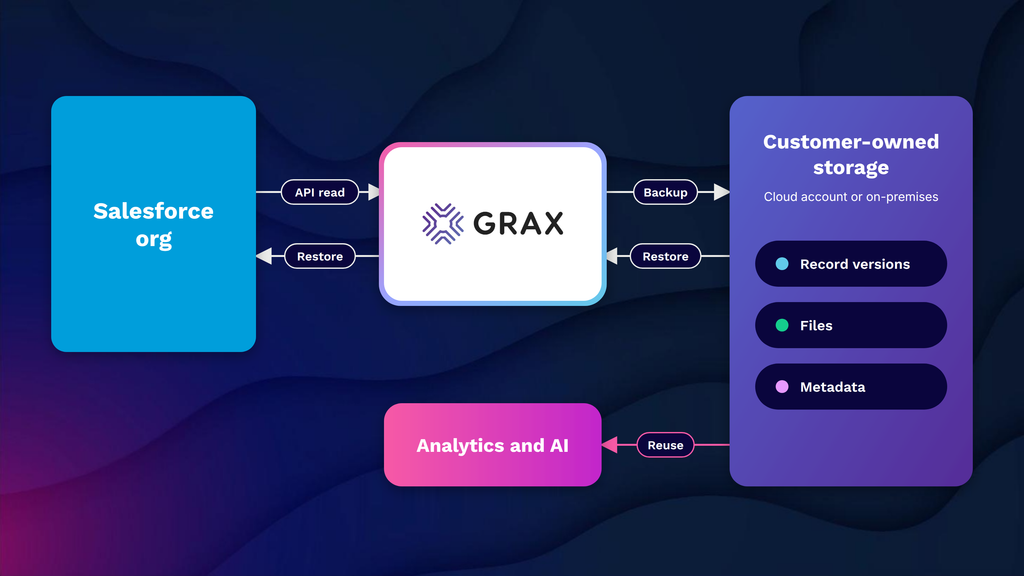
GRAX stores all Salesforce backup data in the customerās own cloud environment (AWS, Azure, GCP, on-premises) and never transmits it through GRAX-managed infrastructure, providing customers with full data ownership and control over their backup data. It continuously captures every single change to Salesforce data, metadata, and schema ā storing everything in open Parquet format to be easily accessible by BI, analytics, and AI tools without the prerequisite of exporting or transformation. GRAXās restore capabilities include a combination of point-in-time record recovery, mass hierarchical restores, and sandbox seeding.
Customer ratings:
- AppExchange ā 5/5 points based on 32 user reviews
Advantages:
- All backup data is stored entirely within the customer’s own cloud environment ā GRAX never touches or holds customer data, which is the strongest data sovereignty model on this list
- Open Parquet format output makes backup data immediately accessible to BI, analytics, and AI tools without requiring additional export or transformation steps
- Consistently high user ratings on both G2 and the Salesforce AppExchange, with customer feedback frequently highlighting ease of use and quality of support
Shortcomings:
- Pricing is positioned at the higher end of the market, which makes it a harder sell for organizations that do not have an active need for the data reuse capabilities alongside backup
- The customer-owned cloud infrastructure model, while a security strength, requires the organization to maintain its own cloud environment ā which adds operational overhead for teams without existing cloud infrastructure
- Public review volume is relatively limited compared to more established vendors, making peer-based evaluation harder for prospective buyers
Pricing:
GRAX offers no specific prices on its pricing page, but it does offer some information about its licensing tiers:
- Daily Plan ā offers daily backups, granular recovery, PITR recovery, sandbox seeding, built-in parquet data lake, and more
- Continuous Plan ā expands upon the previous option with continuous backup, data archival & data retention policy management
- Continuous + Intelligence Plan ā adds one-click data lakehouse deployment for advanced analytics to the previous offering
The authorās personal opinion:
GRAX has its own niche on this software list ā itās as much as a backup tool as it is a data reuse platform, and such distinction is important for teams that aim to extract the analytical value from Salesforce history, not just protect the data itself. The customer-owned cloud model is a great selling point by itself, and the open Parquet output guarantees that backup data is instantly ready for ingestion into downstream tools. GRAX tends to appeal the most to data-mature organizations that are already working with a cloud data infrastructure and wish to integrate their Salesforce history into their ecosystem.
Gearset Backup

Gearset is a Salesforce DevOps platform that has backup deeply integrated within its core alongside deployments, CI/CD, and metadata management. It offers org-wide backups on a daily basis and hourly high-frequency backups for critical data, as well as restore workflows that run within the same comparison and deployment interface Salesforce teams are already using regularly. One of its biggest strengths is the wide range of metadata recovery support ā Gearset restores hundreds of metadata types, which is a lot more than what the vast majority of competing backup solutions provide, significantly reducing manual recovery steps.
Customer ratings:
- G2 ā 4.7/5 points based on 262 user reviews
- AppExchange ā 4.98/5 points based on 58 user reviews
Advantages:
- Restore workflows use the same comparison and deployment interface the team already knows, which significantly reduces friction and error risk during actual recovery scenarios
- Metadata restore coverage is substantially broader than most competing tools, eliminating the manual steps that limited metadata support forces on other platforms
- Backup is integrated into the full DevOps lifecycle rather than treated as a separate concern, which means teams naturally maintain backup discipline as part of existing release processes
Shortcomings:
- Backup is one module within a broader DevOps platform ā teams that only need backup without the DevOps tooling may find the pricing less compelling relative to standalone options
- As a per-user subscription, costs scale with org size in a way that can become significant for large user bases relative to flat-rate alternatives
- Users who adopt Gearset purely for backup without engaging the wider platform may not get the full value proposition the pricing assumes
Pricing:
Gearsetās entire solution is provided in three different pricing tiers:
- Starter ā $215 per user per month, an essential pack of DevOps features, like metadata comparison/deployment, source control, full deployment history, clone packages, live chat support, and more
- Teams ā $320 per user per month, with scheduled deployments, deployment rollback, support for role-based access control, issue tracking integration, and so on
- Enterprise doesnāt have any public pricing and adds SAML to all the previously mentioned features
Customer reviews (original spelling):
- Saul B. ā G2 ā āThe automation features are fantastic, especially the diff tool which gives me a crystal-clear view of the discrepancies between our sandboxes and our QA or UAT environments. I also find the rollback functionality to be a massive safety net; itās incredibly quick and effective if we ever need to revert a change. It just feels like a natural extension of our Salesforce ecosystem.ā
The authorās personal opinion:
The unique value of Gearset is that backup isn’t tacked on to a different product of sorts ā it’s part of the same daily DevOps workflow that developers are accustomed to. Having that familiarity is crucial during a genuine incident when the data needs to be restored as quickly as possible. It tends to resonate most with teams that are already using Gearset for deployments, where adding backup is a natural extension rather than introducing another vendor.
Spanning Backup

Spanning Backup for Salesforce provides automated daily backups of records, metadata, files, attachments, Chatter, reports, dashboards, and custom objects within a native Salesforce interface with no external tools. The restore functionality includes point-in-time, granular search-based, field-level, cross-org, and end-user self-service restore ā the last of which helps non-admin users to recover their own records directly from record pages. Spanning provides unlimited retention, unlimited versions, and its backup data is stored in AWS, secured via AES-256 data encryption at-rest and SSL encryption during transit.
Customer ratings:
- Capterra ā 3.8/5 points based on 29 user reviews
- G2 ā 4.2/5 points based on 225 user reviews
- AppExchange ā 4.73/5 points based on 67 user reviews
Advantages:
- Native Salesforce interface integration means backup management and restore operations happen without leaving the platform, which reduces friction for admins and end users alike
- End-user self-service restore allows non-admin users to recover their own records directly from record pages, reducing the support burden on IT teams for common recovery scenarios
- Consistently high marks for ease of setup and low maintenance overhead ā widely regarded as one of the most accessible set-and-forget options in the market
Shortcomings:
- Support quality and billing process transparency have received notably negative feedback since the Kaseya acquisition, with multiple users citing degraded responsiveness
- Reporting and alerting capabilities are limited ā administrators have less visibility into backup health detail than more enterprise-focused tools provide
- Sits at the simpler end of the capability spectrum, which works well for straightforward orgs but creates gaps for teams with complex metadata restore requirements or advanced compliance needs
Pricing:
Spanning has no specific pricing data on its official website.
Customer reviews (original spelling):
- David S. ā Capterra ā āI use spanning to back up client data from Microsoft 365 suite including mailbox data and sharepoint data. I occassionally have to restore data from the spanning backups and I find this straight forward.ā
- BENOIT C. ā G2 ā āKAESYA Spanning Backup is simply a game-changer! Setup was a breeze, the interface is super intuitive, and our data has never felt safer. Backups run seamlessly in the background without slowing anything down. Highly recommend it to any team looking for a reliable and hassle-free backup solution!ā
The authorās personal opinion:
Spanning would have to be the closest thing on this list to a true set-and-forget backup option, as it’s lightweight, hosted within Salesforce itself, and requires almost no admin overhead once configured. The self-service restore for end-users is a great feature that takes a lot of pressure off of administrators when dealing with regular recovery scenarios. The solution is positioned at the simpler end of the capability spectrum (compared to an enterprise level solution), but it’s difficult to beat for teams that are looking for a solid, reliable backup coverage without a complex learning curve.
Odaseva

Built specifically for enterprise Salesforce environments with large data volumes, Odaseva offers data processing capabilities of over 300 million records per hour; it can also be used to run backups as frequently as every 15 minutes, and comes with an intelligent API consumption management feature to avoid hitting Salesforce governor limits. Restore capabilities include granular record-level recovery, full object point-in-time rollback, and parent-child relationship restoration up to 30 levels deep. Using their patented no-view provider architecture (meaning not even Odaseva employees can access customer data), plus five levels of data encryption and a zero trust security approach, Odaseva’s data protection capabilities are as powerful as their competitorsā or better.
Customer ratings:
- G2 ā 4.5/5 points based on 44 user reviews
- AppExchange ā 4.96/5 points based on 96 user reviews
Advantages:
- Purpose-built for large data volume environments ā the platform has demonstrated performance at billions of records, which no other tool on this list can match at equivalent scale
- Patented no-view provider architecture ensures that Odaseva staff cannot access customer data under any circumstances, which is the strongest confidentiality posture available
- Guided restore flows for every recovery scenario ā from single record to full org rollback ā reduce operator error and speed up recovery in complex environments
Shortcomings:
- Pricing is firmly enterprise-tier and not publicly disclosed, which makes early-stage evaluation difficult and effectively excludes mid-market and smaller organizations from consideration
- The platform’s depth and configurability introduce a learning curve that typically requires professional services engagement or significant admin investment to get full value from
- Review volume on public platforms is sparse relative to competitors, which limits the peer feedback available to prospective buyers conducting independent research
Pricing:
There is no publicly available pricing information that could be found on Odasevaās official website.
Customer reviews (original spelling):
- Mirko P. ā G2 ā āMy favorite function is the console of monitoring; in a single view, it’s possible to overview all backups or plan execution, possibility to check the limits of the contract.ā
The authorās personal opinion:
Odaseva might just be the most hyper-focused solution in this article, making no attempts to focus on any other customer segment aside from enterprise. Large data volume performance figures are not just for show, either, considering how plenty of large modern businesses tend to operate with billions of records daily (and Odaseva is one of the few solutions that does not degrade as the volume of data grows). For organizations that are not running complex, high-volume Salesforce environments, it will feel oversized and overpriced ā but for those that are, it occupies a category largely by itself.
AutoRABIT

AutoRABIT Vault is the backup and recovery component of AutoRABITās overarching Salesforce DevOps platform, covering data, metadata, files, and attachments. It supports scheduled full and incremental backups, as well as granular restore capabilities. The platform integrates its capabilities directly into the DevSecOps pipeline (CI/CD, static code analysis, and version control), making it possible for backup runs to be tied to deployment events instead of operating independently. Vault also provides comparison tools for detecting data and metadata changes between snapshots, sandbox seeding, archiving, and support for GDPRās right-to-erasure with the help of automated data deletion workflows.
Customer ratings:
- G2 ā 4.3/5 points based on 199 user reviews
Advantages:
- Vault integrates directly with AutoRABIT’s CI/CD and version control pipeline, enabling backup jobs to be triggered automatically around deployment events rather than running independently
- Strong compliance feature set including encryption, role-based access, audit trails, and support for HIPAA, GDPR, and SOC 2 ā with CodeScan carrying FedRAMP Moderate authorization
- nCino support extends backup coverage to financial services teams running on the nCino Bank Operating System, which most other tools do not address
Shortcomings:
- The user interface receives consistent criticism for being less intuitive than competing tools, with users citing a need for improvement in error clarity and navigation
- Like Gearset and Flosum, Vault is a module within a larger platform ā teams evaluating it purely for backup will find the value proposition harder to justify without the broader AutoRABIT ecosystem
- Public review volume for Vault specifically is low, making it difficult to assess backup-specific user sentiment independently from the broader AutoRABIT platform reviews
Pricing:
While AutoRABIT doesnāt offer specific pricing information on its website, it does offer a few options to start interacting with the service provider in question ā such as requesting a demo, getting a code assignment, or getting a risk analysis.
Customer reviews (original spelling):
- Nancy G. ā G2 ā āAutoRabit makes the release process easier and more controlled. I like that it provides clear visibility into deployments ,version control and mera data changes which helps reduce manual efforts and mistakes . The automated backups and compliance features are also helpful because they add an extra layer of security for Salesforce environmentsā
The authorās personal opinion:
Just like Gearset, AutoRABIT is not a standalone backup tool, but an integrated component of a wider DevOps platform. The biggest differentiator of AutoRABIT here is the fact that it leans more heavily into the āsecurity and complianceā angle, making it a better option for highly-regulated industries (healthcare, finances). Teams that are not already using AutoRABIT for CI/CD or deployments are not highly likely to adopt it purely because of its backup capabilities, but it does act as a meaningful data protection capability for those that are already in the same ecosystem in some way.
How Do Salesforce Backup Strategies Differ by Business Needs?
The strategy appropriate for a startup of twenty people and Salesforce will simply not be adequate for a regulated enterprise managing millions of records with active compliance requirements. The right architecture for a Salesforce backup should consider factors such as the size of the org, sensitivity of the backed-up information, enterprise recovery goals, and relevant regulatory considerations.
What backup capabilities do startups need versus enterprises?
Backup needs increase as an organization becomes bigger and more complex. The gap between the needs of a startup and the needs of an enterprise is substantial, to say the least. The major concerns of a startup would be cost-effective backup for primary records with a simple restoration procedure, whereas an enterprise has to consider data volumes, multi-org instances, compliance, and integration with the overall disaster recovery planning.
Some of the most common topics to compare startups and enterprise environments on in terms of backup and restore capabilities are presented below.
| Dimension | Startup | Enterprise |
| Backup frequency | Daily snapshots typically sufficient | Multiple daily backups or near-real-time replication |
| Metadata coverage | Core configuration and custom objects | Full metadata including managed packages and DevOps artifacts |
| Retention period | 30ā90 days | 1ā7 years depending on regulatory requirements |
| Restore granularity | Object or full-org restore | Record-level, object-level, and point-in-time restore |
| Compliance documentation | Minimal | Audit trails, SLA documentation, certifications required |
| Multi-org support | Single production org | Multiple orgs, sandboxes, and connected platforms |
| Budget | Cost is a primary constraint | Total cost of data loss exceeds backup investment |
Startups tend to find SaaS backup solutions with minimal setup and low ongoing maintenance the most effective. Comparatively, large enterprises prioritize vendors that can offer demonstrable compliance credentials, as well as granular restore capabilities and support for complex organizational structures.
What RPO and RTO should different teams expect or target?
Recovery Point Objective (RPO) defines the maximum acceptable age of recovered data ā in other words, how much data loss a team can tolerate measured in time. Recovery Time Objective (RTO) defines how quickly systems and data must be restored after an incident.
More information about both metrics and what they mean for Salesforce can be found in this dedicated article.
Both metrics should be defined before selecting a backup solution, since they directly determine what backup frequency and restore capability is required. It is worth mentioning that both RPOs and RTOs tend to vary significantly depending on many different factors, which is why there are a few general cases for target RPO/RTO presented in a table below:
| Team / Org Type | Target RPO | Target RTO | Notes |
| Small business | 24 hours | 48ā72 hours | Daily backup sufficient; manual restore acceptable |
| Mid-market | 4ā12 hours | 12ā24 hours | Automated backup with tested restore procedures |
| Enterprise | 1ā4 hours | 4ā8 hours | Near-real-time backup; documented DR playbook required |
| Regulated industry | 1 hour or less | 2ā4 hours | Compliance mandates may define minimums |
| High-transaction orgs | Minutes | 1ā2 hours | Continuous replication may be required |
RTO/RPO targets that are not properly documented tend to expand informally over time, as teams assume more tolerance than actually exists until an incident of sorts breaks that assumption.
How do regulatory requirements (e.g., GDPR, HIPAA) change backup design?
Regulatory compliance is far more than the addition of compliance checkboxes to an existing backup strategy ā they fundamentally affect retention periods, storage architecture, access controls, and even deletion workflows. Every major regulation has certain requirements that must be reflected in the way backup data is collected, stored, and eventually disposed of.
| Regulation | Key Backup Implications |
| GDPR | Backup data must honor right-to-erasure requests; data residency requirements restrict where backups can be stored; retention periods must be justified and documented |
| HIPAA | Backup systems must meet the same technical safeguards as production systems; audit logs of backup access are required; Business Associate Agreements must cover backup vendors |
| SOX | Financial records must be retained for a minimum of 7 years; backup integrity must be verifiable; access to backup data must be restricted and audited |
| PCI DSS | Cardholder data in backups must be encrypted; access to backup systems must be logged and reviewed; backup media must be physically and logically secured |
There is an element of GDPR that is not present in any of the other legislations ā the right to erasure. If a data subject requests their records to be deleted, then this request must be honored not only in the production data, but also across any and all backup copies. For this to happen, the backups must have the capability to erase data instead of being simply treated as an immutable archive.
When is near-real-time replication necessary versus daily snapshots?
The decision between near real time replication and daily snapshots depends on the amount of data loss and downtime your organization can tolerate.
Daily snapshots will meet the needs of most organizations ā covering the majority of the possible data loss scenarios and doing so at a much lower cost and complexity.
Near-real-time replication becomes necessary when the volume or value of data created within a single day makes a 24-hour RPO unacceptable.
Scenarios that warrant near-real-time replication:
- High-transaction sales orgs where a day’s worth of pipeline activity represents significant revenue risk
- Customer support environments where case and interaction data is created continuously and loss would breach SLAs
- Orgs operating under regulatory frameworks which define RPO in hours rather than days
- Environments where Salesforce is the system of record for financial transactions or healthcare data
Scenarios where daily snapshots are sufficient:
- Orgs where data changes incrementally and a prior-day restore would cover most realistic loss scenarios
- Small to mid-size teams where the cost of continuous replication is disproportionate to the risk
- Sandbox and non-production environments where configuration backup matters more than transactional data frequency
How to Design a Robust Salesforce Backup Architecture?
Salesforce backup architecture is a combination of intentional decisions about what needs to be backed up, when, where it would be stored, and who can access it. These are the decisions that are more crucial for tool selection than anything else: getting these right beforehand is what allows a backup solution to hold under pressure instead of failing during an incident.
What are the key components of a backup architecture for Salesforce?
A Salesforce backup architecture is not just one tool or process, but a collection of interdependent components that ensure the recoverability of both data and metadata. Each component handles a specific type of failure, and the inability to correctly manage the gap in any single one of the components can create issues for the entire backup strategy.
| Component | Description | What It Protects Against |
| Data backup layer | Scheduled export and storage of all standard and custom object records | Record deletion, corruption, overwrite |
| Metadata backup layer | Versioned capture of org configuration, automation, profiles, and custom fields | Configuration loss, bad deployments |
| Backup storage | Secure, redundant storage destination ā cloud or on-premises | Backup data loss or unavailability |
| Encryption layer | Encryption of backup data in transit and at rest | Unauthorized access to backup contents |
| Access control layer | Role-based permissions governing who can view, trigger, or restore backups | Insider threats, accidental restores |
| Monitoring and alerting | Automated checks that confirm backup jobs completed successfully | Silent backup failures going undetected |
| Restore tooling | Mechanisms for granular and full-org recovery with relationship integrity | Slow or failed recovery during incidents |
| Retention policy | Defined rules for how long backup versions are kept before deletion | Storage bloat and compliance exposure |
The component that is most frequently omitted from Salesforce backup architectures is the metadata backup layer, and itās also the one component whose absence is most painful to discover during a recovery scenario.
How should you structure backup schedules, retention, and versioning?
Backup schedules, retention periods, and versioning are three distinct decisions that are commonly lumped into a single default setting during initial configuration. It is possible to create a much more efficient and defensible architecture by treating these three options as their own independent design choices.
| Element | Recommended Approach | Common Mistake |
| Backup schedule | Align frequency with RPO ā daily for most orgs, multiple daily for high-transaction environments | Setting the maximum available frequency regardless of actual RPO requirements |
| Retention period | Define separate retention tiers ā short-term (30 days), medium-term (1 year), long-term (7 years for regulated data) | Applying a single flat retention period to all data regardless of type or regulatory status |
| Versioning | Maintain multiple point-in-time snapshots rather than overwriting the previous backup | Single-version backup which cannot recover from a corruption that went undetected across multiple backup cycles |
| Incremental vs. full backup | Use incremental backups for daily runs to reduce storage and time; schedule periodic full backups as a baseline | Running full backups exclusively, which increases storage costs and backup window duration unnecessarily |
Short retention periods create compliance exposure, while too long retention periods without tiering often create unnecessary storage costs. The most appropriate structure is going to try and account for both of these extremities.
What role do encryption, access control, and key management play?
The security principles that any Salesforce backup architecture is built upon ā encryption, access control, and key management ā are often implemented with a lot less care and attention than the production org it is backing up. A backup containing sensitive Salesforce data with weak security controls becomes an additional attack surface that is often less monitored than the primary environment.
Encryption ensures that backup data is unreadable to unauthorized parties both while it is being transmitted to storage and while it resides there. Access control defines which users and systems can interact with backup data. Key management defines who holds the encryption keys and under what conditions they can be used ā a critical consideration for organizations concerned with demonstrating data sovereignty or meeting regulatory requirements around cryptographic controls.
Common implementation considerations include:
- Confirm that the backup vendor encrypts data at rest using AES-256 or equivalent
- Verify that encryption in transit uses TLS 1.2 or higher
- Establish whether the vendor or the organization holds encryption key custody
- Apply least-privilege access to backup management consoles and restore functions
- Audit backup access logs on a regular schedule, not only after incidents
How should backups be stored geographically to meet resiliency needs?
The geographic storage strategy determines whether backups can be accessed during a regional cloud outage, natural disaster, or data center failure. The most common geographic storage mistake is to back up data within the same region as the production org ā since a regional outage can take out both the production environment and the backup at the same time.
Backup archives should ideally be kept in two or more different geographical locations. Most organizations with a SaaS backup vendor will be covered by that vendorās multi-region storage facilities (which should be verified rather than assumed). Replication to a secondary cloud region or an independent storage provider is a typical architectural requirement for self-hosted implementations.
Geographic storage considerations that incorporate personal data must also consider data residency regulations ā GDPR, for instance, does not permit the transfer of EU resident data to destinations outside the European Economic Area, so the physical backup location is not only a compliance decision, but also a resiliency one.
How Are SFDC Restores Performed and What Challenges Arise?
A Salesforce backup strategy is only as useful as the restore capability attached to it. The restoration process has its own set of challenges, including scope, data integrity, and speed ā all of which have to be understood and planned for before any incident happens.
How do you restore individual records, objects, or entire orgs?
A backup strategy in Salesforce is only as valuable as the restore capability it offers. The process of data restoration introduces its own set of problems ā in terms of scope, data integrity, and speed ā which needs to be understood and planned for before any kind of disaster occurs.
| Restore Scope | Typical Method | Complexity | Common Use Case |
| Individual records | Direct re-import via backup tool or Data Loader using record ID matching | Low | Accidental deletion of a specific Account, Contact, or Opportunity |
| Single object | Full object re-import with relationship mapping to preserve lookups and master-detail links | Medium | Bulk delete or overwrite affecting one object |
| Multiple related objects | Sequenced restore respecting parent-child insert order across dependent objects | High | Integration overwrite or automation failure affecting a data model |
| Full org restore | Complete data and metadata restore to a point-in-time snapshot | Very high | Catastrophic data loss or corrupted org configuration |
| Metadata only | Redeployment of org configuration, automation, and profiles without touching record data | Medium | Bad deployment that altered or deleted configuration components |
In practice, full org restores are not particularly common ā most of the actual restores deal with individual records or objects, which makes the granular, record-level restore a more commonly used function than full org recovery.
What are the risks of partial restores and referential integrity issues?
Partial restores ā the ability to restore a portion of affected data, rather than an entire data set ā introduces referential integrity threats that can leave the org in a worse state than the original loss event. In Salesforce, referential integrity is maintained by lookup relationships, master-detail relationships, and external ID mappings, all of which rely on IDs to match between the parent and child records.
During partial restore events, relationships can be broken without raising an error whenever the records are inserted with new IDs or when child records are inserted prior to parent records. These relationships break in silence ā the records still exist, but are either orphaned or linked incorrectly.
Specific integrity failure scenarios to account for during partial restores:
- Orphaned child records ā Contacts, Cases, or Opportunities restored without their parent Account existing in the org at the time of insert
- Broken lookup fields ā Lookup fields that reference records which were not included in the restore scope, leaving the field blank or pointing to a non-existent ID
- Duplicate record creation ā Re-importing records without deduplication logic can create duplicate entries alongside surviving originals
- Automation re-triggering ā Restoring records through the API may fire active triggers, flows, or validation rules which were not active at the time of original data creation, causing unexpected modifications or rejections
- Timestamp and audit field conflicts ā System fields such as CreatedDate and LastModifiedDate cannot be set directly via standard API, which means restored records may carry incorrect timestamps that affect reporting and compliance
How do you test restores and validate data integrity post-restore?
Restore testing is arguably the most ignored element of a Salesforce backup strategy. A backup that was never tested cannot be assumed to work ā as there are many failure modes that only surface when a restore is actually attempted (configuration errors, API changes, permission issues). Testing in the sandbox environment before something goes wrong is the only way to be certain that the recovery plan is understood and executable.
A restore test and validation process should include:
- Scheduled restore drills ā Perform test restores at least quarterly, using a representative subset of production data in a sandbox
- Record count verification ā Confirm that the number of restored records matches the expected count from the backup snapshot
- Relationship integrity checks ā Validate that lookup and master-detail relationships are intact by querying child objects and confirming parent references resolve correctly
- Field-level spot checks ā Manually verify a sample of records across key objects to confirm field values match the backup source
- Automation behavior review ā Confirm that triggers, flows, and validation rules behaved as expected during the restore and did not modify or reject records incorrectly
- Restore time measurement ā Record how long the restore took and compare against RTO targets to identify gaps before a real incident requires meeting them
- Documentation update ā Capture any issues encountered during the drill and update restore runbooks accordingly
What rollback and disaster recovery playbooks should teams maintain?
A disaster recovery playbook turns the concepts outlined in your backup plan into a series of actions that any competent person on your team would be able to follow under pressure. The real value of having a playbook isn’t just in its existence, but also its accuracy. A playbook that hasn’t been updated since its initial setup is obsolete ā it will have outdated assumptions about the org structure, personnel, and tooling that will render it useless when you really need it.
Core components a Salesforce disaster recovery playbook include:
- Incident classification criteria ā Defined thresholds that determine when a recovery operation is initiated and at what scope
- Roles and responsibilities ā Named owners for each step of the restore process, with documented escalation paths when primary owners are unavailable
- Step-by-step restore procedures ā Sequenced instructions for each restore scope (record, object, full org) that account for relationship dependencies and insert order
- Vendor and tool access details ā Login procedures, support contacts, and SLA reference information for the backup solution in use
- Communication templates ā Pre-drafted internal and external notifications for data loss events, including stakeholder update cadences
- Post-restore validation checklist ā The specific checks that must be completed before a restore is declared successful and systems are returned to normal operation
- Review and update schedule ā A defined cadence ā at minimum annually, and after any significant org change ā for reviewing and testing the playbook
What Are Best Practices for Salesforce Backup Processes and Governance?
The security of technical backup controls is dependent upon the procedures that the organization implements to manage these controls. A governance system outlines the accountability, the measurement, and the process to keep policies up-to-date as the org grows and evolves.
How often should backup policies and runbooks be reviewed and updated?
Backup policies and runbooks should be audited at a predetermined frequency (once a year, ideally), though itās even more important to identify triggers where there is an immediate need for a review of a backup policy/runbook outside the normal cycle. Organizations that are undergoing rapid growth require a more rigorous schedule than a once-annual cadence, too, since Salesforce configuration, personnel, and regulatory needs can change rapidly during the course of twelve months.
Events that should trigger an out-of-cycle policy and runbook review may be the following:
- A significant org change such as a new managed package deployment, major metadata restructuring, or migration to a new Salesforce edition
- A change in backup vendor or tooling, including version upgrades that alter backup scope or restore procedures
- A personnel change affecting the roles named in the runbook ā including admin turnover, IT ownership changes, or compliance team restructuring
- A regulatory change that affects data retention, residency, or deletion requirements applicable to the org
- Any completed restore operation, drill or real, which revealed gaps or inaccuracies in the existing documentation
- A security incident affecting either the production org or the backup environment
Who should own backup responsibilities in a Salesforce org?
Backup ownership in a Salesforce org is very rarely a task held by only one person, and assigning ownership this way creates a single point of failure in practice. On a day-to-day level, backup ownership is spread across Salesforce administration, IT infrastructure, and compliance functions ā and the most fitting ownership model depends on how those functions are structured within the organization.
We can provide a general idea of how this would work in different organizations using three generic org sizes ā small, mid-market, and enterprise:
| Org Size | Primary Owner | Supporting Roles |
| Small (1ā2 admins) | Salesforce Admin | IT generalist or managed service provider |
| Mid-market | Salesforce Admin or Architect | IT/Infrastructure team for storage and access; Compliance for retention policy |
| Enterprise | Dedicated Salesforce Platform team | IT Security for encryption and access control; Legal/Compliance for regulatory alignment; DevOps for metadata backup integration |
Regardless of org size, two ownership elements must always be explicitly defined:
- The primary owner responsible for backup health and policy compliance
- The documented escalation path that is not dependent on a single individual being available during an emergency
How should access to backup data be audited and controlled?
Access to backup data carries the same risk profile as access to production data ā in some cases higher, because backup environments are typically subject to less real-time monitoring. Backup access controls should leverage the same least-privilege principles applied to the production org, treating restore permissions as a high-privilege operation that necessitates explicit authorization instead of being widely available to any admin-level user.
Recommended access control and audit practices for Salesforce backup environments:
- Restrict restore initiation permissions to a named set of users with documented justification for that access level
- Require multi-factor authentication for access to the backup management console
- Maintain a complete log of all backup access events ā including who accessed what, when, and whether a restore was initiated
- Review access logs on a regular schedule, not only in response to incidents
- Immediately revoke backup access for departing employees, which is a step that is often overlooked when offboarding focuses primarily on production org access
- Conduct periodic access reviews to confirm that current permissions reflect current roles, since backup access granted during an incident is frequently not rescinded afterward
What metrics should you track to ensure backup reliability and coverage?
Backup reliability cannot be simply assumed from the fact that a backup solution is set up and running. Only by monitoring a set of specified operating metrics administrators can detect silent failures, coverage drift, or performance degradation before any of those can impact recovery capability.
| Metric | Definition | Target / Threshold |
| Backup success rate | Percentage of scheduled backup jobs that complete without error | 100% ā any failure should trigger immediate investigation |
| Backup coverage | Percentage of org objects and metadata components included in the backup scope | 100% of defined scope; audit quarterly for new objects not yet included |
| RPO adherence | Actual time between the most recent successful backup and the current moment | Should not exceed the defined RPO at any point |
| Restore success rate | Percentage of restore operations ā including drills ā that complete successfully | 100% ā failed drills indicate a backup reliability problem |
| Restore duration | Time taken to complete a restore operation of each scope type | Must fall within defined RTO; track trends over time |
| Retention compliance | Confirmation that backup versions are retained for the required period and purged on schedule | Zero deviations from defined retention policy |
| Alert response time | Time between a backup failure alert being generated and a team member acknowledging it | Defined by internal SLA; typically under 1 hour for production orgs |
Tracked metrics that are never acted upon are a big source of false assurance. Each metric in the set needs to have a named owner, a defined response procedure for threshold breaches, and even a review cadence to make sure that the data is being examined, not simply collected.
A playbook without tested restores is just a document.
See how GRAX customers run recovery validation without disrupting production.
How to Evaluate and Choose the Best Salesforce Backup Solution?
Selecting a Salesforce backup solution is a procurement decision more than anything else. It carries a number of operational and compliance implications that will affect the organization long after the solution has been purchased. Following a structured evaluation process instead of a feature-by-feature comparison results in a decision that will hold true as the org grows and the requirements change.
What checklist items should you use when comparing backup tools?
A proper backup tool evaluation process has to cover more ground than what the vendorās feature page can offer. The checklist below is separated into several logical categories to ensure that you can assess coverage, security, restore capability, compliance, and operational fit ā instead of defaulting to a vendor with the biggest market presence.
Coverage
- Does the solution back up both data and metadata, including automation, profiles, and custom fields?
- Are Salesforce Files and Content backed up in addition to object records?
- Does the solution support all Salesforce editions and org types in use ā including sandboxes?
- Are new objects and metadata components automatically included in backup scope, or must they be added manually?
Restore capability
- Does the solution support granular restore at the individual record level, or only full-object and full-org restores?
- How does the solution handle referential integrity during partial restores?
- What is the documented restore time for each scope type ā record, object, full org?
- Can restores be targeted to a specific point in time, or only to the most recent backup?
Security
- Is backup data encrypted at rest and in transit, and what encryption standards are used?
- Who holds encryption key custody ā the vendor or the customer?
- Does the solution support multi-factor authentication for console access?
- Are access logs maintained and exportable for audit purposes?
Compliance
- What certifications does the vendor hold ā SOC 2 Type II, ISO 27001, HIPAA BAA?
- Can data residency requirements be met through configurable storage region selection?
- Does the solution support targeted deletion of individual records to honor GDPR right-to-erasure requests?
- What is the vendor’s documented process for data deletion upon contract termination?
Operational fit
- What is the onboarding and configuration timeline for an org of comparable size and complexity?
- Does the solution provide monitoring and alerting for failed backup jobs?
- Is there an API or CLI available for automation and integration with existing tooling?
- What support tiers are available, and what are the documented response times for critical incidents?
How important are restore speed, granularity, and automation in selection?
The three capabilities that determine if a backup solution can perform in a real incident, rather than just a vendor demo are:
- Restore Speed
- Granularity
- Automation
Their features are often similar among vendors at the coverage layer, so these operational capabilities are the primary source of genuine differences between them.
Restore speed determines whether the system can meet the RTO target values. What might work for the small org with a 48-hour RTO (necessitating many hours to restore a single object) might not work for an enterprise with a 4-hour RTO target. Restore speed needs to be tested against realistic data volumes during the evaluation instead of simply taking information from vendor documentation at face value.
Granularity sets the proverbial āblast radiusā of the restore operation. A solution that only supports full org restores is going to force teams to choose between overwriting valid data and accepting the loss ā and a solution with granular record-level restore eliminates this kind of trade-off. The importance of granularity grows in tandem with the complexity of an orgās data model, as targeted recovery of related objects requires a solution to understand and preserve not only the data itself, but also all the relationship structures.
Automation determines the degree of manual intervention necessary to complete a restore. Products that offer automated restore workflows, ready-made relationship mapping, and automated scheduled restore tests decrease recovery time and reduce the possibility of operator error. In enterprises where restores are more likely to be performed by an on-call system administrator or junior architect, automation is a reliability control, not a convenient optional capability.
What pricing model fits different org sizes and usage patterns?
The costs associated with Salesforce backups vary significantly across vendors and are not always capable of scaling linearly with org size. Determining which pricing model aligns better with organizational usage patterns is what helps prevent overpaying for unused capacity and encountering unexpected costs as data volumes grow.
| Org Profile | Recommended Pricing Model | What to Watch For |
| Small org, limited records | Per-user or flat monthly fee | Ensure metadata backup is included, not an add-on |
| Mid-market, moderate growth | Per-org or tiered storage-based pricing | Confirm pricing at 2x current data volume to anticipate growth costs |
| Enterprise, high data volume | Custom enterprise contract with defined SLAs | Negotiate retention period and restore SLA commitments into the contract |
| Multi-org environment | Per-org licensing with volume discount | Verify sandbox coverage is included or priced separately |
| Regulated industry | Compliance-tier plans with audit and reporting features | Confirm that compliance features are not gated behind the highest tier |
Pricing models that charge per API call or per restore operation introduce unpredictable costs in high-incident environments ā flat or storage-based models are generally more predictable for orgs that expect to use restore capability regularly.
How do integrations with CI/CD, ETL, and monitoring tools influence choice?
Enterprises that use Salesforce as a part of their DevOps or data pipeline ecosystem tend to find that their backup tool integrations can meaningfully affect the overall operational efficiency. A standalone backup tool that doesnāt interact with existing tooling creates manual handoffs and monitoring blind spots that a well-integrated solution aims to eliminate.
CI/CD integration matters for teams that manage Salesforce metadata through deployment pipelines ā a backup solution which connects to tools such as Gearset, Copado, or custom Salesforce CLI pipelines can incorporate metadata backup into the deployment process itself, ensuring that configuration is captured before and after every release.
ETL integration is relevant when Salesforce data moves regularly between external systems ā backup solutions that expose an API allow ETL tools to trigger backup jobs before major data loads, creating a recoverable snapshot ahead of any operation that carries overwrite risk. Monitoring integration ensures that backup job failures surface in the same alerting environment the operations team already monitors instead of requiring a separate console check that may be missed.
Monitoring integration ensures that backup job failures surface in the same alerting environment the operations team already monitors instead of requiring a separate console check that may be missed.
What Are Common Backup Mistakes and How Can They Be Avoided?
The same types of backup failures are occurring repeatedly across Salesforce orgs of all sizes and industries. It is much cheaper to identify these patterns prior to their occurrence instead of doing so during a live recovery operation.
Why do many teams underinvest in Salesforce backup until itās too late?
Underinvestment into Salesforce backups follows a predictable pattern ā the cost of backup is visible and immediate, while the cost of data loss is theoretical until the actual data loss incident happens.
Teams that have never experienced significant data loss calculate risk based upon their own history rather than the actual probability of data loss and its consequences ā thus deprioritizing backups in favor of capabilities that can demonstrate a clear, short-term return on investment.
The invisible nature of backups compounds this dynamic ā a backup solution that works correctly would produce zero output that stakeholders can actually see (no dashboards, no user-facing features, no revenue attribution), making them difficult to justify investment in organizational contexts where there is a clear dependency between visibility and funding.
This kind of logic only changes when a restore is needed but the backup either does not exist or does not work as intended.
How can failures in backup configuration lead to false confidence?
False confidence is more dangerous than conscious unawareness ā a team thatās aware of the fact that they have no backup will act accordingly, while a team that believes it has coverage will not. Backup configuration failures which produce false confidence are particularly common in Salesforce environments due to their complexity that makes it quite possible to configure a backup that appears complete but actually contains meaningful gaps.
Specific configuration failure scenarios that produce false confidence:
- Scope drift ā New custom objects, fields, or metadata components added to the org after initial backup configuration are not automatically included in backup scope by all solutions, which means the backup covers the org as it was, not as it is
- Credential expiration ā Connected app credentials or OAuth tokens used by the backup solution expire silently, causing backup jobs to fail without the team being aware that coverage has lapsed
- Storage quota exhaustion ā Backup storage limits are reached and subsequent jobs are silently truncated or skipped rather than triggering an alert
- Metadata excluded by default ā Some backup solutions exclude certain metadata types from default configuration, which requires explicit opt-in that teams frequently do not complete during onboarding
- Sandbox-only testing ā Teams that configure backup against a sandbox and assume production process behavior will be identical miss org-specific differences in data volume, API limits, and object complexity that cause production backup jobs to behave differently
- No restore verification ā Backup jobs report as successful but the output has never been used in a restore attempt, which means corruption or formatting issues in the backup files remain undetected
What pitfalls occur during restore testing and disaster drills?
Restore testing reveals issues that backup monitoring could never find; and failures discovered during drills are almost always more instructive than the ones teams can expect. Restore testing failures are rarely technical; they are almost invariably procedural, which makes them completely preventable using proper planning and preparation.
Common pitfalls during restore testing and disaster drills include:
- Testing against unrepresentative data ā Drills conducted against a small or simplified dataset do not surface the relationship integrity and insert-order issues that emerge at production data volumes
- Undocumented dependencies ā Restore procedures that worked during initial setup fail during a drill because org changes introduced new object dependencies that were never added to the runbook
- Unavailable personnel ā Drills scheduled during business hours do not account for incidents that occur outside them, leaving teams without the personnel or access needed to execute the restore
- Restore permissions not maintained ā Access to the backup console or restore tooling has changed since the last drill due to personnel turnover or permission audits, which means the designated restore operator cannot initiate the recovery
- Time underestimation ā Teams discover during a drill that the actual restore duration significantly exceeds the RTO target, with no documented plan for how to handle the gap
- No post-restore validation ā The drill is declared complete when the restore finishes rather than when data integrity has been verified, which means corrupted or incomplete restores are marked as successful
How can automation and policy enforcement mitigate human error?
Human error is the primary culprit in Salesforce data loss and backup failure. The single most appropriate approach to prevent such issues is to take humans out of the parts where errors are most likely to happen. While automation will not remove all the risks, it does remove the variability that comes from manual processes executed under pressure, by different people, with different levels of familiarity with the system.
Here are the specific automation and policy enforcement mechanisms that are worth implementing:
- Automated backup scheduling ā Eliminate manual backup initiation entirely; all backup jobs should run on a defined automated schedule with no dependency on human action
- Automated failure alerting ā Any backup job that fails, is skipped, or completes with warnings should trigger an immediate alert to a named owner rather than requiring console review to detect
- Scope change detection ā Solutions or custom scripts which monitor org metadata and flag when new objects or components are not covered by existing backup configuration
- Access policy enforcement ā Backup console permissions managed through a centralized identity provider rather than configured manually per user, which ensures that access is revoked automatically when employment status changes
- Automated restore drills ā Scheduled restore tests that run against a sandbox environment on a defined cadence without requiring manual initiation, which ensures testing actually occurs rather than being deferred
- Retention policy automation ā Backup version deletion governed by automated rules tied to defined retention periods rather than manual cleanup, which prevents both premature deletion and indefinite accumulation
Every Salesforce org needs a backup strategy that works when it counts.
Get a personalized demo and see how GRAX fits your org, your cloud, and your recovery requirements.
FAQs
What is the difference between restore data and full data recovery in Salesforce?
Data restoration in Salesforce is the targeted recovery of specific records, objects, or metadata components ā a surgical operation only necessary when the scope of a loss is small and well-known.
Full data recovery is the complete reconstruction of an org from a snapshot with all the records, metadata, configuration, and relationships ā only necessary in catastrophic loss scenarios where partial restore is not enough.
How can teams automate Salesforce backup and recovery workflows without manual intervention?
Backup automation is achieved by configuring scheduled jobs within a backup solution or via the Salesforce CLI, which run on a defined cadence and write output to a storage destination without requiring human initiation. Recovery automation relies on pre-built restore workflows ā available in most commercial backup platforms ā which handle relationship mapping, insert ordering, and validation automatically rather than requiring an operator to execute each step manually.
Together, these capabilities reduce the dependency on individual availability and institutional knowledge during time-sensitive recovery scenarios.
When should you use archive instead of active backup in Salesforce data management?
Archiving is the most suitable when data is no longer operationally active but must be preserved for historical or regulatory purposes ā moving the records out of the production org and into long-term storage to remain accessible without consuming Salesforce storage.
Active backup is almost the complete opposite, designed for data that may have to be quickly restored to a working state, thus making its storage in the production environment justified.
How does sandbox seeding impact data integrity in complex, highly relational Salesforce orgs?
Sandbox seeding ā the process of populating a sandbox with production data subsets for development and testing ā introduces data integrity risk when the seeded subset does not include all records that existing relationships reference, which results in orphaned lookups and broken master-detail links within the sandbox environment. In highly relational orgs, this risk compounds across multiple object layers, making it important to use seeding tools that are relationship-aware and can traverse the data model to include all dependent records rather than extracting objects in isolation.