
What is Salesforce Data Export?
Salesforce data export refers to the process used to export data from Salesforce, extracting records, files, and metadata from a Salesforce org. The main purpose for this export data would be either data backup, migration, analysis, or some other usage type outside of the core platform.
Businesses tend to start with manual CSV file download and move to other export approaches once the previous method stops scaling well. Some go as far as to create fully automated pipelines that feed a data warehouse directly once data volume outgrows what manual exports can handle. Exporting tends to be one of the most important factors for downstream initiatives: reporting, compliance, data management, or system integrations.
What types of data can you export into Salesforce?
Salesforce data export is not limited to the standard records in Excel spreadsheets; org data tends to come in a variety of forms, each with its own export needs. A proper exporting solution usually has to include all data types, such as:
- Standard objects: Accounts, Contacts, Leads, Opportunities, Cases, and similar core CRM records
- Custom objects: org-specific data models built to support unique business processes
- Files and attachments: Content Documents, Content Versions, Chatter files, and legacy Attachments
- Metadata: object schemas, page layouts, workflow rules, and validation rules that define how the org behaves
- Relationship data: lookup and master-detail links that tie records together across objects
- Activity history: tasks, events, and email logs associated with records
Focusing your exporting efforts on the visible record data while skipping files, metadata, and relationships between those records is a very common mistake for many Salesforce data export projects.
Why is accurate data export important for CRM success?
Salesforce operates as the system of record for sales, service, and marketing teams, making the accuracy of exported data having a direct effect on how much the organization can trust the CRM as a whole. Whenever an export fails to include fields, breaks relationships, or silently fails with large objects, the resulting dataset is no longer considered a representation of what is actually happening within the company.
The importance of accurate data export goes beyond the export job itself. An inaccurate data export can compromise regulatory compliance, distort audit trails, and introduce risk during org migrations (or activities in relation to M&A). All these processes rely heavily on a clean, complete data export, making it mandatory and not optional.
In this sense, data export accuracy is less of a technical checkbox and more of a prerequisite for CRM reliability at large.
How does exported data impact reporting and automation?
Salesforce report dashboards and automation tools (Flow, approval processes, third-party BI platforms) can only be as reliable as the data thatās being fed into them.
Incomplete or delayed exports inevitably propagate their own errors downstream:
- A missing lookup relationship can silently break a report filter
- A stale export could trigger an automation action toward outdated records
Since all these tools consume exported data programmatically (without manual review), catching errors introduced during export becomes significantly more difficult due to them being invisible up until the point of those errors surfacing as an incorrect dashboard figure or a misfired automation rule ā both of which happen well after the original export is finished.
Protect Your Report Accuracy
See how GRAX preserves every relationship intact.
How Do You Prepare Your Salesforce Data Before Exporting?
Preparation separates a successful attempt to export your data from the one that would require repeated troubleshooting. Before any data can leave the org, most teams have to do certain actions like validate data quality, resolve duplicate records, confirm field mappings, and understand the technical constraints of the platform.
What are the data export limits in Salesforce (record limits, file size, API limits)?
Salesforce imposes its limits on several layers: daily API request caps, per-batch record counts, file size ceilings. These limits also differ (by API type and Salesforce edition), with the most suitable method varying depending on the orgās data volume.
| Limit Type | Threshold | Applies To |
| Daily API requests | 100,000 per 24 hours (Enterprise Edition), plus 1,000 per additional user license | REST, SOAP, and Connect API calls combined |
| Bulk API batch submissions | 15,000 batches per rolling 24-hour period | Shared across Bulk API 1.0 and Bulk API 2.0 |
| Bulk API 2.0 record processing | Up to 100 million records per 24-hour period | Bulk API 2.0 ingest jobs |
| Batch size | 10,000 records per internal batch | Bulk API 2.0 (auto-chunked) |
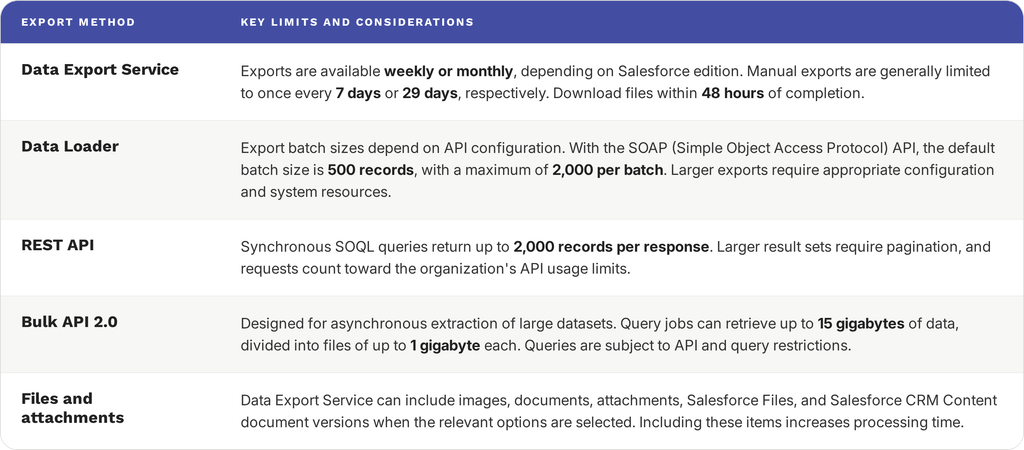
| Query data volume | Up to 15 GB per job | Bulk API query jobs |
| Concurrent jobs | 25 concurrent jobs | Bulk API 1.0 and 2.0 combined |
| Metadata API package size | 39 MB (deploy/retrieve), 50 MB (compressed) | Metadata API zip files |
Since these limits are applied per API and per org configuration, exceeding them is not always a loud and pronounced failure event. While a daily API limit provides a clear error message, a Bulk API job that retrieves a failing batch ten times in a row might take hours before surfacing as a failed event.
Itās important to be aware of these limits ahead of time to allow teams to plan batch sizes, schedule windows, and fallback methods before attempting a large export event.
How Do You Handle Data Relationships and Lookups?
Itās rare for Salesforce records to exist in isolation. Most objects in an org are linked together via lookup or master-detail relationships. Preserving said relationships is one of the trickiest parts of any export process, as the back-end record IDs that represent them are highly specific to the source org and become meaningless if transported anywhere else.
Two relationship types matter most here:
- Lookup relationships are loosely coupled links between objects (for example, a Case linked to an Account) that can typically be null
- Master-detail relationships, which are tightly coupled links where the child record’s existence depends on the parent; delete the parent during a restore, and the child will follow, regardless of intent
By their very nature, Salesforce record IDs are org-specific, meaning that it will not re-link related records using their original IDs if a dataset was exported from one org to another (or even to the same org after a data model change). A typical answer to this data migration issue is to leverage exported and referenced external ID field values, which are stable, human-readable, and can persist when crossing systems.
This way, relationships can be re-established via import tools by matching values instead of IDs. Incorrect handling of this stage is a common cause of āorphanedā records: child records that have been imported successfully but lose their connection to a parent record due to it referencing an ID that no longer resolves to anything.
What has Changed in Salesforce Data Export in Recent Years?
The export landscape of Salesforce has changed tremendously in the last few years. New APIs, increasingly rigid platform governance, and an ever-growing complexity of the compliance environment are the primary contributors to said change. Practically any strategy that was built before 2025 is probably due for a review, if only to see how it holds up against everything that has changed since then.
Which new Salesforce features and APIs matter most for exports?
- GraphQL API has moved from experimental to a first-class option for querying and shaping export payloads, giving teams more control over nested data retrieval than REST alone allows
- Pub/Sub API is now Salesforce’s recommended path for event-driven integrations, positioned ahead of the older Streaming API for teams building real-time or incremental export pipelines
- Data Cloud was rebranded to Data 360 (effective October 2025), with a dedicated set of Data 360 APIs for querying and ingesting data separately from standard Connect API calls
- Older API versions (21.0ā30.0) were retired in mid-2025, meaning integrations still pinned to legacy versions will fail outright with no fallback
- Salesforce Functions was retired, pushing async workloads in the direction of Platform Events, Pub/Sub, and external serverless patterns
- The platform is shifting from classic Connected Apps to External Client Apps for OAuth-based integration setup, affecting how export tooling authenticates
Teams that built their export tools two or three years ago can treat the abovementioned list as a checklist of things to verify. A lot of these changes can easily turn integrations that used to work great into hard failures and not just warnings.
How have platform limits and governor limits evolved for bulk operations?
Most bulk operation limits have been expanded in Salesforce.
Rather than using the old approach of manually stitching together batches with Bulk API 1.0, its successor manages batching automatically, while its throughput ceiling has also improved greatly over what Bulk API used to be capable of.
Query result handling has also improved recently, expanding server-side cursor limits in the recent API version to reduce a common pagination bottleneck for large query jobs.
That being said, not all the limits have been relaxed. Sandbox environments have a fixed daily API call ceiling regardless of edition. A bulk export process that used to work fine in production could hit that ceiling in a testing sandbox, since sandboxes don’t scale with data volume the way production orgs do.
Governor limits for Apex transactions (CPU time, DML rows, SOQL queries) have also remained mostly the same, as their primary purpose is to protect the multi-tenant stability of the platform instead of attempting to scale with a single customerās data volume. Fortunately, export architectures built around Bulk API instead of synchronous Apex triggers tend to avoid this category of friction in its entirety.
What compliance, privacy, and residency updates affect export strategies?
Compliance needs around Salesforce data have grown more demanding instead of aiming to become more standardized.
Data residency options have expanded. EU customers can provision Hyperforce-based orgs in certain regions (Germany, France) to keep personal data within the borders of the European Economic Area. Other transfers are still using Salesforceās EU-US Data Privacy Framework certification and Standard Contractual Clauses as a fallback.
Since the US does not yet have a unified federal legislation protecting privacy, it leaves enterprises to wrestle with approximately two dozen distinct state laws that all govern privacy in different terms for data consent, deletion rights, and data handling. This picture alone is significantly more fragmented than anything from a few years ago. Salesforce has also rolled out its revised Data Processing Addendum in March 2026 as a response to the continuing regulatory pressure from the EU.
The patchwork of state privacy laws was difficult enough on its own. Now thereās also generative and agentic features getting increasingly involved with exported and processed data, forcing organizations to assess automated-decision-making obligations (GDPR Article 22, for example) separately from standard data-processing compliance. The approach of treating export as a one-time check will now have to account for this shifting regulatory surface on an ongoing basis.
Why Rethink Your Salesforce Data Export Strategy in 2026?
A lot of export setups havenāt changed much since the orgs that use them had only a fraction of todayās data volume. As the sheer volume of information grows, along with the compliance scrutiny and the demand for real-time analytics, the gap between the capabilities of native tools and the current needs of organizations has expanded significantly.
Are traditional exports still meeting performance and reliability needs?
The answer to this question is ānoā in most cases.
Itās true that most businesses are yet to evolve from native Salesforce Data Export Service and its capabilities. Yet, its exporting capabilities are limited to once per week at best, and the resulting zip files are only available for 48 hours before being deleted. That window is narrow enough for one missed download to cost you the entire backup cycle.
Teams that select Data Export Service also find it doesn’t support native data export of the actual binary content of files and attachments; ContentVersion and Attachment records appear in the CSV output but the file data itself would still have to be retrieved separately.
Some of these gaps can be closed if you use Data Loader, which supports full SOQL filtering and larger volumes via the Bulk API; however, it still remains a technical tool that expects familiarity with SOQL syntax and command-line automation, and it even has the same blind spot around binary file content.
Neither Data Export Service nor Data Loader provides point-in-time recovery, and restoring related records in the correct parent-child order is up to whoever runs the restore entirely. None of these are edge-case limitations. They are the default behavior of the tools that most Salesforce orgs already rely on, which is why considering the exports to be running already is not the same as having a formulated strategy that is going to hold up under real recovery pressure or growing data volume.
Replace Weekly Export Windows
See how GRAX backs up data continuously.
Which business use cases require fundamentally different Salesforce export strategies?
- AI and analytics initiatives: feeding Data 360, a data warehouse, or a BI tool requires clean, relationship-preserving, often near-real-time exports
- Regulatory audits and legal holds: auditors and legal teams typically need point-in-time data reconstruction that native tools without versioned backups cannot provide
- Mergers, acquisitions, and org consolidations: Merging two orgs’ data requires precise relationship mapping and external ID management that ad hoc exports were never designed to handle
- Multi-cloud and cross-platform integration: Syncing Salesforce data continuously with ERPs, marketing platforms, or data lakes needs incremental, event-driven export capabilities
- Disaster recovery with tight RTOs: organizations with strict recovery-time requirements would not be satisfied with reconstructing data manually from raw CSVs and need exports that support fast, correctly ordered restoration
Each of these scenarios are pushing way past what a native, backup-oriented export process intended to do originally.
What are the cost and operational trade-offs of legacy vs modern export methods?
The trade-off is simple: upfront simplicity against long-term operational cost. With legacy tools, there are no license fees, but there is the labor of babysitting weekly export windows, manually reconstructing file content, and sequencing restores by hand. That cost only becomes visible during an actual data-loss event or audit request.
Modern export approaches shift that cost forward, trading a real and predictable tooling investment for a drastic decrease in operational risk later on.
Trying to weigh these against each other on their own isnāt enough. Whatās more important here is how these two approaches stack up on a feature-by-feature basis.
| Factor | Legacy Native Exports | Modern Export Approaches |
| Direct cost | Included with Salesforce license | Additional tooling or platform cost |
| Setup effort | Minimal (point-and-click or SOQL) | Higher upfront configuration |
| Ongoing labor | Manual monitoring, manual restores | Largely automated, scheduled |
| File/attachment handling | Requires separate retrieval process | Typically handled natively |
| Recovery speed | Slow, manually sequenced | Fast, relationship-aware restore |
| Failure visibility | Limited or none | Built-in monitoring and alerting |
Which Export Methods are Available in 2026 and When Should You Use Each?
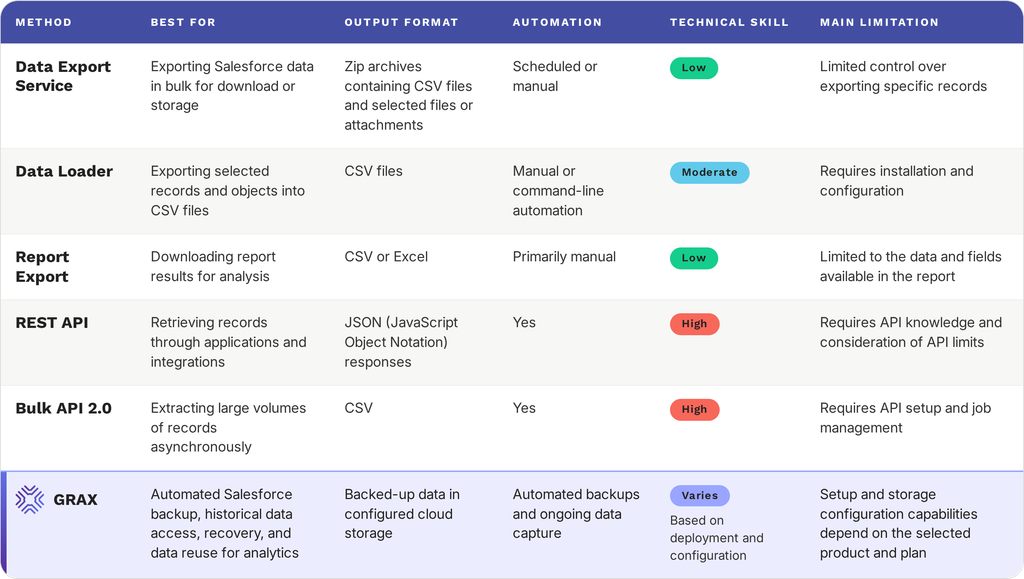
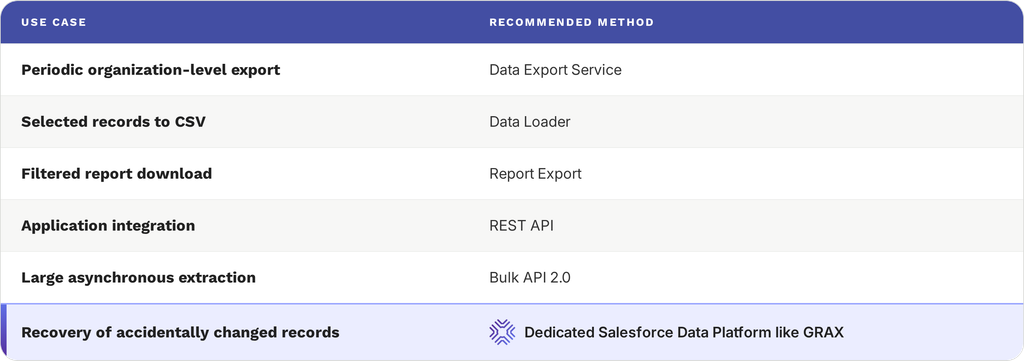
Salesforce offers several ways to export data (REST API, Bulk API, Data Export Service, Data Loader), and the right export option depends on factors like data volume, whether files are involved, and how up-to-date the data needs to be.
How do you export Salesforce files, attachments, and related content?
File export in Salesforce uses three different objects, and each object behaves differently enough to confuse people:
- ContentVersion, which is the modern object for Salesforce Files that stores binary content in the VersionData field
- Attachment, which is the legacy object for classic attachments that stores binary content in the Body field
- ContentDocumentLink, which is a joint object that connects a file to all the records itās shared with; itās particularly important for trying to learn which files belong to which records post-export
Hereās the tricky part: no bulk method retrieves binary file content directly. Both versions of Bulk API let you export data using efficient queries of ContentVersion or Attachment records, but the result is still metadata with a reference instead of the content itself. The binary data would have to be pulled using REST APIās dedicated binary endpoints, one file at a time.
An org with just a few hundred files would not see this as anything other than a minor inconvenience. An org that has hundreds of thousands of files, on the other hand, sees this issue as their single biggest bottleneck for the entirety of the export process due to the inability for these files to be batch processed.
This kind of situation is also where ContentDocumentLink earns its place in the export plan: exported files lose their association with the records they belonged to without it. The absence of this link turns folders and files into nothing more but a collection of unlabeled binaries without any way to reattach them to the right Account, Case, or Opportunity.
When should you use the REST API instead of the Bulk API for SFDC data export?
The true cutoff line between the two is mostly about volume and timing.
REST API works well for smaller, synchronous tasks (2,000 records per operation or less): a targeted lookup, a single record, or a Composite API call to bundle a few related objects.
Once total volume is over that 2,000 record threshold, or if the export process can be reasonably launched asynchronously in the background, Bulk API 2.0 becomes a much more efficient option. Some of its biggest advantages here are tied to using batching and throughput allowances that were already mentioned before.
Thereās a small nuance worth mentioning here: using REST API for a large export job is not a hard error kind of situation, but more of a slow and inefficient way to process data. A lot of the large REST-based exports are getting rebuilt on Bulk API once the difference in volume becomes noticeable enough.
How do SFDC Data Export, Data Loader, and Bulk API compare?
Data Export, Salesforce Data Loader, and Bulk API are located at different points in the ātechnical effort vs controlā spectrum in Salesforce. Picking the incorrect option for a specific job is a very common export mistake, which should be made obvious with the comparison below:
| Dimension | Data Export Service | Data Loader | Bulk API |
| Setup effort | None (point-and-click) | Low (desktop app, guided UI) | Moderate (requires API integration code) |
| Technical skill required | None | Basic SOQL familiarity | Developer-level, API and auth setup |
| Filtering precision | None; full object export only | Full SOQL query support | Full SOQL query support |
| Binary file handling | Metadata only, no file content | Metadata only, no file content | Metadata only, no file content |
| Automation / scheduling | Weekly/monthly only, no custom scheduling | Command-line mode enables scripting | Fully automatable via API |
| Best fit | Ad hoc, no-code backup snapshots | Targeted, one-off, or lightly automated exports | High-volume, production-grade export pipelines |
The fact that binary file handling is a limitation that all three methods share should be really easy to notice. It is more of a platform-wide limitation than something a better tool can resolve. Itās also the reason why file export was addressed on its own earlier in the article instead of being repeated here.
The true differentiator across these three approaches is not about what they can extract for the most part. The differences in the amount of manual effort and skill necessary to run a tool reliably at scale would be the single most unique factor for all three.
When is the Bulk API (vX) the best choice and what has changed about it?
As of 2026, āBulk APIā as a term refers to Bulk API 2.0, which runs on the current platform release (API v.66 as of Spring 2026). That said, Bulk API 1.0 is also still operational, but it requires constructing and submitting batches manually. This is something that 2.0 eliminates due to its ability to chunk records automatically.
Bulk API 2.0 is the correct choice for situations when the export or load operation is high-volume, can be launched asynchronously, and doesnāt have to be done within the timeframe of just one user-facing request. In other words, the current Bulk API is great for most production export pipelines that were built for anything other than irregular, low-volume pulls.
It can become less fitting, though, in situations where a workflow genuinely requires synchronous results in real-time for a small number of records (which is REST APIās territory more than anything).
How do Streaming, Change Data Capture (CDC), and Platform Events compare for incremental exports?
What all three of these have in common is that theyāre attempting to resolve the same underlying issue: getting data on only the changed records out of Salesforce instead of pulling entire objects. Their approaches to this task differ in certain ways, though, including both what they capture and how they deliver captured data.
Salesforce has also consolidated a large portion of its delivery layer by now, with the Pub/Sub API now being the recommended transport for both CDC and Platform Events; itās also prioritized over the older Streaming API (PushTopic-based) approach, as well.
| Technology | What It Captures | Setup Complexity | Best Fit |
| Streaming API (PushTopics) | Query-defined record changes matching a SOQL filter | Low ā declarative topic definition | Simple, low-volume change notifications on a narrow record set |
| Change Data Capture (CDC) | Full before/after field values for create, update, delete, undelete on subscribed objects | Moderate ā object-level subscription setup | Feeding a data warehouse or downstream system that needs complete, field-level change history |
| Platform Events | Custom-defined event messages, not tied to a specific object’s native fields | Higher ā requires defining event schemas | Business-process-driven events (e.g., “order shipped”) that don’t map cleanly to a single object’s field changes |
Abovementioned notes aside, CDC remains the strongest fit for incremental data exports due to its capability to capture actual field-level changes that are necessary to keep external datasets in sync. Platform Events, by contrast, are more suitable for triggering downstream logic instead of replicating data wholesale.
Important note here: Platform Events and CDC have the same delivery allocation in standard Salesforce tiers. What this means is that any high-volume events that use both should keep that in mind and possibly have a backup plan for additional capacity. Simply assuming that the two use separate budgets is very dangerous here.
Can a Salesforce data export tool replace native exports?
Yes, Salesforceās Data Export tool can replace native exporting capabilities, and thatās exactly what most production environments use to begin with. Third-party export tools are usually built to cover the gaps created by native tools like Data Export, including:
- Automated scheduling instead of fixed weekly processes
- Versioned or point-in-time backups instead of one snapshot that is constantly overwritten
- Native binary file retrieval instead of a metadata-only reference
- Relationship-aware restores instead of manual reconstruction
Most businesses arenāt replacing native exports with a Data Export tool. The tool itself costs nothing beyond the existing Salesforce license and doesnāt even need any setup. What it can do is act as a reasonable baseline, even in situations where a dedicated tool already handles the production workload.
The more practical approach would be not āeither/orā, but something a bit more complex, with a third-party tool carrying the operational weight while native export is still available as a zero-cost fallback for situations when the primary system is unavailable for some reason.
How Can You Make SFDC Data Exports Faster and More Efficient?
Exporting speed is hardly ever a single, obvious bottleneck a company has. Instead, itās often the compounding effect of exporting too much, too frequently, too sequentially. There might be no single fix for all these issues at once, but a lot of the performance gains can still appear as companies address these factors individually.
What partitioning and parallelization tactics reduce export time?
Large exports show improved performance when they can be broken into independent chunks that are executed concurrently (instead of having only one sequential job):
- Date-range partitioning, which implies splitting a large object into smaller windows (by CreatedDate or LastModifiedDate) that can be queried and exported in parallel
- Object-level parallelization covers running exports for unrelated objects (Accounts, Cases, Opportunities) as separate concurrent jobsĀ
- Concurrent job caps set a hard ceiling on how many Bulk API jobs can run at once. Salesforce caps concurrent Bulk API jobs, so the practical approach would be to parallelize up to that ceiling
The main risk of partitioning is the existence of record relationships that span partition boundaries. These boundaries should generally be aligned with natural boundaries in the data model to avoid a situation where a parent record in one data window has a children record in another, complicating reassembly.
How does selective field-level and incremental extraction improve throughput?
The fastest export job is always the one without any unnecessary data to run against.
Selective field-level extraction reduces both query cost and payload size by pulling only the fields you actually need downstream. In the meantime, incremental extraction helps avoid re-exporting an entire object on every new cycle by filtering on LastModifiedDate or SystemModstamp in order to capture only changed records since the previous successful run.
The main principle here is the same as the one behind CDC, with the biggest difference being the ability to apply that same incremental logic to traditional query-based exports that donāt use CDC whatsoever.
Which export optimization techniques deliver the biggest performance improvements first?
While there are certain optimization steps that are more valuable than others, itās still possible to waste plenty of effort on marginal gains before getting to the actual bottleneck if these optimizations were not conducted in a specific order, such as:
- Switch from record-by-record or REST-based exports to Bulk API for any object exceeding a few thousand records (tends to be the most noticeable speed improvement on the list)
- Add incremental filtering so recurring exports stop re-processing unchanged records
- Parallelize independent objects to use available concurrency rather than running jobs sequentially
- Trim field selection to only what downstream systems actually consume
- Fine-tune partition boundaries for any remaining large objects
How Can You Make Exports More Reliable and Fault-Tolerant?
A well-optimized export can still fail for several reasons: a token expiring mid-job, a network blip dropping a connection, or a malformed record tripping a validation rule. Recovering without manual intervention matters more than avoiding failure in the first place.
Why do Salesforce data exports fail, and how can you troubleshoot them?
The majority of export failures can be attributed to one of several recurring categories:
- Authentication tokens expiring mid-job
- Rate limit or governor limit breaches
- Malformed or unexpected data
- Dropped connections
- Schema drift between the source and export
Troubleshooting usually begins by figuring out what kind of category a failure belongs to, as the fixes also differ depending on those categories. The #1 useful habit to have in this context is to log the specific job ID, batch, and record range at the point of failure; Salesforceās job status API can use this data to see if the failure in question came from the platform side of things or from the export tooling.
What are best practices for retry logic, idempotency, and checkpointing?
Retry logic needs to know the difference between transient (network blips, temporary rate limits) and permanent (malformed data, invalid field references) failures, as only the former can resolve with a simple retry. That retry should also be approached using the exponential backoff tactic that implies waiting progressively longer between retry attempts.
Idempotency works to ensure that a retried export or load must not be allowed to create duplicate records or double-count data if the original attempt had at least a partial success. A common way to make retries safer to repeat is to rely on external ID-based upserts instead of plain inserts.
Checkpointing is using the last successful batch or record in order to allow a failed job to continue from where it stopped. Itās an important feature in the context of very large exports, making a difference between a failure that costs a few minutes of reprocessing and the one that costs hours to resolve.
How can observability (logs, metrics, tracing) detect and prevent export failures?
Reliable export pipelines tend to need all three observability layers at once instead of just one or two.
Logs provide concrete, granular information on what exactly happened with an application during a given job run: which batch failed, what error code was displayed, what the payload looked like at the failure point. Logs, in general, are great for after-the-fact root-cause analysis but tend to be impractical for real-time monitoring due to their level of detalization.
Metrics turn those details into trends worth tracking: job success rates over time, average job duration, records processed per run, or API calls consumed against the daily allocation. That information lets teams catch a decline while itās still a mere five-minute fix and not a multi-hour outage.
Tracing is connecting the dots in a multi-step pipeline, demonstrating how exactly the export flows through extraction, transformation, and loading stages. Architectures where a failure in a downstream step has to be traced back to the specific upstream export job that produced it benefit the most from these tools. The absence of tracing leads to the appearance of failures that are easy to detect but difficult to localize: everyone knows that something broke, but learning which specific pipeline stage is responsible cannot be done without a manual investigation.
These three layers used together shift failure detection from reactive to proactive.
What SLAs and monitoring alerts should you define for critical export jobs?
Any export task that supports a business-critical process requires a few specific thresholds that have to be explicitly defined instead of being left implicit, such as:
- Maximum acceptable job duration
- Minimum acceptable success rate across a rolling window
- Data freshness SLA
- API consumption threshold
- Escalation path
Export failures can be turned into routine, rapidly-resolved incidents in systems where these thresholds are defined before any failure happens.
How Do Security and Compliance Influence Export Design?
Since export pipelines transmit sensitive data outside of Salesforceās native access controls, the export design itself has to reconstruct the protections by itself. This section pays particular attention to the mechanics of doing that.
Which encryption, masking, and tokenization options should you use in transit and at rest?
There are two separate data states that must be addressed when it comes to protecting exported data, as the data protections applied on moving information do not apply to the data that has already landed somewhere.
In most cases, the data transit process is secured using the TLS protocol. The more consequential decisions are usually about the data at rest and the security decisions around that, including:
- Data encryption using strong, up-to-date standards (such as AES-256) instead of relying on the default settings of the destination storage system
- Field masking applied to areas that donāt need to retain their real values downstream
- Tokenization for the more sensitive fields with the ability to recover the real value later on
- Applying all of the above consistently across all the environments the export lands in
Reversibility tends to be the primary question when deciding between masking and tokenization. Masking is great when the real data value is never needed again, while tokenization works better if a downstream process would legitimately need to reconstruct the original value at some point (in controlled conditions).
How do consent, data residency, and audit requirements change export workflows?
Consent, data residency, and audit requirements all turn into specific constraints for the export job:
Consent management means checking consent status before including a record, and excluding it if consent was withdrawn.
Data residency requirements influence where the export destination is actually going to be.
Audit requirements imply that the entire export process must be auditable, including what ran, when, and what data it touched.
What role do least-privilege access and scoped tokens play in secure exports?
The primary role of both least-privilege access and scoped tokens is damage containment; they are not supposed to prevent credentials from being compromised, but they can limit how much an attacker can do with those credentials once they have them.
A dedicated integration user that is only scoped to the objects and operations the export job requires is a great way to try and close a very important issue of export credentials being a single point of failure by design. Some businesses might even use read-only scoping to prevent anyone with those credentials from doing anything but reading the data in question. Credential rotation is another way to limit the potential blast radius of the exposure, invalidating tokens on a regular basis irrespective of whether they were compromised or not.
No one can ever assume that credentials are never going to leak. However, businesses with all these practices can safely assume that compromise is possible but its consequences are severely limited by design.
Secure Data With Full Ownership
See how GRAX keeps you in control of access. (
What Architecture Patterns Enable Modern Salesforce Exports?
In addition to choosing an individual export method, itās also necessary to design the overall architecture in such a way that would help the pipeline scale gracefully instead of needing regular reworks as data volume grows. Luckily, there are a few recurring patterns that cover most of the Salesforce export designs in the real world.
When should you use event-driven architectures vs scheduled batch exports?
Generally speaking, event-driven architectures should only be employed when a company has an actual latency requirement. The choice itself comes down to how quickly downstream systems have to know about any kind of change in the system:
| Best for | Trade-off | |
| Scheduled batch | Downstream needs (weekly reports, reconciliation) that tolerate delay | Simple, predictable failures |
| Event-driven (CDC/Platform Events) | Near-real-time needs (dashboards, fraud rules, live status) | Adds ordering, delivery, and backpressure complexity |
How can a hybrid architecture combine CDC, ETL, and data streaming for resilience?
Mature architectures tend to layer all three of those together due to the fact that they help cover each otherās weaknesses. For example:
- CDC offers fast, incremental changes, but cannot guarantee replay capabilities if a person on the other end goes offline for a long time
- Batch ETL runs on longer intervals and works as a reconciliation pass, catching anything that was missed by CDC
- Streaming infrastructure buffers changes whenever downstream systems slow down or go offline temporarily, decoupling Salesforceās output rate from the consumerās intake rate
Redundancy is the main reason for the resilience. CDC provides speed, ETL provides a safety net, and streaming absorbs timing mismatches. These layers cannot replace each other.
Which Salesforce export architecture scales best as data volume grows?
Incremental, event-driven extraction has a better scaling capability than repeated full batch exports. Batch cost grows with total data volume, while incremental costs only grow with the rate of change (that grows a lot slower than the dataset).
A ten-million record object with a modest daily change rates tends to scale a lot better under CDC than with a nightly full export ā even if the latter worked just fine when the org was smaller.
What role do data lakes, warehouses, and real-time stores play in post-export processing?
Each destination type aims to balance cost, commitment, and speed in some way. Most of the distinguishing elements can be summarized as follows:
| Destination | Role | Best fit |
| Data lake | Stores raw/unstructured data, defers schema decisions | Requirements still evolving; multiple future use cases |
| Data warehouse | Organizes data into a query-optimized schema | Stable, settled reporting/analytics use case |
| Real-time store | Minimizes query latency (in-memory/key-value) | Live dashboards, latency-sensitive app features |
What Are Practical Migration and Implementation Steps for 2026?
Transitioning from a legacy export setup to a modern one has to be a sequence of deliberate steps in order for it to succeed. Getting the order of these steps right is just as important as each individual step, considering the fact that attempts to skip ahead are a common source of migration problems.
Step-by-Step Salesforce Data Export Process
- List all Salesforce objects involved (standard, custom, files, and relationships). Skipping this is a common way for gaps to go unnoticed until after go-live.Ā
- Match each object with the right method: Bulk API for high-volume objects, REST for small or real-time needs, CDC for objects that need incremental sync.
- Confirm that relationships survive both the export and the re-import. This is the step most likely to leave orphaned records behind if it’s skipped.Ā
- Set up scoped tokens, encryption at rest, and field-level masking before any real data moves.Ā
- A pipeline thatās already failing silently is difficult to fix after the fact ā nobody notices the gap until something downstream breaks. Put logging, metrics, and alert thresholds in place before go-live, not after.
- Validate the full process on a single object or a representative subset before scaling to the entire org, comparing output against the source data for completeness and accuracy.Ā
- Once the pilot is validated, move the pipeline to its production schedule with retry logic and checkpointing already in place.Ā
- Record what runs, on what schedule, and why each object uses the method it does to keep the pipeline maintainable by someone other than its creator.
How do you audit current exports and identify quick wins?
A lot of businesses have no idea how much export activity is running quietly across their entire org. That includes: a scheduled report export someone set up years ago, a Data Loader script from a former employeeās device that was never turned off, or a weekly Data Export service that no one remembers setting up to begin with.
The most obvious first step of an audit would be to map out all the current processes in the org, specifying what runs, how often, with what method, and whoās responsible for it. Itās not uncommon for this step alone to surface many exports that are either broken, redundant, or are pulling data nobody is actually using anymore.
From there onward, quick wins can be achieved via certain recurring patterns, such as:
- Objects still being pulled through REST API at a volume that clearly belongs on Bulk API, wasting time on every run
- Full export from Salesforce running on objects that change only marginally each cycle are strong candidates for incremental extraction
- Missing or incomplete external ID mappings producing orphaned records without throwing an obvious error
What migration roadmap mitigates risk and minimizes downtime?
Running the new export system alongside the legacy one for a cycle is the safest way to migrate. It lets you compare outputs directly before switching over for good.
Migrating one object at a time might also be a lot more convenient in terms of early mistakes than dumping an entire org in one pass. The typical sequence looks as follows:
- Start with lower-risk, lower-volume objects to validate the process
- Move to bigger or more sensitive objects once that pattern holds up
- Save the highest-stakes object for last (often the one driving the whole migration) after every earlier run has surfaced and fixed its own issues
The best bet is to decommission the legacy processes after the new pipeline has been running in parallel for at least a full cycle or two.
Which Salesforce data export tools and capabilities become essential as organizations scale?
Certain capabilities can definitely help make export setups scale a lot easier than the rest, with the most notable examples being:
- Automated scheduling and retry logic matter more as export frequency increases; past a certain volume, manually triggering and monitoring every job stops being realistic
- Native binary file handling closes a gap that every native Salesforce tool shares, and becomes a bigger operational burden the more files an org accumulates over time
- Point-in-time recovery and versioned backups start to matter more as the cost of losing even a day of changes grows alongside total data volume
- Built-in monitoring and alerting shift failure detection from reactive to proactive to help focus on alerts that are more complex than āsomething looks wrongā
- One platform handling both batch and incremental extraction to avoid stitching together separate tools for each.Ā
How Can Organizations Modernize Salesforce Data Export with GRAX?
Most of this guide has been covering plenty of features involved in data export from Salesforce that native tools aren’t capable of handling by themselves. As a third-party solution, GRAX was built specifically to close such gaps.
Instead of pushing data into a vendor-controlled environment, GRAX can back up and archive Salesforce data directly in an organizationās own cloud environment (AWS, Azure, GCP). It preserves what GRAX calls a Digital Chain of Custody ā the full history of every record, file, and relationship exactly as it was in Salesforce. This approach addresses the ownership and portability concerns that appear in orgs relying only on Salesforce-native tools.
In practice, this covers a number of the weak points that were raised earlier in the guide:
- Continuous, incremental backup to replace static weekly exports
- Click-to-restore recovery for records, files, relationships, and attachments together, including the binary file content that native Bulk API and Data Loader exports cannot retrieve directly
- Multi-org support, useful for organizations managing several Salesforce instances or consolidating after an acquisition
- Direct integration with data warehouses and BI tools (Snowflake, BigQuery, Redshift, Tableau, and others), turning archived data into something usable for ongoing analytics rather than a static backup sitting untouched
GRAX can offer solutions to most, if not all, of the issues listed in this article within the same, single platform.
Modernize Your Export Strategy
See how GRAX replaces fragile export pipelines. (
FAQ
Should organizations export Salesforce data or access it directly through APIs?
Direct API access works for real-time, on-demand needs. It would also leave an organization without a recoverable data copy if itās the only export method implemented when the org is compromised or corrupted. A lot of businesses use both in some capacity:
- Live API access when something needs to happen right now
- Scheduled export or backup to be used in case the org itself is compromised
How often should Salesforce data be exported?
There’s no universal cadence for this topic; it comes down to how much data loss the business can tolerate and how current downstream systems need the data to be. An object feeding a real-time process needs continuous or near-real-time export; data that barely changes can get away with a weekly job.
How do you know when it’s time to replace native Salesforce export tools?
One of the clearest signs itās time to switch is hitting a gap this guide has already covered: missing binary content, no point-in-time recovery, or manual restore ordering thatās causing real problems. A team thatās regularly working around these limitations instead of bumping into them occasionally has usually already passed the point where switching wouldāve been cheaper.