

An ordinary afternoon
On one Tuesday afternoon, a mid-market company’s revenue operations analyst was busy cleaning up duplicate accounts left over after an acquisition. The task? To merge approximately two thousand accounts. The merge list was created in a spreadsheet and approved by the RevOps manager. It was supposed to be applied during a quiet week, business as usual.
The job itself is done in the matter of minutes. Later that day, a field rep calls to ask why a major customer account he’d been working for months is gone from the pipeline. Not just the opportunity – the entire account, gone. The manager suggests that it was a list view filter that was to blame.
By the time the evening rolls in, the analyst has figured it all out. The issue stems from external ID mapping being built against a column looking like it has a unique identifier, even though it doesn’t. As a result, a few hundred records didn’t quite merge the way they should have, dragging some of the surviving accounts into the placeholder records nobody had cleaned up. After that, Salesforce did its job like it always does, making children follow parents: thousands of contacts, hundreds of opportunities, years of case history, and a large chunk of other valuable data simply disappeared.
The loss you don’t see is the expensive one
The dramatic scenario involves a disgruntled admin performing a mass deletion. While possible, what typically happens in reality is a flow writing a null because an input variable wasn’t set, or an integration treating “absent from payload” as an instruction to delete. A validation rule being turned off for a bulk load and never reactivated can leave web-to-lead records without territories for days.
Worse still is field-level overwriting, because nothing is deleted. Record counts hold. Reports run. The close date is just blank on thousands of opportunities, or the amount shifted because a currency conversion ran twice. A campaign attribution wipe can sit unnoticed for months, until an audit finds it. Every pipeline report and board deck built on that quarter had been quietly false, and nobody had done anything wrong after the original mistake. They’d been reading a broken instrument and believing it.
What it costs, in order of size
The direct cost of recovery is usually only a small part of the total amount of money spent on recovering from such incidents. A multi-day incident with a working group of, let’s say, six people can easily cost a business tens of thousands of dollars even before calling someone outside for assistance.
The higher costs are usually the ones that aren’t visible in an invoice. A planned release slips a sprint or two, and the change that relied on it has to wait for at least another quarter. Deals also get stuck in this proverbial blind window: you can recover amounts and stages, but the notes and the emails stating who said what are often unrecoverable.
Then there’s audit exposure. Whenever an auditor or a regulator asks what happened, the issue will be about proving what existed before the incident, what changed since then, what exactly was recovered, when, and by whom. Neither “we lost it during a merge” nor “we believe we recovered most of it” is going to cut it here.
Trust also factors in here, and it tends to last the longest. Once one such incident occurs, reps start keeping their own account spreadsheets “just to be sure,” rebuilding the same shadow system that probably took years to get away from.
Why your safety net probably isn’t one
Here’s how the Recycle Bin, Weekly Data Export, and point-in-time recovery compare after a data incident:
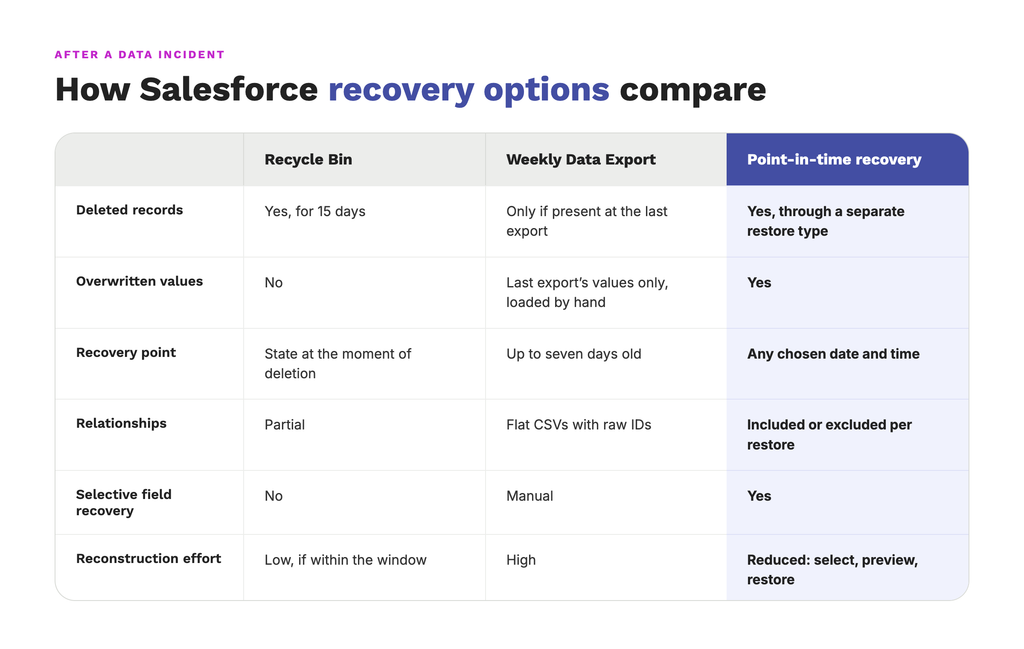
With flat CSVs full of raw IDs, relationship rebuilding becomes incredibly time-consuming, at the scale of an entire new project.
Even though Salesforce has certain responsibilities as a platform, you as a client would still remain responsible for safeguarding your own data. Despite the total number of similar issues happening for years now, a lot of customers are still unaware where the line is between Salesforce’s and a client’s responsibilities.
Know What Your Backup Actually Covers
See how GRAX restores any field from any point in time.
The sequence that actually works
Salesforce data recovery goes off the rails immediately if it starts with the restore process. The steps outlined below are meant to help companies make decisions in such an order that their first incident won’t become a second one after a while.
Step 1: Stop the cause
Begin by stopping the cause of the issue. Remember to write down everything you disabled.
Disable the job, flow, or integration that broke it, and then anything that might continue or compound the problem, such as schedules and other loads running under the same integration user. If it was an integration that broke it, putting a freeze on its user prevents additional logins, but does not disable the account. This even stops retry loops.
Maintain a list of what was turned off and when. This list will serve as your re-enable checklist later on, and not having one could lead to something staying offline long after the problem has been discovered and resolved.
Before trying to change any data, capture the complete damaged state as well, with all affected objects exported with their “last modified” timestamps. That way, a restore won’t overwrite your evidence of what happened, and it’ll also serve as the baseline for checking the recovery.
Step 2: Determine the blast radius
Scope the extent of the damage, including all the children, junction objects, files, and second-order effects. Those few hundred accounts that were merged incorrectly sent an automated email to real customers informing them that their account owner changed. Total record count would show how many records changed, but it won’t tell you what the changes themselves touched.
Begin with what has already left the org, as a Salesforce restore won’t recall an email or a value written into another system. Look through all the sent emails, outbound messages, Platform Events, and middleware queues to create a list of every single downstream system that received incorrect values.
After that, keep working inward:
- Look at every user or integration that made the change within the incident window across every object that the user had access to. This must also include objects that nobody usually expects to be affected.
- Follow lookups and master-detail relationships in both directions, as merges and reparenting tend to move children along with their parents.
- Don’t forget about junction objects; many-to-many records would point to two parents, and either one of those could’ve been affected.
- Check the document links to ensure all files still attach to the right records.
- Create a list-overview of all Flows, triggers, and scheduled jobs that ran because of the changes, along with covering what each one created or updated.
Step 3: Find the last clean point
Establish a timestamp you know is “good” before planning a restore. Pick the very last moment you can identify as “clean” and expect it to remain this way before anyone notices the problem. Locate the first change introduced by the offending job or integration and try to revert just before it happens. If the degradation happened over time, pick the earliest anomalous change possible.
Before writing the exact timestamp down, double-check time zones. The regular Salesforce interface provides time in the viewing user’s appropriate time zone, but API timestamps in SystemModstamp are always in UTC. A restore point being off by a few hours because of the time zones either misses part of the affected data or rolls back a portion of legitimate work.
The clean point of your choice can be double-checked by looking at a few records you know were healthy at that moment.
Step 4: Separate bad changes from legitimate ones
Something that a lot of teams skip is deciding what the “correct” is in your case. In reality, it’s almost never the “Tuesday’s state”, but “Tuesday’s state with every legitimate change since,” but separating bad changes from legitimate ones is where this gets tricky. A rep that updated a close date on Wednesday actually made a legitimate change to a record that was corrupted on Tuesday, and a full rollback would’ve erased it.
Sort the changed fields in order of who made the changes and when. If they were done by the offending job during the time window of the incident, those are the ones you’ll want to reverse. Otherwise, everything done by people or other jobs outside of the window can stay. Remember to restore at field level and touch only the damaged fields so that the potential edits to other fields on the same record aren’t affected in the process.
The example below assumes that the owner goes back to its Tuesday value, but the close date and the note keep what the rep entered on Wednesday:
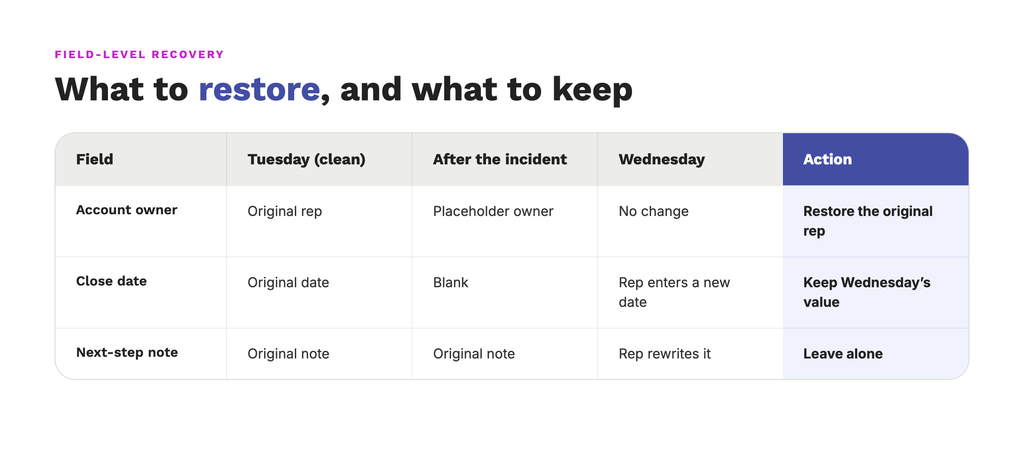
A genuinely conflicting case is a situation where a field was touched by both the incident and a later user edit. The latter value usually prevails over the former one, so make sure to exclude fields like these from the bulk restore job to handle them on a case-by-case basis.
Check the restore preview against the clean-point values to compare them with existing ones and mark every row that was edited after the incident started.
Step 5: Map dependencies and restore order
A typical Salesforce chain uses a “Product and Price Book > Account > Contact > Opportunity > Opportunity Product” order. Junction records like Opportunity Contact Roles are usually last, as they point to both an Opportunity and a Contact at the same time. Before you try to restore anything, map the chain for the objects in the restore.
Always restore parents before children.
Order is important since a child can only point to a parent record that already exists. Meanwhile, records that got recreated via the API receive new IDs, so every child would have to be re-pointed to their new parent’s ID instead of the old ones. In our merge example, the accounts that merged the wrong way have to exist again before their contacts and opportunities can be moved back.
Whenever the order is wrong, though, there are two possible outcomes:
- Required relationships failing loudly, preventing something like a line item from being created without its opportunity, showing an error during the load process.
- Optional lookups failing quietly, with cases like a contact restore with an empty account lookup: no one would find it until someone notices that a contact has no account attached.
Owners should also be checked where possible. Records assigned to inactive users will simply fail on restore, so make sure that doesn’t happen ahead of time.
Step 6: Check for schema drift
The data that was valid at the clean point may not be valid in the org today. Compare the clean point metadata with current metadata and resolve any differences before attempting a restore. The changes that break a restore most often are:
- Fields that were deleted or renamed, leaving their historical values with nowhere to go, so the restore process would either skip them or show an error message.
- Text values that are trying to load into a field that’s now either a number or a date.
- Whenever the picklist gets restricted, all of the values that aren’t on that list are rejected outright.
- Records that were valid at the clean point but didn’t go through the validation rules that were established since.
- The lookup pointing to a different object or field-level security stopping the restoring user from writing a field.
Each unresolved difference turns into a failed record later on.
Step 7: Control automation before restoring
Turn off automation during the restore to avoid sending thousands of outbound messages to your ERP within a short time span. A restore process rewrites thousands of records, and every automated event that listens to changes will react to every single one of such rewrites. Before starting the restore, inspect and switch off the following:
- Record-triggered Flows and Apex triggers on every object in the restore.
- Legacy Workflow rules and Process Builder processes.
- Platform Events and Change Data Capture subscriptions published by those automations.
- Outbound messages plus middleware and integrations that receive them.
- Email alerts and notifications that can usually be held back org-wide by configuring email deliverability.
- Validation rules that need either a documented bypass or for them to be left on so they reject records for review.
The integrations that poll by last-modified are forgotten most frequently. The restore process would update that field on every record, with the integration treating the whole restore as new changes. Pause the consumer in the middleware and the automation inside Salesforce. Managed packages also carry their own triggers – something worth checking ahead of time too.
Re-enable one item at a time, working back through the list of everything that was disabled and testing each one with a single record before moving on. For each downstream system, you’ll have to decide whether you want to pass along the restored values as one controlled batch of values or not.
Step 8: Preview, then restore
Restore into a sandbox first, even when you’re on a time crunch. A rehearsal on representative data would show which specific records failed and why. You’ll still want to verify that the sandbox’s integrations point at test endpoints to avoid conducting rehearsals that email real customers.
Once that’s done, read the full preview: the record count alone won’t show what exactly will be written. The full preview would show the exact values going in, so you’ll have to look for empty values and deselect them unless the reset was intended. Double-check the restoration point, the objects, the fields, and whether relationships are included. A record count that’s lower than expected often means the restore point falls before some records are created. To make sure you’re not missing anything, download the preview and have a second person read it.
Launch the first production batch small, in the order of dependency. Whenever you stop a restore midway, it often doesn’t revert the records already written, making the first batch also the last place to catch a mistake.
Step 9: Isolate and retry failed records
You can expect a subset of records to fail even when everything’s prepared and configured properly. Rerunning the entire restore would overwrite records that already succeeded, on top of any legitimate edits made since then, so the failures should be the main focus:
- Export the list of failed records with their error messages; count the successes separately.
- Group the failures according to their case: validation rules, missing permissions, schema drift, missing parents, and inactive owners all produce different errors, with even one cause accounting for hundreds of failures.
- Fix the issue behind each group, reassigning the inactive owner, restoring the missing parent, adjusting the field-level security, and bypassing the rule for the retry. Every fix should be written down.
- Retry only the failed records, starting from the parents.
- Repeat until the failure list is empty or until every remaining record has a decision attached.
Step 10: Validate the recovery
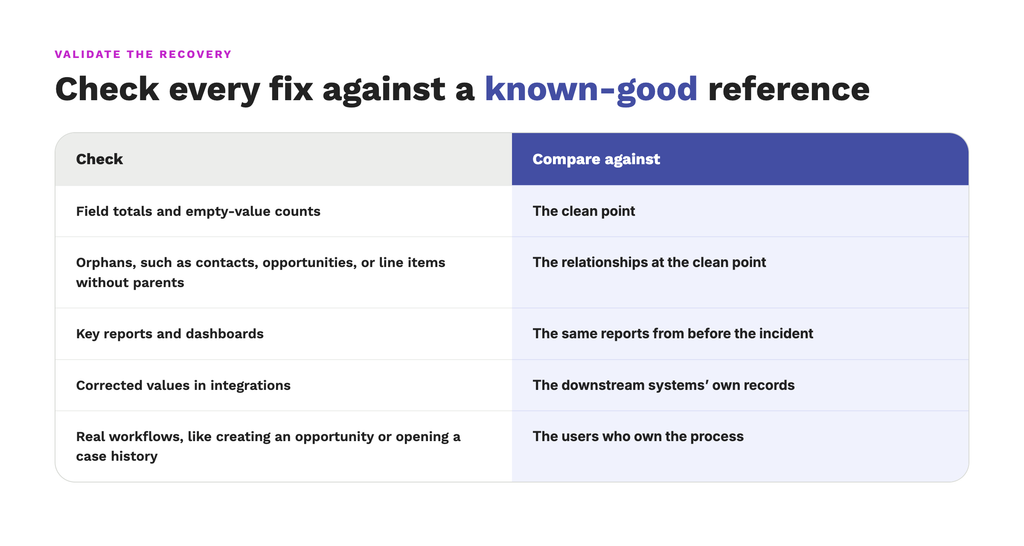
Verify everything against independent sources. Checking a restore against its own source would only prove that the copy is faithful, so use the copies that predate the incident while asking the people who own the data to confirm values no system can.
Pick a sample of records and check them manually. An illustrative starting size tends to be around 30 records, growing with the number of objects in the restore.
Record counts are only the first check out of several:
Where GRAX fits
GRAX captures Salesforce data continuously with full version history, storing it in the storage you own using a Parquet format. Of course, nothing would be able to prevent this automatic merge from happening; your job still executes. The relevant part here is about restoration: your restore point comes from the captured history, and the preview would show what will be written. This way, a restore becomes a controlled operation instead of a reconstruction project.
What changes in the recovery
A restore point would be any date and time you designate, making sure you use the latest version of each record that existed at the moment. Field-level restore makes the overwrite case simple: one field across thousands of records, without touching anything else. GRAX also restores deleted records via a separate restore type, configured to always bring along the parent they require.
The preview lists the values that will be written and can be downloaded as a CSV, with the option to override or exclude individual field values or include/exclude relationships.
When certain records fail, mostly because of validation rules or schema changes, the error message at each one would point to the cause. Each retry also creates a new run seeded with only the failed records, preventing successful records from being written again. So, if an owner record for a deactivated user fails, retrying can set the owner to empty.
Why the history sits in your own cloud
The history that was captured is stored in a cloud account you own, like an S3 bucket in your own AWS account, in the form of Parquet files that any tool supporting the format can read.
Investigation doesn’t depend on the affected org. Whenever production’s a part of the incident, the team would be able to query earlier versions of the data without logging into the org that holds the damage or using its tools.
Access and control remain with you. Permissions and location follow your own cloud policies, keeping all files readable even if the tools are changed later on. With GRAX, the recovery data won’t become a second silo under a vendor’s control.
Reconstructing a recovery later
Six months later, someone could ask what exactly was restored and by whom. A defensible record holds:
- The chosen restore point
- The objects and fields restored
- Who ran it
- The failures
- The retries
- The validation evidence
- The completion time
A portion of that record is in the tool itself. It offers the list of restore runs with their statuses and the batch-level outcomes, with the ability to download a preview as a CSV. As for the rest – it would all have to be recorded by the team as the recovery proceeds, which would be a lot easier if each step left a note after it.
Practice the recovery before you need it
A recovery drill is a perfect way to rehearse the entire recovery in a controlled environment. It involves a sandbox that closely resembles real-world accounts, contacts, opportunities, products, and their relationships. Someone damages the data deliberately, for example, by overwriting one field across a few thousand records and merging a subset of accounts, and then makes a legitimate edit to a different field on some of the same records. It’s the responsibility of a second individual, who didn’t orchestrate the exercise, to identify the incident window, evaluate the damage, restore only what is impacted, and verify the integrity of the data.
A serious drill would measure:
- The time from the first symptom to a confirmed incident window and restore point.
- Whether scoping found every affected child record, junction record, and file.
- How many legitimate edits the restore overwrote (should be zero).
- The share of records restored on the first pass.
- How long clearing the failures took.
- Whether validation against an independent source found anything the tool’s own counts missed.
- Total time elapsed.
- Whether any automation fired during the restore.
Practice Recovery Before You Need It
View a GRAX demo and see a full restore from start to finish.
The last thing
Everything came back by the following Monday, at a cost that ran to tens of thousands of dollars.
Once an incident like that happens, someone senior could ask what to change. The worst part is usually to have to make decisions blind for hours, without knowing how many records exactly were lost.
Of all those things, the loss of confidence is what lasts longest. When reps start keeping private account spreadsheets and building shadow systems to protect themselves, it undoes years of building a single source of truth.
Confidence does come back through practice, though. A team that has restored several fields in a drill and validated the result would at least have something to point to whenever a real incident arrives.
That’s the real problem worth solving.