


A walkthrough of masking Salesforce PII with an AI agent, your GRAX history, and a verified way back.
The Salesforce sensitive data problem nobody wants to say out loud
Every Salesforce team needs realistic data below production. Developers build against it, QA tests on it, trainers onboard new hires with it, sales engineers demo on it. The usual way to get that data is refreshing a sandbox from production, which means that PII such as every real customer’s name, email, phone number, birth date and government ID lands in the environment with the most users, the most contractors, the loosest monitoring and a fraction of production’s controls. Your most sensitive Salesforce data ends up in your least protected org, on a schedule, put there by people doing their jobs correctly.
Most security teams already know this. It’s sitting in the risk register as a standing GDPR, CCPA and HIPAA exposure, and it’s the sort of thing that turns a minor incident into a reportable breach.
Fixing the issue is harder than it looks from the outside. Finding the PII in Salesforce means going through standard objects, hundreds of custom fields with names that aren’t intuitive or don’t accurately reflect their contents, and free text where an email address might sit halfway through a sentence. Miss one of these fields and you’ve leaked. Then the sandbox has to stay usable afterward, because blanked-out org fields are worthless for testing and broken lookups are worse than no sandbox at all. Then you have to prove it to a security team that won’t accept “we think we got it all.”
And when masking goes wrong, you tend to find out later on, since masking often fails quietly. A bulk job may report every row was successfully masked, and a verification query might return zero, even though both of those numbers may be false.
Almost every team has three specific problems, usually in order:
“We don’t actually know where the PII in Salesforce is”
Nobody has a current, accurate list of which fields in your org hold personal data. The org has grown for a decade, admins have come and gone, and a field named Account_Contact_Ref_2__c might hold a lookup, a note, or somebody’s mobile number. Free text in various Salesforce objects is even worse, because the PII inside it doesn’t align with field names at all. If you use the labels to guess, you will be wrong in both directions: masking fields that never held anything sensitive, and ignoring the fields that contain Salesforce PII.
“If we get it wrong the sandbox is toast, and there’s no undo button”
This is the reason the project stalls. Masking is destructive by definition, the person approving it owns that risk personally, and the two ways it goes wrong are both expensive. If you overwrite too much, you’ve spent a weekend producing a sandbox your engineers can’t test against. Break a relationship or write a value the field won’t accept and you’ve corrupted the org rather than protected it.
“We can’t prove to security that it’s clean”
“We ran a masking job and it reported success” does not satisfy an auditor, and it shouldn’t. Bulk jobs often report successful rows without writing anything, verification queries can return zero because they were malformed and didn’t flag PII in the data, and field-level permission gaps regularly produce a silent no-op that looks exactly like a completed write.
How GRAX identifies and protects Salesforce PII
- GRAX lake holds the real values, historically, in your cloud, so the agent identifies Salesforce sensitive data by reading what’s actually in them and treats the name as a weak secondary signal. That is the difference between a defensible answer versus an educated guess, and it’s why the last pilot could show that two entire objects held no personal data while a field nobody suspected did.
- GRAX helps prevent masking issues: First, the markers are format-valid by design, so they load and the org still works, and second, record IDs and relationships are never written. More to the point, GRAX retains every version of every record, so your pre-mask values are still in the lake after the mask. An operation you can reverse is a much smaller decision than one you can’t.
- Verification of masking completeness means reading values back out of the org, field by field, across every record in scope, and separately auditing against the lake, which never performed the write. You get a dry-run report before anything changes and a final report afterward: every field, the decision, the reason, and the counts. That’s the artifact your security team asked for, and it’s produced as a by-product rather than assembled afterward, giving them the evidence they need.
Read the data, not just the field name
See how GRAX scores content, not guesses from labels.
Two connections, and a wall between them
A run needs Athena on your GRAX lake, and a bulk-capable write path to your sandbox (a CRUD Salesforce MCP that supports Bulk API 2.0 or sObject Collections, or the Salesforce CLI).
The lake is read-only to this process, permanently. It picks which records are in scope and audits the result afterward. The org is the only thing that gets written. Keeping those on separate surfaces is what makes the verification worth anything, since the system checking the work isn’t the system that did it.
For you, that means no new database, no staging copy of your data to secure, and no rules engine anyone has to own next quarter. Nothing persists between runs either. No field dictionary, no saved configuration, and no customer values stored anywhere in the tooling.
Salesforce PII detection reads the data, not just field names
Field names can lie in two directions: field names can imply PII when none exists, and field names that sound clear may contain loads of Salesforce sensitive data, so each field gets scored on independent signals, and content outranks naming.
Behind that sit around forty portable PII classes covering common forms of personal and sensitive information, each with a defined one-way treatment and a crosswalk to the regulation that drives it. Anything Salesforce-Id shaped gets a structural veto, preventing relationships from ever entering the blast radius.
Here’s what that buys in a worked example:
- A Description field existed in the org on three objects but had no column at all in the lake, meaning it has never held a value in the org’s recorded history.
- Three fields resolved for free, where name-matching would have masked all three.
- Running content probes across every text column then turned up two fields that were fully populated and unique per record, which the name pass had walked past. Both were formulas, updateable = false, which is what settled them.
For instance, a health-scoring field matched the health name bucket and held exactly one distinct value across every record, so it was left alone.
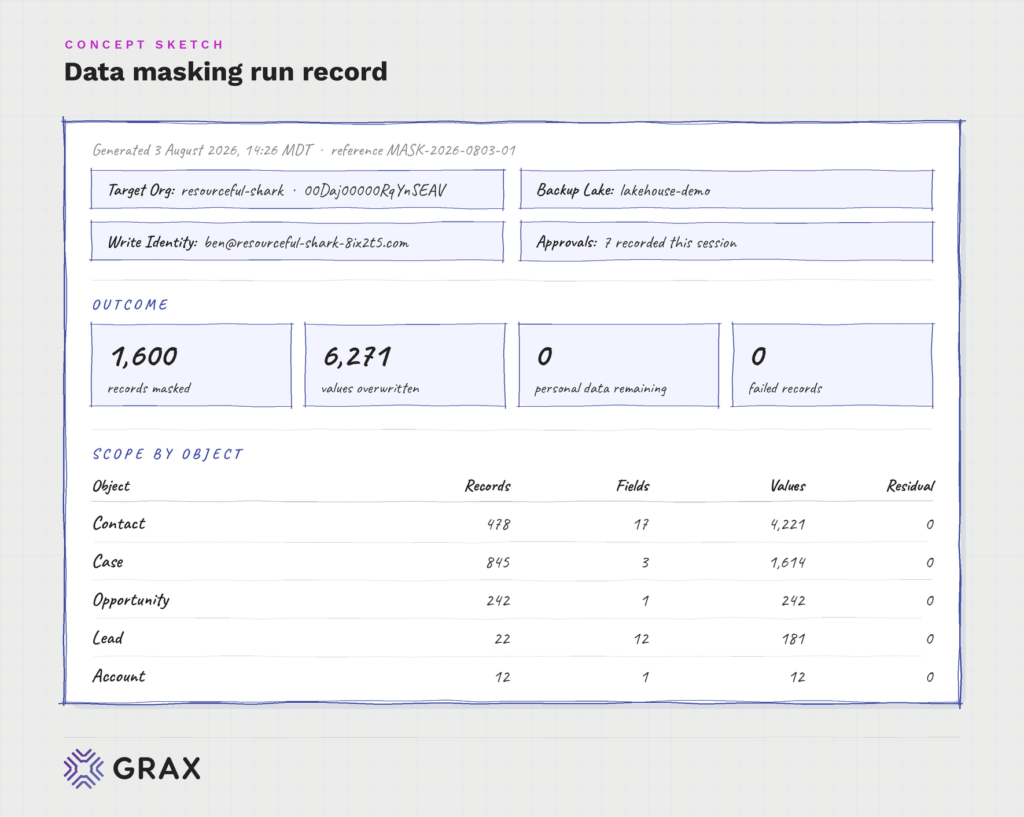
The result that surprised the operator: of five objects put in scope, two had no personal data in them whatsoever. Account and Opportunity went through detection in full, every populated field came back as a business identifier, a formula or a foreign key, and neither object was written to.
Accuracy cuts both ways: 1) mask a field that didn’t need it and you degrade the sandbox your engineers work in all day and 2) miss one field containing Salesforce PII and it may be the field named in a breach notification. Reading real values rather than inferring from labels is what separates those outcomes, and “we read the data” holds up in an audit where “we matched on field name” doesn’t.
Ambiguous Salesforce sensitive data is treated as PII
If a field’s status can’t be settled from the evidence, it gets masked. Over-masking a benign field costs some realism; leaving Salesforce PII exposed can create a much greater regulatory and security risk. The only carve-out in this case was the structural veto above, since masking a key protects nobody and does corrupt the org.
That rule got real results in a worked example:
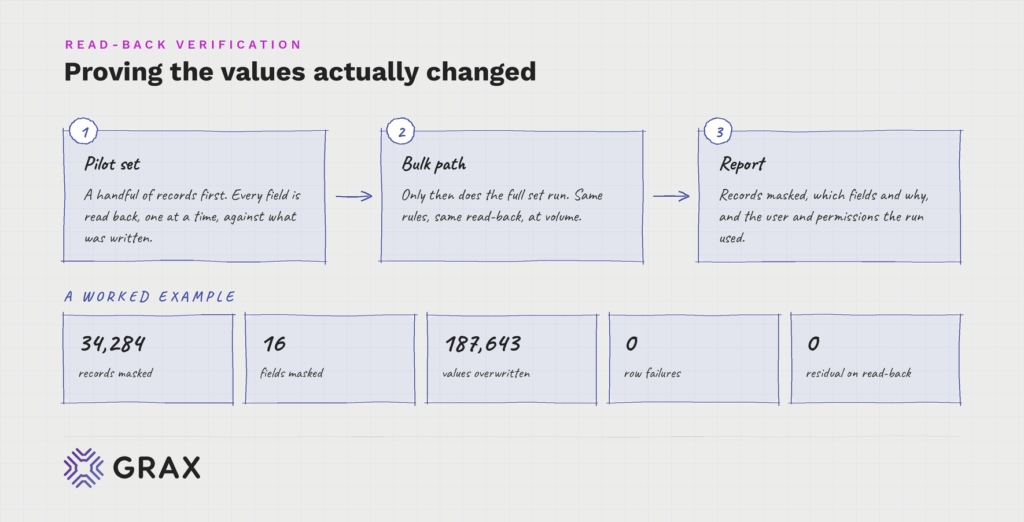
- Two objects had their title fields masked because the class tables disagreed with each other.
- Four geography fields got masked because person address versus company address couldn’t be resolved from the values.
All decisions were logged in the report as ambiguity-driven, so an operator can explicitly overrule them next time, and nobody has to make that call at speed in the middle of a run.
Which direction a system fails in is a policy question. Better to answer it once, in writing, than at 4pm on a Friday.
The guardrail assumes you’ll point it at the wrong org
Masking is one-way. So before anything happens, the operator names the target sandbox’s OrgId, and the run aborts unless the connected org matches it and reports IsSandbox = true. No override exists.
The same suspicion can be applied to the lake. The org and the lake are both picked from an enumerated list rather than inferred, even when only one candidate exists, and a name that resembles the org’s is explicitly not treated as evidence. The pair is bound from data instead: the agent probes login domains in the lake’s user table and requires an exact match. In the worked example it was confirmed that the intended sandbox lake held 153 of 153 users and rejected the production lake, which came in at 156. Three users away from passing any check based on size, on a lake nobody wanted touched.
There’s one more step before writing, on the backup. If a record has been edited in the org since the last backup, masking it destroys a change no restore can recover. That check fired in the worked example on 16,629 rows left over from an earlier cycle. Instead of waiving it, both sides were exported and compared value by value: 83,145 values, and zero mismatches. Timestamp drift, undo intact, run proceeds.
The catastrophic version of this project was never a missed field. It was a mask against production, and every guardrail above exists because some plausible-looking shortcut led there.
Salesforce PII markers are obviously fake, and they load
Masked values are visible: [MASKED], a valid masked.<Id>@example.com, 1900-01-01. Format validity is non-negotiable, so the marker follows the field type. A phone-typed field takes a reserved fictional number. Where State and Country picklists are switched on, the marker is null, since a text marker gets rejected outright.
Record IDs and relationships are never masked. Derived fields inherit their parent’s mask, and the run verifies that they did.
One approval gate, positioned where it helps
Before a single record changes, you get a dry-run report: every field, mask or leave decision and the reasoning. Once approved, the masking run proceeds. You’re never asked to apply changes yourself or sit through the run.
You don’t need to click through every step, you just need to see what’s happening. One report you can read beats ten confirmation prompts you learn to click through, and it doubles as the artifact when someone asks in October what you did to that sandbox in March.
How to verify that Salesforce PII has been protected
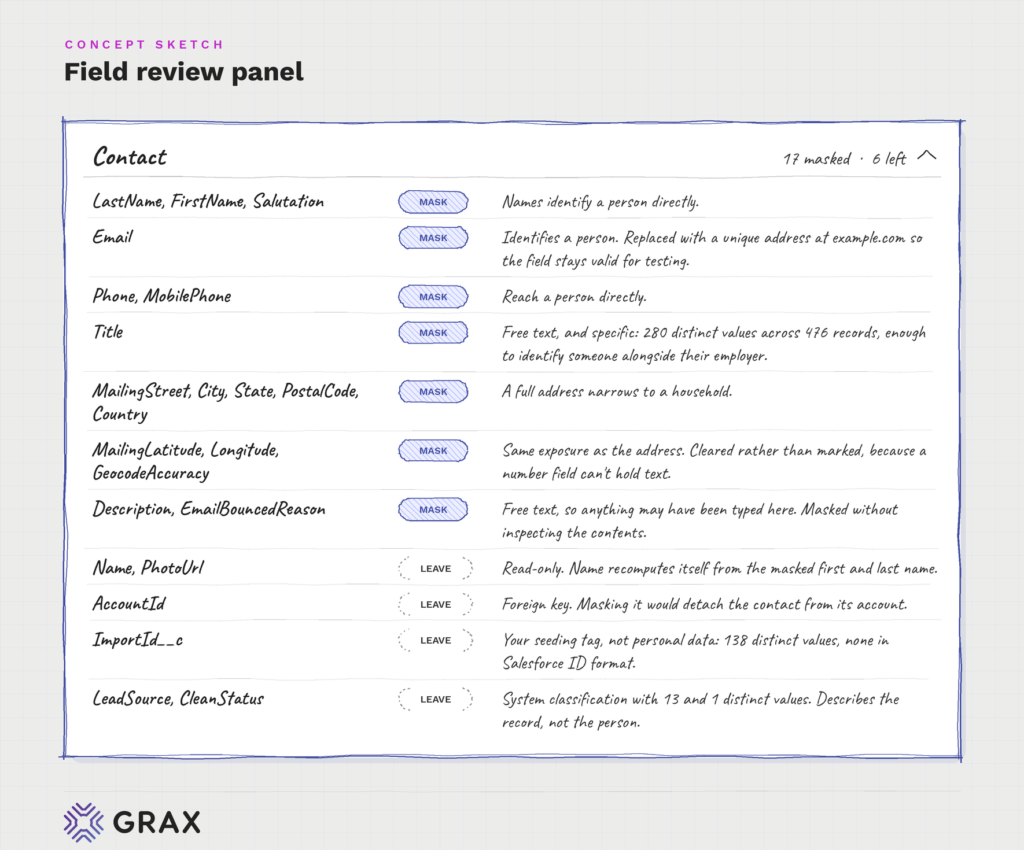
A handful of records are tested, every field is read back one at a time. Then the full set runs through the bulk path.
Once complete, a report is generated. The report shows the total number of records masked, what fields were masked and why, and what user and permissions were used to run the test.
In a worked example, we masked 34,284 records, 16 fields, 187,643 values, with zero row failures and zero residual on read-back. This read-back confirms that the identified sensitive data in Salesforce was actually changed, rather than relying on the masking job’s reported status. This is a portion of what’s shown in the report.
That’s the difference between a successful masking project and a masking claim, and it prevents the silent failure that lets a team believe a sandbox is clean for a year and a half.
The expertise is written down
You can see why any given field was masked, argue with a rule, or hand the whole folder to your security team before a record changes. Every defect the pilots turned up went back into that context, including one case where the document’s own advice about restore payloads was wrong and the run proved it. The next run starts where the last one finished.
That matters because of what’s being asked. You’re letting an AI agent make irreversible changes to Salesforce data, and the only sane basis for agreeing is being able to inspect what it was told before it acts. Opaque automation earns the pushback it gets.
The bigger picture
Now let’s take a step back and look at what actually happened here. An AI agent read your real Salesforce data, worked out which of it was sensitive PII and which only looked personal, acted on that at scale, proved its own work against an independent copy, and left a verified path back. All of it grounded in history you own, none of it guessed.
That’s what AI readiness looks like when it’s an actual process rather than a strategy deck. A live task, with consequences, done accurately because the agent could see the truth of your data instead of inferring it from labels. Masking is one job; the same foundation feeds your analytics, your copilots and whatever you build next. And the masked sandboxes you just created are where your team will safely build and test all of it.
Owning 100% of your history in your own cloud gets you more than resilient backup and lower storage costs. It gives you a foundation you can activate to identify and protect Salesforce sensitive data, support compliance, create safer sandboxes and prepare for enterprise AI.
The teams that own their history get to move. The teams that don’t are still copying production down and hoping.
Adapt faster. The future is what you make of the past.
Do you own your data?
Want to see how GRAX turns your Salesforce history into a safe, AI-ready foundation you fully own?